HypurrScan Explained: How To Use The Hyperliquid Explorer To Track Wallets, Whales And TWAP Orders

The blockchain world keeps expanding, and new ecosystems appear every year. Hyperliquid has drawn particular attention with its high-performance on-chain derivatives exchange and its distinctive auction mechanism for new tokens. Fast growth creates demand for tools that can track and analyse that chain in depth, and HypurrScan has become a go-to explorer for it. It works as an on-chain data hub for the Hyperliquid Layer 1, showing asset flows, large trades and the behaviour of whales in near real time. In this guide, Backcom.io explains what HypurrScan does, how to use it to follow large wallets and where its data stops being enough.
What Is HypurrScan? The Hyperliquid Explorer For On-Chain Data
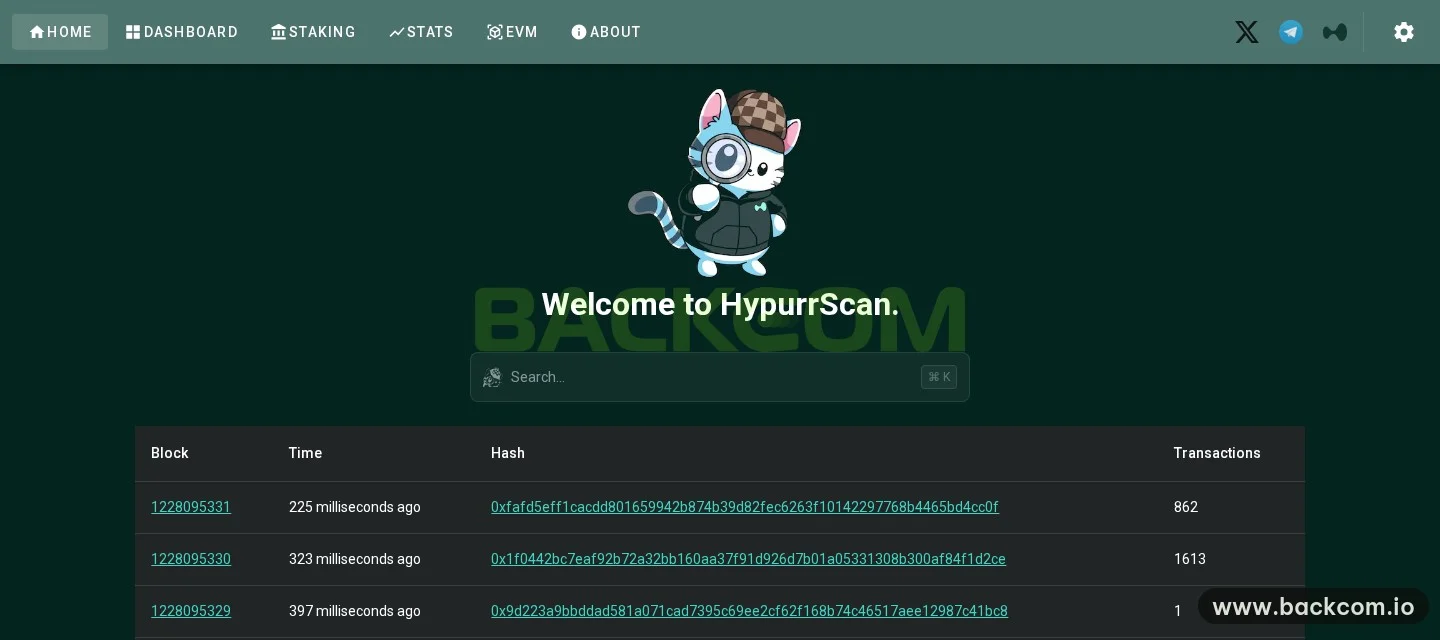
HypurrScan is a block explorer built specifically for the Hyperliquid ecosystem. It lets you inspect on-chain data directly and in detail, including Dutch auctions for new tokens, TWAP orders, token deployments and the movement of assets between addresses. Compared with Hyperliquid's default explorer, it presents the data in a more visual and complete way, which makes it easier to follow market activity and spot where on-chain attention is building.
Some background helps. Hyperliquid describes itself as a Layer 1 blockchain whose core layer, HyperCore, runs fully on-chain order books for perpetual futures and spot trading, alongside the HyperEVM for smart contracts. Because every order and position lives on-chain, an explorer can show far more trading detail than a typical Ethereum explorer. If blockchains are new to you, start with our beginner guide to crypto.
Key Features Of HypurrScan
Beyond looking up transactions, HypurrScan offers:
- Address pages for each wallet, with tabs for transactions, holdings, perp positions, orders, vaults and staking.
- Token pages and perp market pages, so you can move from a trade to the asset behind it.
- Dashboard, Staking, Stats and EVM pages on the main menu, for a view of the chain beyond a single wallet, including the HyperEVM side of Hyperliquid.
This means you can go from a large transaction to the wallet profile, then to the related token or market, without switching tools.
How To Track Hyperliquid Whales With HypurrScan
For everyday traders, HypurrScan works as a way to "follow the whales", because it makes Hyperliquid's on-chain data fully transparent. The approach breaks down into four steps.
Find A Hyperliquid Wallet Worth Following
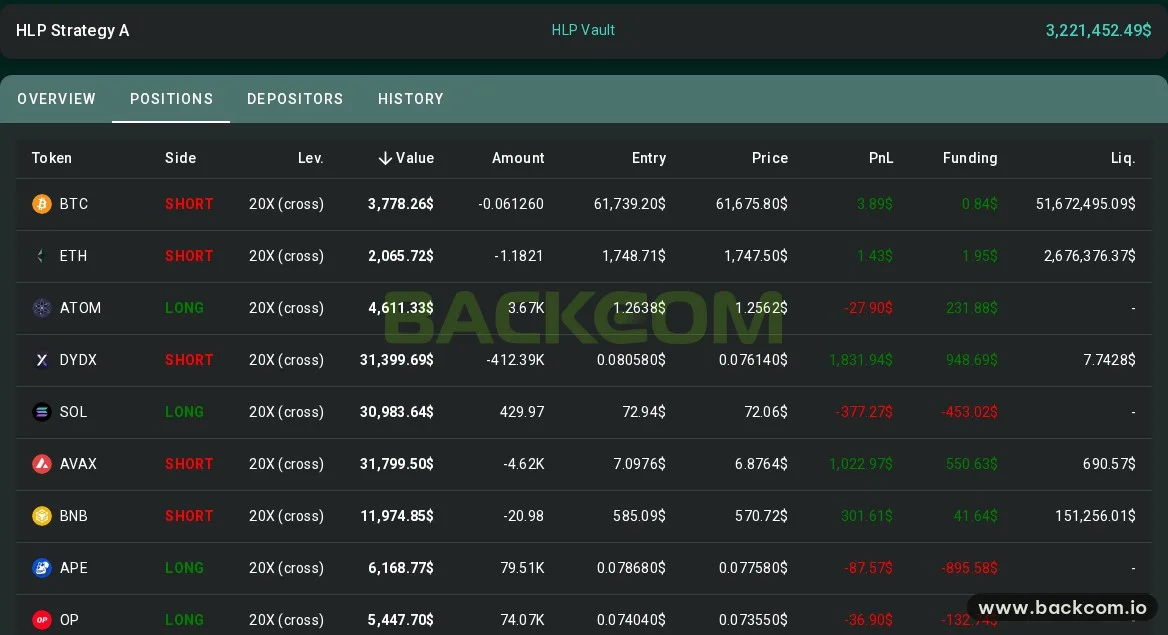
You can identify influential addresses by large trading volume, frequent activity or the value of assets held. HypurrScan shows the detailed history of each address, which helps you tell a whale apart from a market maker or a smart contract. The fastest way in is to paste a Hyperliquid wallet address (starting with 0x…) into the search box. The address page then shows open positions, order history, deposits and withdrawals. A vault address, such as one of the strategy vaults behind Hyperliquid's HLP, opens a vault view instead, with Overview, Positions, Depositors and History tabs.
When you read a position table, check these columns first:
- Side and leverage, to see whether the wallet is long or short and how much risk it carries.
- Value and entry price, to judge how large the position is and where it was opened.
- Unrealised PnL, which shows whether the position is currently in profit or under pressure.
- Funding and liquidation price, which show the carrying cost and the level where the position would be closed.
If those terms are new, our guides to the funding rate and how to calculate a liquidation price explain them with worked examples.
Track Asset Flows
The transactions tab of an address page shows money moving in and out of whale wallets:
- transfers between wallets controlled by the same trader or team;
- deposits to and withdrawals from Hyperliquid;
- movements into pools, vaults or token auctions.
This is the data that helps you recognise accumulation, distribution or the build-up to a large move.
Watch TWAP Orders And Auctions
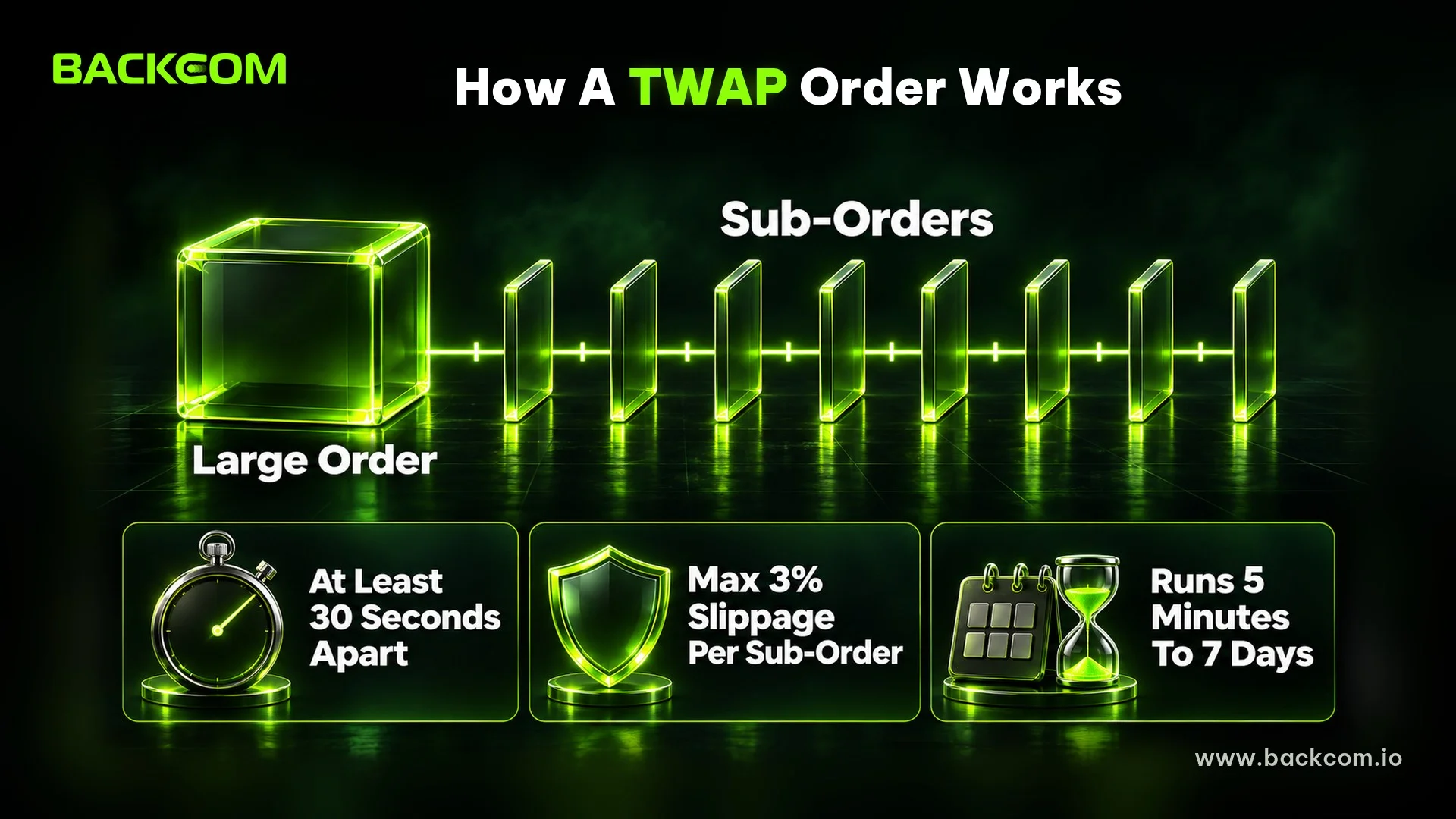
HypurrScan also tracks strategic on-chain actions such as TWAP orders, participation in token auctions and trades split over time. On Hyperliquid, a TWAP order splits a large order into smaller sub-orders sent at least 30 seconds apart, with a maximum slippage of 3% per sub-order, and the whole order runs for 5 minutes to 7 days, according to the Hyperliquid order types documentation. New spot tickers are deployed through a 31-hour Dutch auction paid in HYPE, as set out in the HIP-1 token standard. Both patterns often show how large players enter or exit without shocking the price.
Put The Data In Market Context
Instead of copy trading, use HypurrScan data to read the intent and strategy of large money, then compare it with price action, liquidity and the broader trend on Hyperliquid. Large wallets can also be hedged elsewhere, so a single position rarely tells the whole story.
Used this way, HypurrScan will not turn you into a whale, but it is a practical tool for observing and learning from whale behaviour. That supports more grounded trading and risk decisions. If you are new to the products these wallets trade, start with what perpetual futures are and how an on-chain venue differs in centralised vs decentralised exchanges.
Frequently Asked Questions (FAQ) About HypurrScan
Is HypurrScan An Official Hyperliquid Tool?
No. HypurrScan is a block explorer built by an independent team. It reads public data from the Hyperliquid chain and presents it by wallet, token and market. When numbers look inconsistent, cross-check them against Hyperliquid's official interface before you make a trading decision.
Should You Copy The Trades Of Whale Wallets On HypurrScan?
Not mechanically. On-chain data shows that a position is open, but not whether the wallet is hedged on another venue. Treat whale data as a reference signal, always set a stop loss and size positions for your own capital. The risks of following other traders are covered in our guide to crypto copy trading.
How Is HypurrScan Different From Arkham Intel?
HypurrScan focuses on Hyperliquid data and displays it wallet by wallet. Arkham Intel labels wallets with entities such as exchanges, funds and individuals across many blockchains. Traders often use Arkham to learn who owns a wallet, then HypurrScan to see that wallet's positions on Hyperliquid in detail.
Conclusion: A Window Into Hyperliquid, Not A Trading Signal
In crypto markets, information is often the edge. As an on-chain monitoring tool for the Hyperliquid ecosystem, HypurrScan lets you track and analyse whale activity with a level of detail close to real time. Because the important trades are visible to everyone, beginners and experienced traders start from the same data. Watching or learning from whales is not the same as copying them, though: rational decisions and risk management remain essential.
Used well, HypurrScan helps you read large trades, understand strategy, timing and sentiment, and sharpen your own process. Every trade still carries risk, so treat the data as context and invest with caution.
Disclaimer: This content is compiled by Backcom.io for information only and is not investment advice. Perpetual futures and crypto assets are highly volatile, and following another wallet's positions can lead to losses.
Was this article helpful?
Join The Backcom.io Community
Get the latest on trading rebates, trading tips, and broker deals — and connect with thousands of traders worldwide.

Backcom App
Track Your Rebates Every Day
Every rebate is visible by broker and by day. Manage your wallet and withdrawals in one place.
Open Backcom App