Exness Minimum Deposit: Amount By Account Type And Payment Method


Ask Exness minimum deposit and you will not get one number, because every account type sets its own floor and every payment channel has its own limit. New traders often hear "10 USD is enough to start", pick a Pro or Zero account without noticing that its minimum is 200 USD.
There is a second layer to the question. If you fund by USDT or a QR bank transfer, does the channel minimum match the account minimum, and how much should you actually deposit so the first trade does not eat the whole balance?
In this article, Backcom.io puts two tables side by side: the Exness minimum deposit by account type across five accounts, and the limits of four deposit channels. From them it works out the lowest amount you need to send the first time.
1. What Is The Exness Minimum Deposit By Account Type?
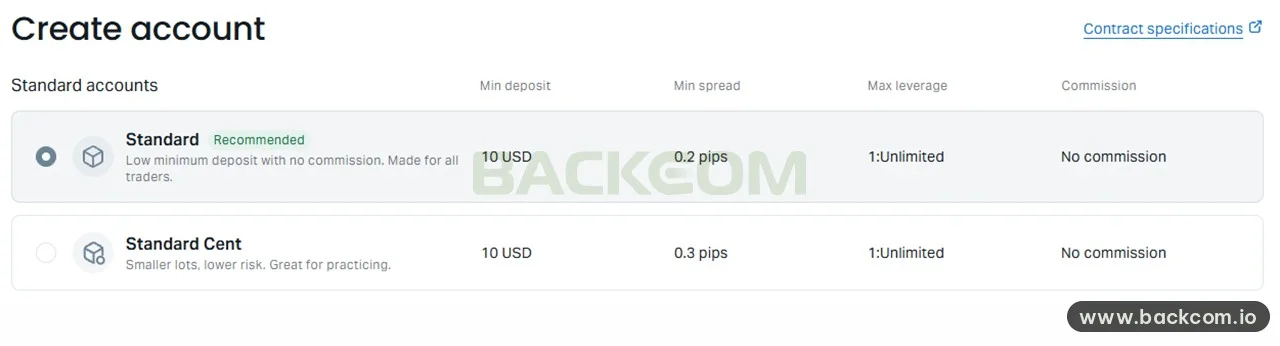
The Exness minimum deposit is the lowest amount the Create account screen asks for on each account: 10 USD for Standard and Standard Cent, 200 USD for Pro, Raw Spread and Zero. These figures sit in the Personal Area at the account-selection step, so you can check them before sending any money.
The table below collects what the Create account screen shows for all five accounts:
| Account Type | Minimum Deposit | Lowest Spread | Maximum Leverage | Commission |
|---|---|---|---|---|
| Standard | 10 USD | 0.2 pips | 1:Unlimited | None |
| Standard Cent | 10 USD | 0.3 pips | 1:Unlimited | None |
| Pro | 200 USD | 0.1 pips | 1:Unlimited | None |
| Raw Spread | 200 USD | 0 pips | 1:Unlimited | Up to 3.50 USD per lot per side |
| Zero | 200 USD | 0 pips | 1:Unlimited | From 0.05 USD per lot per side |
Source: the Exness Create account screen. Minimums can change over time and by region of registration, so check again before you transfer.
Two things stand out:
- The line falls between two groups: the 10 USD group holds the two no-commission accounts in the everyday tier, and the 200 USD group holds the three accounts built around tight spreads.
- The deposit does not follow the feature count: Pro has no commission yet asks for 200 USD, while Standard Cent needs only 10 USD.
The table only gives the minimum to open and fund the account; how much is enough to trade comfortably is the job of section 5. For a deeper spread and commission comparison, read the guide to Exness account types.
2. Exness Standard Cent Minimum Deposit: What Can 10 USD Do?
The Exness Standard Cent minimum and the Standard minimum are both 10 USD, but the two accounts serve different needs. The Create account screen describes Standard as "low minimum deposit with no commission" and Standard Cent as "smaller lots, lower risk", meant for practice.
The difference lies in how the balance is shown and how volume is divided. A Cent account counts in cents (USC), so with the same 10 USD you have more "units" to split your risk. On Standard, even a 0.01 lot (micro lot) trade takes a real bite out of 10 USD.
Here is a hypothetical calculation. If you risk 1% per trade, a 10 USD balance lets you lose at most 0.10 USD. On EURUSD, 0.01 lot is worth about 0.10 USD per pip, so a stop only 20 pips away already costs about 2 USD, or 20% of the account. See the direct reference on pip value by lot size from Capital.com.
That gives you a practical way to choose:
- Standard: suits you if you will add funds after the first deposit, or if you only want to watch the account run at the smallest volume.
- Standard Cent: suits you if you want to test a strategy with real money while keeping each trade at a few cents.
- Both: share the same 1:Unlimited maximum leverage, so margin is not the barrier; risk per trade is.
Unlimited leverage does not mean safe, because losses are still measured on the volume you open; see the guide to Exness leverage, maximum levels and risks. If you are completely new, how much money you need to trade forex puts the 10 USD figure where it belongs: money to test with, not money to live on.
3. Exness Zero Minimum Deposit, Plus Pro And Raw: What Does 200 USD Buy?
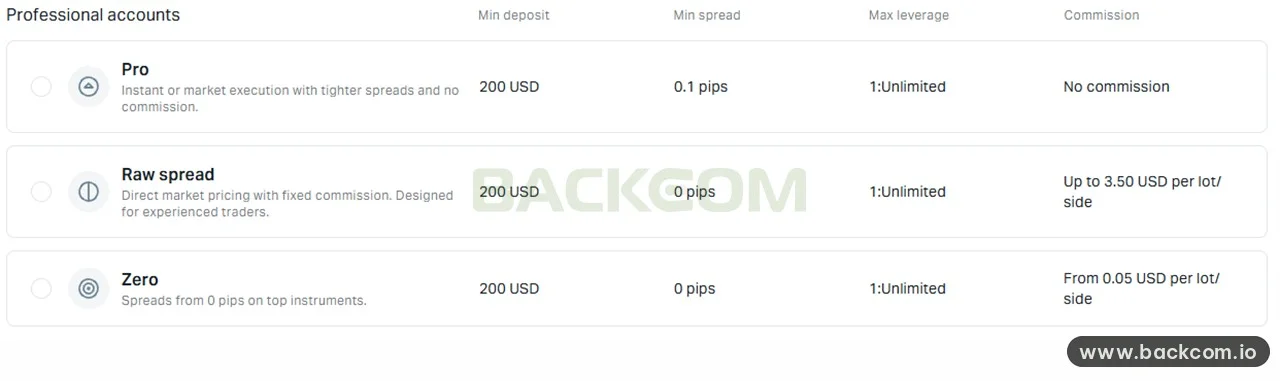
The Exness Zero minimum deposit is 200 USD on the Create account screen, and Pro and Raw Spread ask for the same amount. The three accounts share one deposit level but build trading costs differently, so the same 200 USD can end up very different after a month.
A quick way to tell them apart:
- Pro: spread from 0.1 pips and no commission, so the cost sits entirely in the spread.
- Raw Spread: spread from 0 pips, plus a commission of up to 3.50 USD per lot per side.
- Zero: spread from 0 pips on the top instruments, with a commission from 0.05 USD per lot per side.
Read "per side" carefully. A trade has an entry and an exit, so the Raw Spread commission for a full round trip on 1 lot can reach 7 USD (3.50 × 2), while Zero starts at 0.10 USD (0.05 × 2). The words "up to" and "from" show that commission depends on the instrument, so the real figure for each pair is in the Contract specifications that the Create account screen links to.
With 200 USD, run the 1% rule again. Maximum risk per trade is 2 USD; on EURUSD, a 20-pip stop with 0.01 lot loses about 2 USD, which fits the rule exactly. Compared with the 10 USD account in section 2, the same trade drops from 20% risk to 1%, which is why a balance around 200 USD suits regular trading better than 10 USD, whichever account you open.
Fixed commission eats into short trades, so if you scalp, add up commission per lot instead of looking only at a 0 pip spread, as the guide to Exness trading fees shows.
Note: 200 USD is the minimum deposit; the limit per transfer is set by the deposit channel, see section 4.
4. Exness Minimum Deposit USDT, QR Transfer And BinancePay: What Are The Limits?
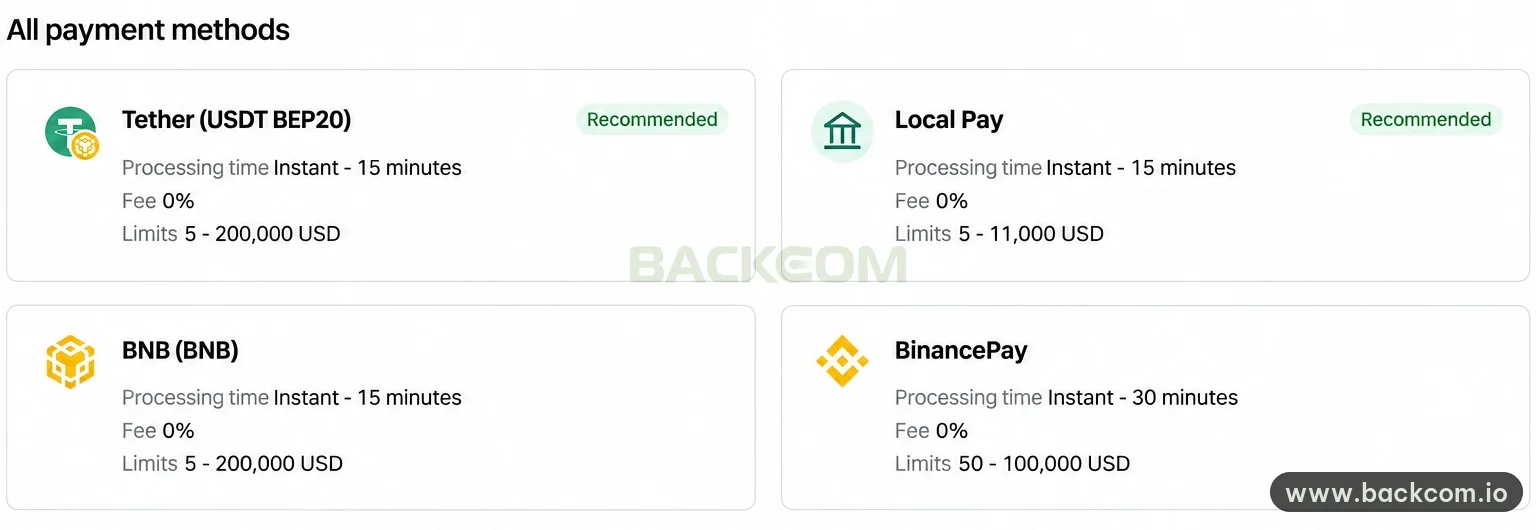
For the Exness minimum deposit USDT route (Tether on BEP20) and for QR bank transfer, the channel minimum is 5 USD, lower than the 10 USD account minimum. The Deposit page in the Personal Area lists every channel with its processing time, fee and limit, so confirm the exact figure there before sending.
Four common channels on the Deposit page:
| Payment Channel | Processing Time | Fee | Limit Per Deposit |
|---|---|---|---|
| Tether (USDT BEP20) | Instant to 15 minutes | 0% | 5 – 200,000 USD |
| Local Pay | Instant to 15 minutes | 0% | 5 – 11,000 USD |
| BNB | Instant to 15 minutes | 0% | 5 – 200,000 USD |
| BinancePay | Instant to 30 minutes | 0% | 50 – 100,000 USD |
Source: the Exness Deposit page. Limits and processing times can change, so check again before you transfer.
How to read the table:
- USDT BEP20, Local Pay, BNB: the same 5 USD minimum and processing within 15 minutes at most.
- BinancePay: a lowest amount of 50 USD, ten times higher, with processing up to 30 minutes.
- Consequence: if you fund a 10 USD Standard account through BinancePay, you hit the wall at once, because the transfer has to be at least 50 USD.
The "Fee" column shows 0% on the Exness side. Your bank or the blockchain network can still charge its own fee, and that is not part of the Deposit screen. For USDT, the network is named in the channel itself as BEP20, which is the token standard on BNB Smart Chain defined in the BEP-20 specification from BNB Chain. Choose that exact network in your wallet or sending platform, because a wrong network can lose the funds and blockchain transfers cannot be reversed.
Local Pay here stands for the local bank payment option. The Deposit page lists payment methods by region, so the name, logo and limits of this option differ from country to country; read the limits of the methods your own Deposit page shows. In this example, a 5 USD floor and an 11,000 USD ceiling per deposit suit both small and mid-sized amounts. Rules on cross-border transfers and digital assets differ by country of residence and change over time, so check the rules that apply to you before choosing a channel, instead of relying on the fact that a channel appears in the list.
5. How Much Do You Need To Deposit The First Time When You Combine Both Minimums?
The lowest amount for a first deposit is the higher of two numbers: the account minimum and the channel minimum. That is the safest way to satisfy both conditions on screen, rather than guessing which one the broker will accept.
The table below works that number out for five accounts across four channels:
| Account Type | USDT BEP20 | Local Pay | BNB | BinancePay |
|---|---|---|---|---|
| Standard | 10 USD | 10 USD | 10 USD | 50 USD |
| Standard Cent | 10 USD | 10 USD | 10 USD | 50 USD |
| Pro | 200 USD | 200 USD | 200 USD | 200 USD |
| Raw Spread | 200 USD | 200 USD | 200 USD | 200 USD |
| Zero | 200 USD | 200 USD | 200 USD | 200 USD |
Calculated from the Exness Create account screen and Deposit page. Check again in the Personal Area before you transfer.
Two examples:
- Opening Zero and funding by QR transfer: you need 200 USD, because the 5 USD channel minimum is below the 200 USD account minimum.
- Opening Standard and funding by BinancePay: you need 50 USD, because the 10 USD account minimum is below the 50 USD channel minimum.
Once you know the minimum, ask whether that amount is enough to place trades within your risk rule. Three practical ways to think about it:
- Start from risk per trade: choose a risk percentage (for example 1%), multiply by the balance, then divide by the stop distance to get the volume. The full method is in the guide to the 1% rule and lot size.
- Separate test money from working money: use Standard Cent or a 10 USD Standard account to test the deposit and withdrawal process, then add funds once the strategy proves itself.
- Never fund with money you need: a deposit should be money you accept you could lose.
Depositing more than the minimum does not raise your odds of winning, because stop-loss discipline still decides the result. To understand 1 lot and smaller sizes, the guide to lot size in forex is the place to start.
6. Does Depositing More Or Less Change Your Rebate?
The amount you deposit does not change the rebate rate. The Exness Rebates page says the rebate is calculated on closed volume, paid daily, processed in the early morning (UTC) and credited to the trading account.
The rates on that page follow each account's cost structure: Standard and Standard Cent get 40% of the spread back (Cent is calculated on cent lots, so each rebate is very small), Pro gets 25%, and Raw Spread and Zero earn a fixed amount per instrument, such as 3 USD per lot on gold (XAUUSD). The spread-based part moves with the market and the table refreshes every 15 minutes, so read the live figure before you decide.
There is no minimum rebate threshold, but amounts below 0.01 USD are not paid, and Copy Trading accounts receive no rebate. Two practical consequences follow:
- A 10 USD account trading 0.01 lot earns a very small rebate, because rebates scale with closed lots.
- Choose the account by how you trade and what it costs, not by the rebate. Standard pays a higher rebate per lot than Pro, but the spread differs too, so add both sides of the cost; gold is worked through in the guide to Exness gold spread by account type.
Backcom.io is an independent introducing broker (IB/affiliate) of Exness; rebates are paid from the commission the broker pays Backcom.io — see the risk disclaimer. If it suits you, you can open an Exness account through the referral link with code backcomio.
Frequently Asked Questions (FAQ) About Exness Minimum Deposit
Can I Deposit 5 USD To Exness?
The USDT BEP20, Local Pay and BNB channels accept transfers from 5 USD, but the Create account screen for Standard and Standard Cent shows a 10 USD minimum. Because the two numbers differ, deposit at least 10 USD so that you satisfy both minimums on screen.
Is The Exness Minimum Deposit The Same In Every Country?
Do not assume so. The figure in the Personal Area applies to the account you are logged in with, and the first deposit for Pro, Raw Spread and Zero can differ by region. The safest check is to open the Create account screen and read the number on your own account before you transfer.
Does Depositing To Exness Cost A Fee?
The Deposit screen shows a 0% fee for USDT BEP20, Local Pay, BNB and BinancePay, charged on the Exness side. Your bank, wallet or the blockchain network may add its own charge, so the amount credited can be slightly lower than the amount sent. Check what actually arrived in your transaction history.
How Do Raw Spread And Zero Differ On Minimum Deposit?
Both need the same 200 USD minimum. The difference is commission: Raw Spread charges up to 3.50 USD per lot per side, while Zero starts at 0.05 USD per lot per side. When you choose between them, compare total cost on the instrument you trade, not the deposit.
Conclusion: Exness Minimum Deposit Is 10 USD Or 200 USD, Plus Your Channel Minimum
The Exness minimum deposit is 10 USD for Standard and Standard Cent and 200 USD for Pro, Raw Spread and Zero, while each deposit channel adds its own limit, from 5 USD (USDT BEP20, Local Pay, BNB) to 50 USD (BinancePay). You need to weigh three things together: the account type, the channel and your risk per trade.
What to do before you send money is short: open the Create account screen to read the account minimum, open the Deposit page to read the channel limit, take the higher number, then check it is enough to place trades within your risk rule. If you want to compare costs further, the guides to Exness account types and Exness trading fees are the next sensible step.
Disclaimer: This content is compiled by Backcom.io for information and reference only and is not investment advice, a trading recommendation or tax/legal advice. Trading forex and CFDs carries a high level of risk and you can lose all of your capital. Minimums, limits and broker policies can change, so check the official information before you decide.
Was this article helpful?
Join The Backcom.io Community
Get the latest on trading rebates, trading tips, and broker deals — and connect with thousands of traders worldwide.

Backcom App
Track Your Rebates Every Day
Every rebate is visible by broker and by day. Manage your wallet and withdrawals in one place.
Open Backcom App