How To Sign Up For OKX: Account, KYC And Security Setup

How to sign up for OKX takes six steps on the web: pick your country, enter an email, confirm the email code, add a phone number, confirm the phone code and then finish identity verification before you can trade. OKX reviews the identity check within 24 hours, so that is the slower part. In this article, Backcom.io walks through each stage in order, from the first form to KYC and two-factor security, using OKX's own help pages checked on 13 November 2026.
You need three things before you start: an email address you can open, a phone number that can receive a code, and a valid government ID. OKX also states that you must be at least 18 years old, and that not every product is available in every jurisdiction. Rules and available services differ by country of residence, so read the notices shown for your country during sign-up.
1. How To Sign Up For OKX In Six Steps
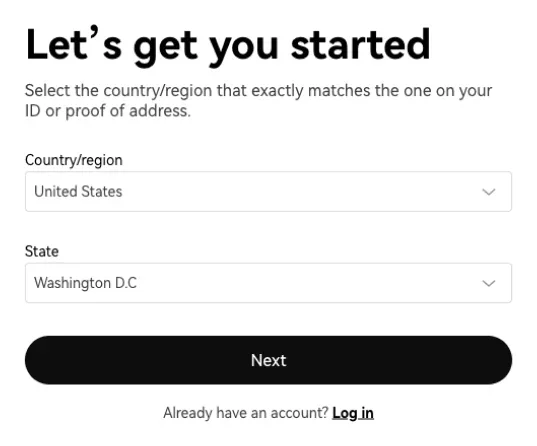
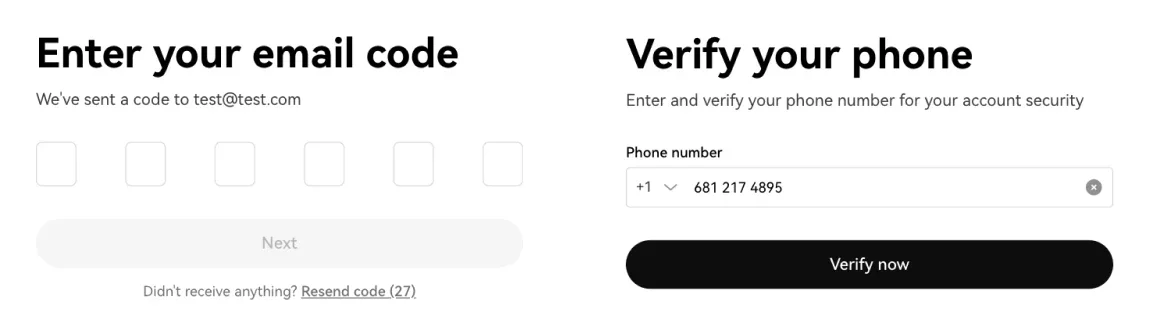
Signing up for OKX means entering a country, an email address and a phone number, and confirming a code sent to each of them. Both the email and the phone number are required. OKX advises making sure both can receive verification messages normally, and each email address and phone number can be used for only one OKX account. The steps below follow OKX's account registration guide.
Create OKX Account On The Web
On the web, OKX lists these steps:
- Go to the OKX website and select Sign up.
- Select your Country/region, tick the box to agree to the Terms of Service, Risk and Compliance Disclosure and Privacy Notice, then tap Create account.
- Enter your email address and, if you have one, a referral code, then select Sign up.
- Enter the email verification code sent to your inbox.
- Add your phone number, choose the correct country code and select Verify now.
- Enter the phone verification code to complete registration.
OKX Account Registration In The App
The app flow is almost the same. You open the app, select Sign up, choose your country, enter your email, confirm the email code and then add a phone number. The only visible difference is that the button after the phone number is labelled Next instead of Verify now.
If you want the account to be linked to a rebate programme, step 3 is the moment to act. Register through a referral link or type the code in the optional field, because a referral relationship is confirmed only through the referral code entered at registration. Leaving the field blank does not affect your registration, but it cannot be added afterwards in the same way. Section 5 explains how that works.
Common OKX Account Registration Problems
A few practical points avoid the most common sign-up problems:
- Use a personal email you control, such as Outlook or a similar provider, because OKX sends system notifications, identity verification messages and password recovery to it.
- Pick a phone number you actually use. Even if you register with a phone number, an email address is still required.
- Switch networks if a code does not arrive. OKX suggests changing from Wi-Fi to mobile data, and asking for a friend's QR code if a referral link does not open.
- Expect a block if your details are already in use. If the system says your phone or email is registered, try password recovery instead of creating a second account.
2. How Do You Complete OKX KYC Verification?
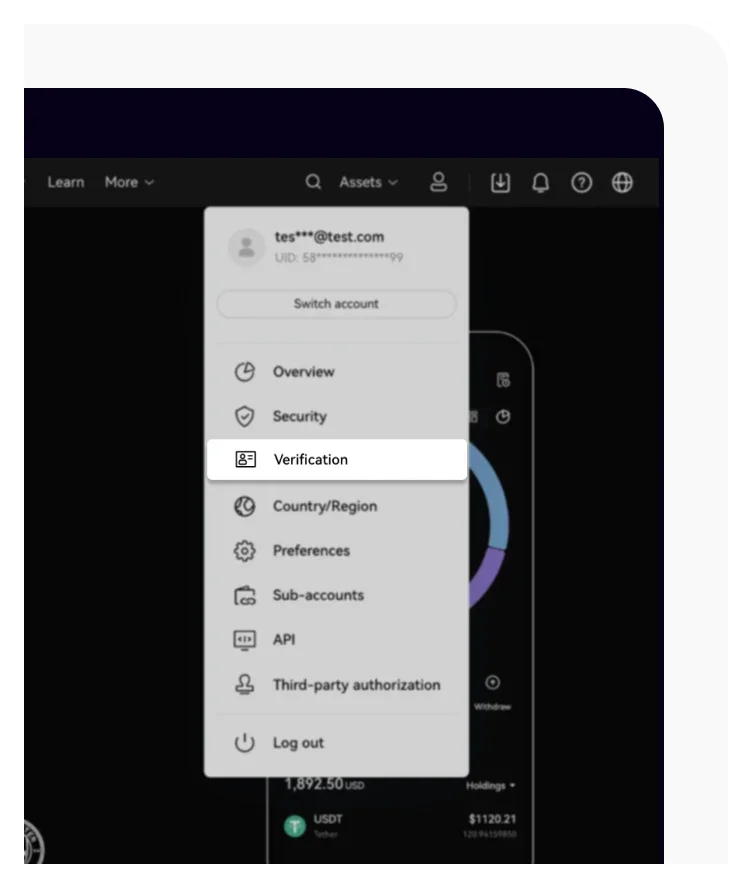
OKX KYC verification is the Know Your Customer identity check that unlocks trading, deposits and withdrawals. Until it is complete, an account cannot buy or sell crypto, deposit or withdraw assets (including internal transfers), borrow or transfer funds. That is why most users do it right after registration. The details below come from OKX's guide to verifying an individual account.
On the web, open the profile icon, choose Verification, find Individual account and select Continue. In the app, open Menu, then Account settings, and select Identity verification under Profile. OKX asks you to update the app to the latest version first if the menu looks different.
The form has four parts:
- Basic info: country of residence, nationality, local-language name where applicable, full name, date of birth, ID number, ID type and residential address.
- ID document: a valid government-issued ID from an eligible country, such as a passport or driving licence.
- Selfie: a photo with your whole face inside the oval frame.
- Proof of address: only if the system asks for it.
OKX is strict about photo quality, and these are the criteria it lists for the document:
- It shows your full name, date of birth, issue date and expiry date.
- It is not a screenshot of any kind.
- It is sharp and legible, with all four corners visible.
- It is not expired.
For the selfie, nothing may obstruct your face, such as masks, glasses or hats, and there should be no reflection or glare from a flash. If proof of address is requested, the document must show your current residential address and be issued within the last six months.
Once you submit, OKX says it will review the application within 24 hours and notify you when it is done. If you need to correct something, the help page points you to the OKX Support Center chatbot. Two rules are worth knowing in advance. OKX may ask you to verify again from time to time. And because one identity document can be linked to only one OKX account, a completed verification cannot be changed or cancelled.
Requirements differ by country. OKX notes that this information may not apply to all customers, and the accepted IDs depend on your region's requirements, so use the screens inside the app as the final guide.
3. How Does OKX 2FA Setup Work With An Authenticator App?
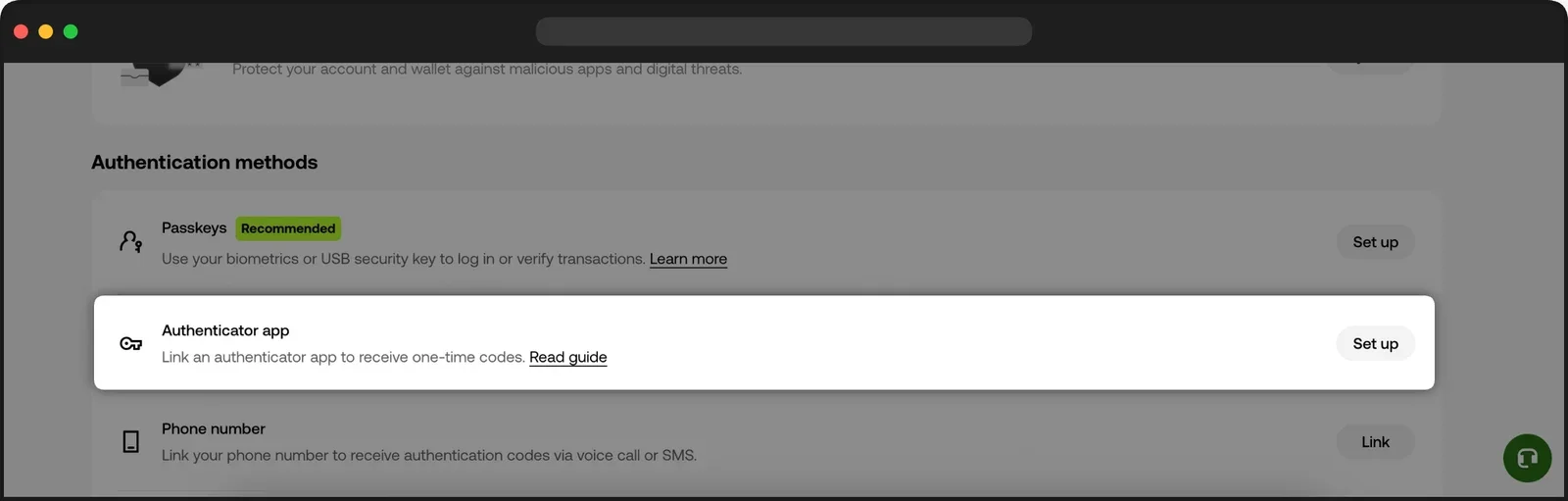
OKX 2FA setup uses an authenticator app that generates a six-digit code on your phone that OKX asks for when you withdraw or change security settings. It is the main second layer on top of your password, and it is worth setting up before you deposit anything.
Before you start, complete email and phone verification. The steps follow OKX's guide to linking an authenticator app. On the web:
- Log in at okx.com and go to the security centre (Profile > Security).
- Find Authenticator app and select Set up.
- Open your authenticator app, or install one, then select I've downloaded one.
- Scan the QR code or enter the setup code by hand.
- Select Continue once the OKX account appears in your authenticator.
- Enter the six-digit code from the app and select Confirm.
In the app, the path is Main menu > Profile and Settings > Security, then Authenticator app under Authentication methods. You can use any authenticator app you prefer, such as Google Authenticator or Microsoft Authenticator. OKX also lets you disable cloud sync in your authenticator app for extra security.
Two warnings from the help page matter more than the steps themselves. First, store your setup key somewhere safe. If you change or lose your phone without it, you may not be able to log in. Second, after you change or reset the authenticator app, withdrawals and P2P trading are disabled for 24 hours. Do not plan a time-sensitive withdrawal on the same day you rebuild your 2FA.
4. Which Other Security Settings Should You Turn On?
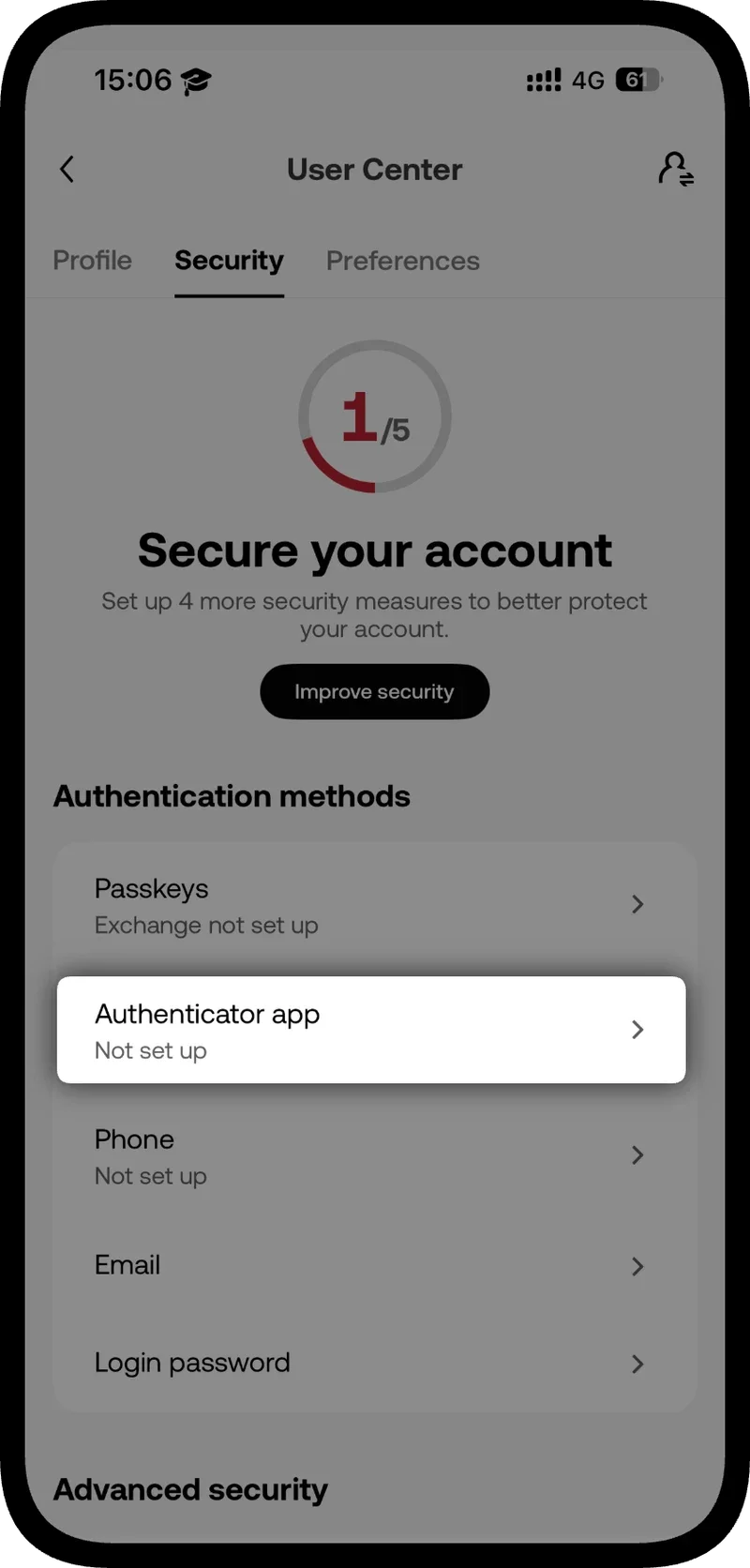
Beyond 2FA, OKX offers passkeys, an anti-phishing code and a device list that make account takeovers harder or easier to spot. The anti-phishing code and the device list take a minute each and are described in OKX's account security guide.
The anti-phishing code is a word you choose that OKX then prints in its emails. To set it up, hover over the profile icon, select Security, choose Anti-phishing Code under Advanced Security, enter the code you want and confirm with the SMS or authenticator code. If an email claiming to be from OKX does not show your code, treat it as suspicious and do not click anything in it.
Passkeys are listed on the same Authentication methods screen as the authenticator app and are marked as recommended there. OKX describes them as a way to log in or verify transactions with your biometrics or a USB security key, so they replace typing a code with a check on your device.
Linked Devices is the third setting. Under Security Settings you can review login activity. If you see a login you do not recognise, change your password promptly and remove the untrusted device. The same page lists third-party apps that can access your account, and you can revoke any you are unsure about.
Three habits complete the setup:
- Never share a verification code, even with someone who claims to be OKX support.
- Type the OKX address yourself or use a bookmark rather than following links in messages.
- Keep your email account secured as well, since password recovery and notices go there.
For a view of how the exchange itself is regulated and how it handles security, see our OKX legitimacy review.
5. How Do Rebates Work On A New OKX Account?
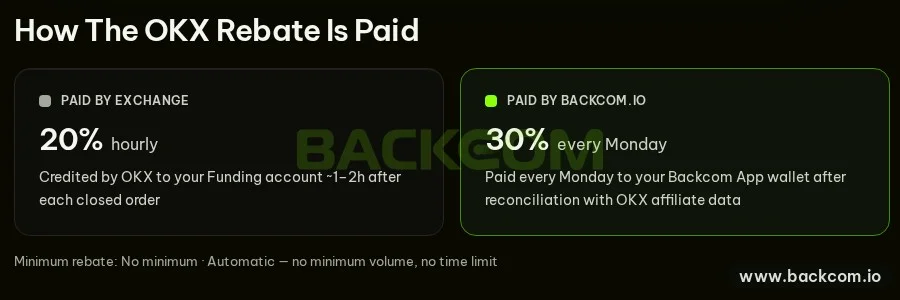
OKX Rebates return part of the trading fees you pay on OKX, and for a new account they depend on how you register. The programme page on this site shows up to 50% of spot and futures fees: 20% credited by OKX about one to two hours after an order closes, and 30% paid every Monday to your Backcom App wallet (page checked 13 November 2026). There is no minimum volume or time limit listed.
For a brand-new account the order matters:
- Register through the program link: create your OKX account here or enter the referral code VIPBACKCOM in the optional field at step 3 above.
- Complete KYC on OKX if it is required, as described in section 2.
- Link your account UID in the Backcom App so your trades are tracked. Your UID is shown in your OKX profile.
- Trade as usual. Rebates start accruing once the link is confirmed.
The page also advises opening the link in an Incognito tab so that the referral is not lost to an old cookie. If you sign up without the code, you generally cannot add it to that new account afterwards, so decide before you submit the form. An account you already use follows the separate route in section 6. Each UID, including every sub-account you trade from, is linked separately.
A rebate is a share of a fee, not of your profit, and it applies to losing trades as well as winning ones. It lowers your cost; it does not change the risk of any position. The OKX trading fees guide shows what you pay before a rebate.
Backcom.io is an independent introducing broker (IB/affiliate) of the exchanges it lists, including OKX; rebates are paid from the commission the exchange pays Backcom.io. See the risk disclaimer for details. A rebate is not a reason to open an account, deposit funds or trade more than you planned.
6. What If You Already Have An OKX Account?
An existing OKX account is handled through a separate linking request, not through a new sign-up. Opening a second account is not a workaround, because OKX allows one account per email, phone number and identity document.
The steps on the OKX rebate page are:
- Open the Reconnect Users link shown there and sign in with the OKX account you already use.
- Wait for OKX to approve the request; the page says approvals usually come around 15:00 UTC.
- Link your UID in the Backcom App so every trade is tracked.
Rebates then count from the moment the link is confirmed, not retroactively, so check your accruals after the first week or two. If the link does not appear to work, the contact options on the page, including WhatsApp and Telegram, are the quickest route.
Frequently Asked Questions (FAQ) About Signing Up For OKX
Do I Need A Referral Code To Sign Up For OKX?
No. The referral code field is optional, and leaving it blank does not affect your registration. If you want the account linked to a rebate programme, enter the code or use the program link before you submit the form.
Do I Need Both An Email And A Phone Number?
Yes. OKX requires you to bind both during registration, and each can be used for only one account. Important notifications and verification messages go to your email.
How Long Does OKX Verification Take?
OKX says it reviews applications within 24 hours and notifies you when the review is complete. Photos that are blurry, cropped or expired are the usual reason for delays, so follow the document and selfie criteria in section 2.
Can I Use OKX Without Completing KYC?
You can register, but an unverified account cannot buy or sell crypto, deposit or withdraw assets, borrow or transfer funds. Plan to finish verification right after you sign up.
What Happens If I Lose My Phone With The Authenticator App?
You may be unable to log in without your setup key, which is why OKX tells you to store it safely. After you reset an authenticator app, withdrawals and P2P trading are disabled for 24 hours.
Conclusion: What Should You Do After Signing Up For OKX?
Signing up for OKX is quick; the steps that protect you come afterwards. Register with an email and phone you control, decide on a referral link before you submit the form, finish identity verification with sharp, unexpired documents, then set up an authenticator app and an anti-phishing code. Keep your setup key offline and expect a 24-hour withdrawal pause if you ever reset 2FA. Learn the interface before you decide whether to deposit anything, and read the OKX trading fees guide so you know what each order costs.
Disclaimer: This content is compiled by Backcom.io for information only and is not investment advice. Crypto assets are volatile and leveraged products can lose your whole margin. Account steps, fees and rebate terms can change, and rules differ by country of residence. Check the current terms and your local regulations before you register or trade.
Was this article helpful?
Join The Backcom.io Community
Get the latest on trading rebates, trading tips, and broker deals — and connect with thousands of traders worldwide.

Backcom App
Track Your Rebates Every Day
Every rebate is visible by broker and by day. Manage your wallet and withdrawals in one place.
Open Backcom App