How To Set Stop Loss In Forex: Placement By Invalidation Point And ATR


Many traders do not lose their account to ten bad analyses in a row. They lose it to one wrong trade that was never closed. Knowing what a stop loss is is the foundation of risk management, because it turns “how much can I lose” from a feeling into a number you fix before you click buy or sell.
In this article, Backcom.io walks through the questions traders search most often:
- What is a stop loss, and why a stop order does not always fill at the price you set.
- Where to place a stop loss using the invalidation point of your trade idea.
- ATR stop loss, which sizes the stop by real market volatility instead of a guessed pip count.
- How to set stop loss step by step, then work back to lot size from the risk you accept, with hypothetical examples.
What Is A Stop Loss? The Order That Caps Your Loss Before You Enter
What is a stop loss? A stop loss (SL) is an order that closes a position automatically when price reaches a preset level, limiting the maximum loss on a single trade. You place it when you open the trade, so the decision to exit is made while you are calm rather than while price is running against you.
A stop loss does not make more trades win. It gives a losing trade a ceiling, and that is what makes lot size, risk-to-reward and losing-streak planning meaningful.
Every trade with a stop needs three numbers at once:
- Entry price: the price at which the order actually fills.
- Stop loss price: the level at which your idea is considered wrong.
- Stop distance: the gap between the two, usually counted in pips.
So treat the stop as part of the trade plan, not an accessory added later. Other order types that sit alongside it, such as pending orders and Take Profit, are covered in the forex order types guide.
Why A Stop Loss Does Not Always Fill At Your Price
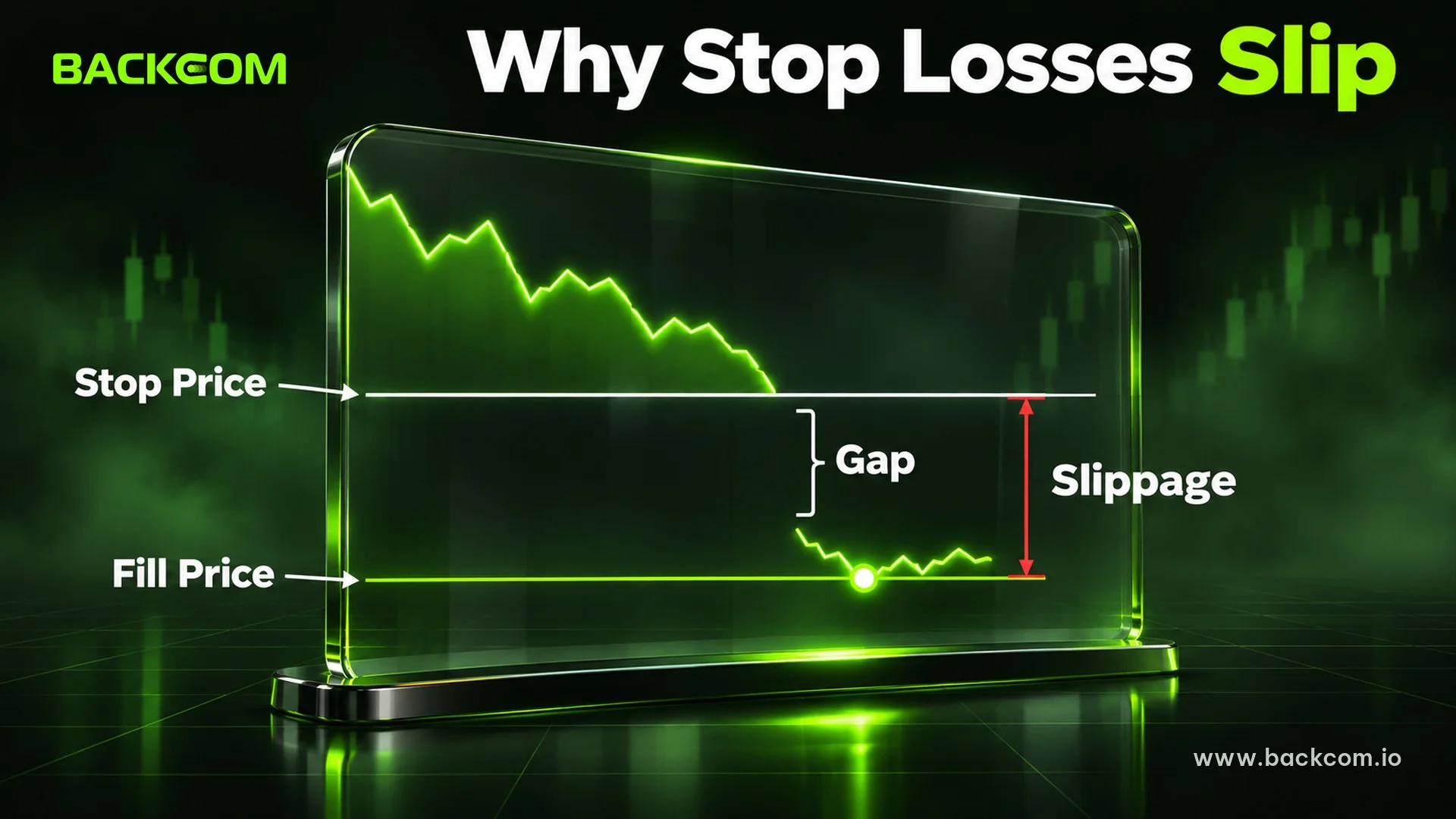
A stop loss is normally a stop order: when price touches your level, the system turns it into a market order and fills at the best price available. As IG explains, when price moves suddenly beyond a stop, the stop may not be triggered at the level at which it was set.
The result is that your fill can be worse than your stop price, an effect known as slippage. Two situations are common:
- Fast news: price jumps through your level within seconds and the order fills at the next price with liquidity.
- Weekend or overnight gaps: the market reopens far from the previous close, so the stop fills at the opening price.
There are two ways to reduce this risk, and each has a cost:
- Stop-limit: it protects a minimum price, but if price jumps past the limit the order may never fill and the position stays open.
- Guaranteed stop: some brokers fill at exactly your level even through a gap, usually for a fee or a wider spread. Not every broker offers it.
Most importantly, leave a margin for slippage when you calculate the loss, rather than treating the stop as an exact number.
Where To Place A Stop Loss: The Invalidation Point Of Your Trade
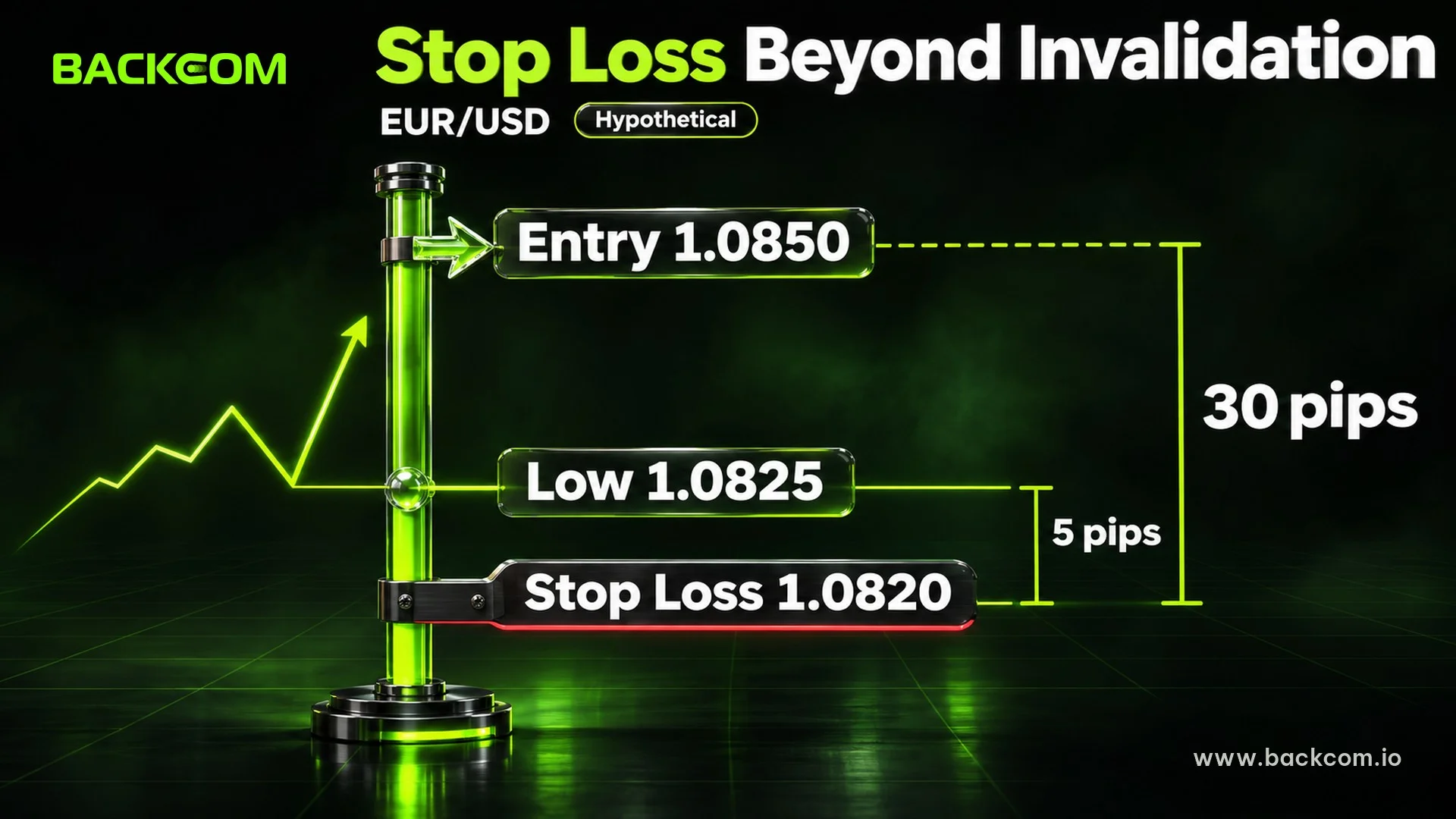
Where to place a stop loss matters more than how many pips to use. The core principle is to put it at the invalidation point, the price at which your reason for entering no longer holds.
The invalidation point is the level that removes the basis of your idea, not the level that merely feels uncomfortable. If you buy because price bounced from support, the idea fails when price closes through that support, so the stop belongs beyond the zone, not in the middle of it.
Traders usually find the invalidation point from price structure:
- Buy after a bounce from support: place the stop below the bounce low or below the support zone.
- Sell after a rejection at resistance: place it above the rejection high or above the resistance zone.
- Trend trade after a pullback: place it beyond the low or high of the latest pullback.
- Breakout trade: place it on the other side of the zone that just broke, because a return into that zone means the breakout failed.
Whichever zone you use, mark it on the chart before entering so the stop is decided in advance.
Stop Loss Placement Forex: Add A Buffer To Avoid Stop Hunts
Placing the stop exactly at a low or high is a common mistake, because many traders put theirs there and price often sweeps through those levels before reversing. Traders usually add a buffer beyond the invalidation point, for example a few pips or a fraction of ATR.
Stop placement methods referenced as at 2 November 2026. All prices and pip counts in this article are hypothetical, so check the live chart before placing any order.
Hypothetical example: a trader buys EUR/USD at 1.0850 after price bounces from a low at 1.0825. The invalidation point is 1.0825, and a 5-pip buffer puts the stop at 1.0820, a 30-pip distance. If the bid touches 1.0820, the stop triggers and the position is closed, because the buy idea was wrong.
ATR Stop Loss: Measuring Real Market Volatility
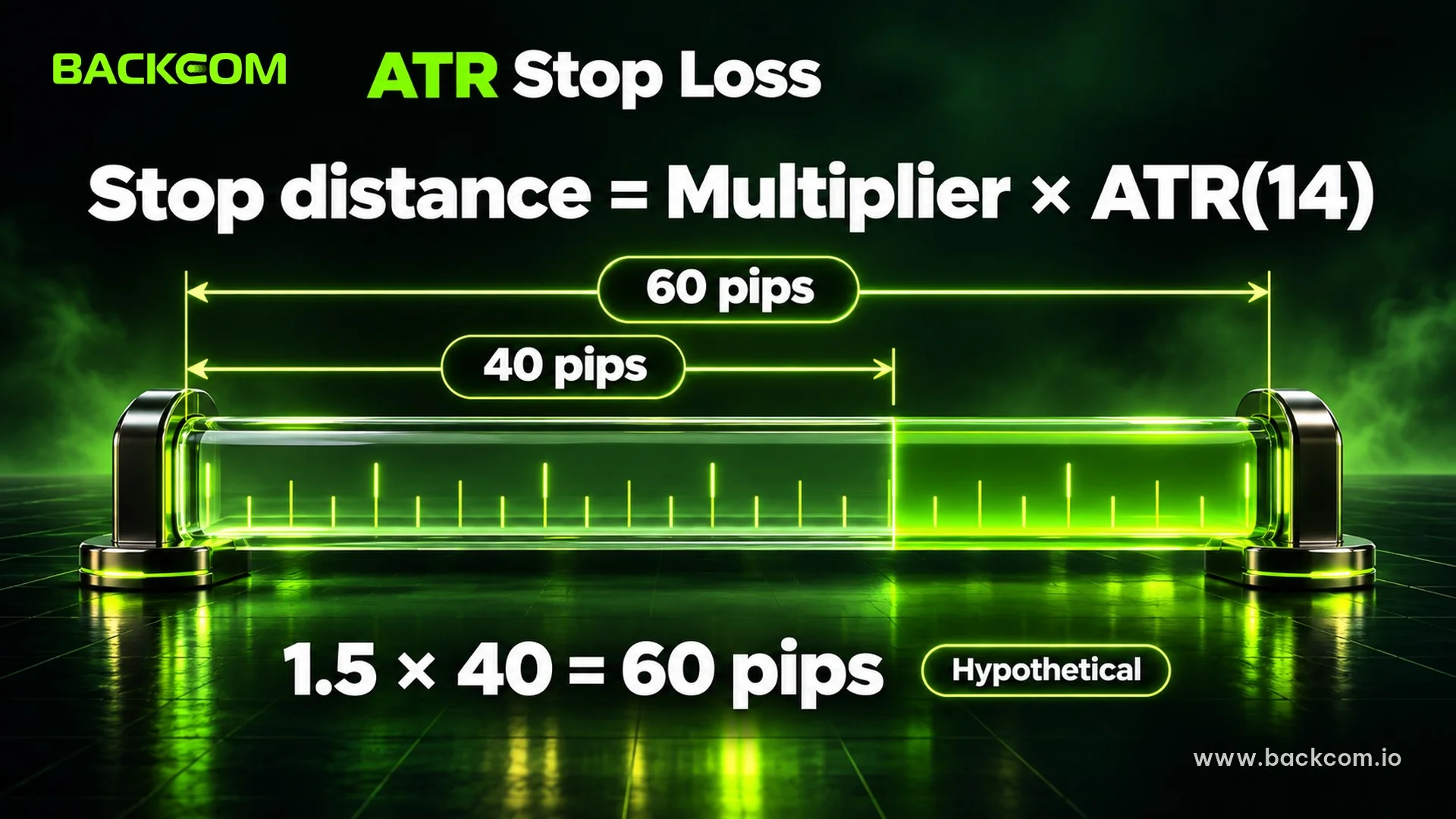
An ATR stop loss uses the Average True Range indicator to set the stop distance from the market’s typical movement instead of a fixed pip count. When volatility is high the stop sits further away, and when the market is quiet it sits closer.
J. Welles Wilder introduced ATR in his 1978 book New Concepts in Technical Trading Systems, with 14 periods as the default, according to the LuxAlgo concept library. Each candle has a True Range, which is the largest of three values:
- The current high minus the current low.
- The current high minus the previous close, in absolute value.
- The current low minus the previous close, in absolute value.
ATR is a smoothed average of those True Range values. It measures the size of movement only and says nothing about direction.
The formula for an ATR stop:
Stop distance = Multiplier × ATR(14)
Many traders use a multiplier between 1.5 and 3. That is community convention, not a rule from Wilder. A low multiplier gives a close stop that is easier to hit, and a high multiplier gives a wide stop that forces a smaller lot.
Hypothetical example: ATR(14) on the EUR/USD H4 chart is 40 pips and the trader picks a 1.5 multiplier. The stop distance is 1.5 × 40 = 60 pips, so a buy at 1.0850 has its stop at 1.0790. A trader can also take the structure-based stop first and use ATR to check that it is not too tight.
| Method | Based on | Strength | Watch out for |
|---|---|---|---|
| Structure | Support, resistance, recent swing points | Tied to the reason for the trade | Distance can be very wide or very tight |
| ATR | Average volatility | Adapts to market conditions | Knows nothing about price structure |
| Fixed pips | One preset number | Easy to apply | Ignores both structure and volatility |
The three methods referenced as at 2 November 2026. Each has limits, so test them on the data of the pair and timeframe you actually trade.
How To Set Stop Loss Step By Step And Size The Lot By Risk
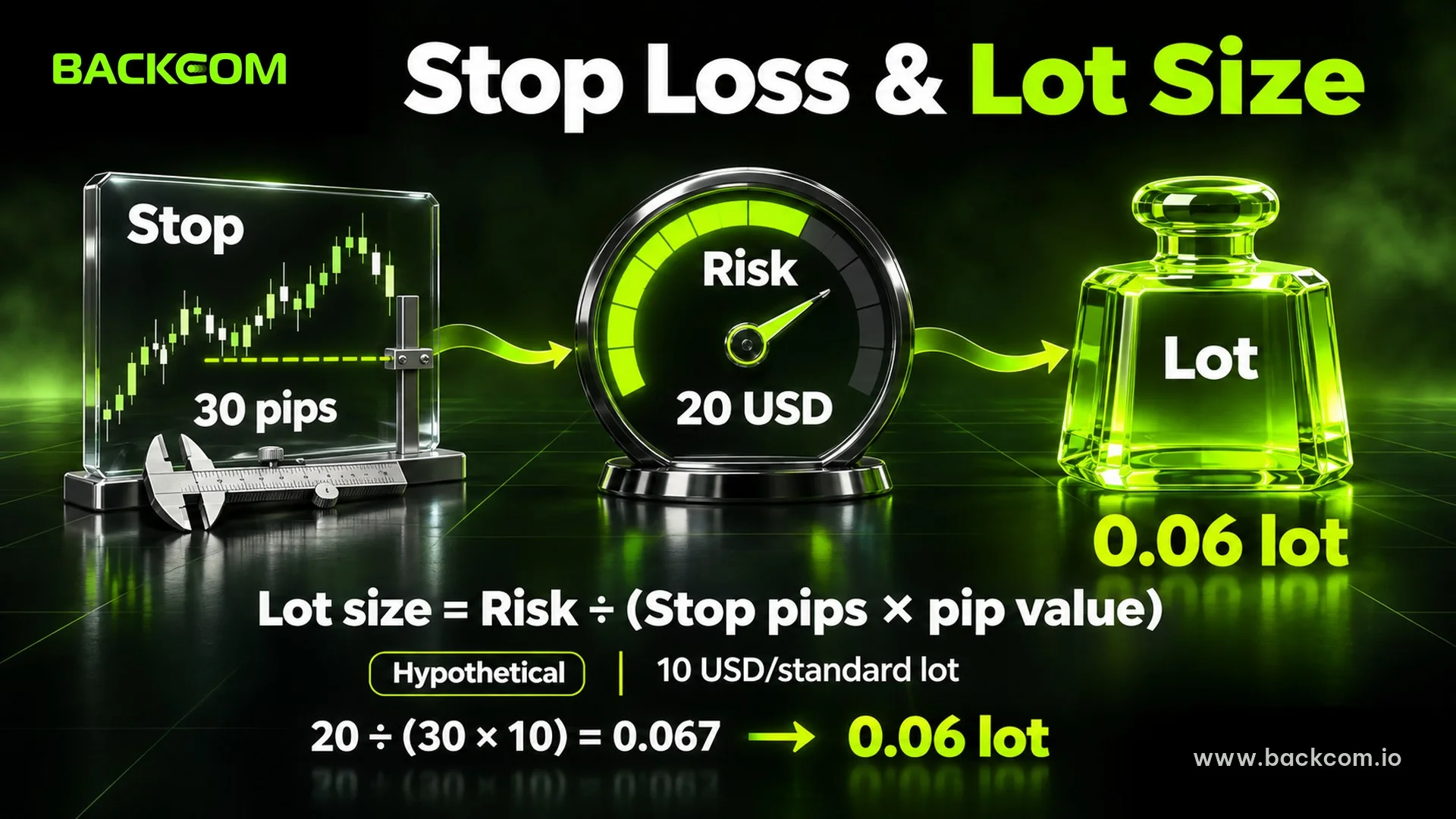
How to set stop loss well means fixing the stop first and calculating lot size second. Many newer traders do the reverse: they pick a lot size by feel, then place the stop wherever the loss feels bearable, and the stop no longer relates to the chart.
The process has six steps:
- Pick the timeframe and the idea: decide what the trade is based on.
- Find the invalidation point: the swing low, swing high or zone that proves the idea wrong.
- Add a buffer: a few pips or a fraction of ATR beyond that point.
- Measure the stop distance in pips: from entry to stop.
- Choose the risk amount: many traders use around 1% of equity, a common starting point rather than a rule.
- Calculate the lot size backwards: the further the stop, the smaller the lot.
The lot size formula:
Lot size = Risk amount ÷ (Stop distance in pips × Value of 1 pip per 1 lot)
Hypothetical example: a 2,000 USD account, risking 1% (20 USD) on EUR/USD, where 1 pip of 1 lot is worth 10 USD.
- 30-pip structure stop: lots = 20 ÷ (30 × 10) = 0.067, rounded down to 0.06 lot. Maximum loss is about 18 USD.
- 60-pip ATR stop: lots = 20 ÷ (60 × 10) = 0.033, rounded down to 0.03 lot. Maximum loss is again about 18 USD.
The loss is nearly identical even though the stops differ by a factor of two. That is why you should adjust lot size to the stop, not the stop to the lot size. Real losses can be slightly larger if slippage occurs, as discussed above.
You can test combinations with the position size calculator, and read the full 1% rule in the guide to forex money management and lot size. The numbers here only illustrate the method and are not advice on capital or risk level.
Common Stop Loss Mistakes
A stop loss protects capital only if you stay disciplined with it. These mistakes appear again and again:
- Moving the stop further away as price approaches: it turns a planned loss into one with no ceiling, and it is the first step in many blown accounts.
- Placing the stop too tight: it sits inside normal price noise and gets hit repeatedly even when your direction is right.
- Trading without a stop because price “will come back”: it may, or it may not, and no one knows in advance.
- Adding positions while the first one is losing: every extra order increases total risk. See pyramiding versus averaging down.
Moving the stop in the profitable direction, toward or beyond entry once a trade is in profit, is a different and legitimate technique. The automatic version is explained in the guide to trailing stops on MT5.
Stop Loss And Trading Costs: How Spread Matters
Spread is a hidden cost built into your stop distance. For a buy, the stop triggers on the bid price while the entry fills at the ask. A 30-pip stop on screen is therefore shorter by exactly the spread at entry. For a sell the reverse applies: the stop triggers on the ask while charts usually draw the bid, so when spreads widen around news, a stop can trigger even though the chart line never reached the level. The mechanics are covered in what is forex spread.
Short-term traders with tight stops and many orders should compare spread and commission across brokers. Part of those costs can be offset by a rebate calculated on lots traded. A rebate does not change whether a trade was right or wrong, and it cannot offset a losing trade.
Backcom.io is an independent introducing broker (IB/affiliate) of the brokers it lists; rebates are paid from the commission the broker pays Backcom.io — see the risk disclaimer. You can check current terms and rebate levels on the partner broker list.
Frequently Asked Questions (FAQ) About Stop Loss
Does A Stop Loss Guarantee I Lose Only The Planned Amount?
Not entirely. A stop loss fills at the best available price when your level is touched, so the fill can be worse during gaps or strong news. Leave a margin for slippage in your lot calculation, and consider trading smaller ahead of major events or weekends.
How Many Pips Should A Stop Loss Be?
There is no pip count that suits every trade. Stop distance depends on the pair, the timeframe and the invalidation point of the idea. Place the stop by structure, check it with ATR, and only then calculate lot size. Choosing a fixed pip number first usually pulls the stop away from the chart.
What Multiplier Should I Use For An ATR Stop Loss?
Many traders use roughly 1.5 to 3 times ATR(14), but this is convention, not a rule from the indicator’s creator. A small multiplier gives a close stop that is hit easily, and a large one forces a smaller lot. Test on historical data and a demo account first.
Should I Ever Trade Without A Stop Loss?
Most risk management material recommends always having an exit plan. Some traders use manual exits or hedging instead of a stop order, but that demands strong discipline and fails if you lose connection. New traders should use a stop on the platform from the start.
Conclusion: What Is A Stop Loss And How To Set One So Risk Has A Ceiling
Understanding what a stop loss is means grasping three things: a stop limits the loss on a wrong trade but does not guarantee the fill price, its position should follow the invalidation point of the idea, and the stop distance decides the lot size, not the other way around. Traders need to look at price structure, ATR range and spread together instead of picking one pip number.
The next step is to write the invalidation point into the plan for every trade, check it against ATR, then use the formula backwards to size the lot from your chosen risk. When you are ready to go further, read the guide to forex money management and lot size to build a risk framework for the whole account.
Disclaimer: This content is compiled by Backcom.io for information and reference only and is not investment advice or a trading recommendation. Trading forex and CFDs on leverage carries high risk and you can lose all your capital. The numerical examples are hypothetical, a stop loss does not guarantee the fill price, and you should verify your broker’s contract specifications before placing any order.
Was this article helpful?
Join The Backcom.io Community
Get the latest on trading rebates, trading tips, and broker deals — and connect with thousands of traders worldwide.

Backcom App
Track Your Rebates Every Day
Every rebate is visible by broker and by day. Manage your wallet and withdrawals in one place.
Open Backcom App