XM Leverage Explained: Maximum Levels, How To Change It And Margin Examples

Many traders hear that XM offers 1:1000 leverage and open an account expecting every trade to run at that level. Then they find a drop-down with seventeen options, or a maximum that no longer matches their balance. XM leverage only decides how much margin is locked for each trade, while profit and loss still depend on position size and pips.
In this article, Backcom.io walks through the XM maximum leverage shown in the account interface, the full list of levels you can choose, and the balance-based limits that official sources do not let us confirm. It also covers how to change leverage on XM and how to calculate margin so you can pick a sensible level:
- The seventeen levels in the drop-down of an MT5 Standard account, from an XM interface screenshot dated 11 November 2026.
- Why 1:1000 does not apply equally to every account and balance.
- The steps to change leverage in the Members Area.
- Two margin examples and a risk rule built around 1% of capital.
1. What Is XM Leverage And Does XM Leverage 1:1000 Apply To Everyone?
XM leverage is the ratio between the position you can open and the margin you must hold. At 1:1000, each 1 USD of margin controls a position worth 1,000 USD. It is a margin rule set by the broker, not cash paid into your account.
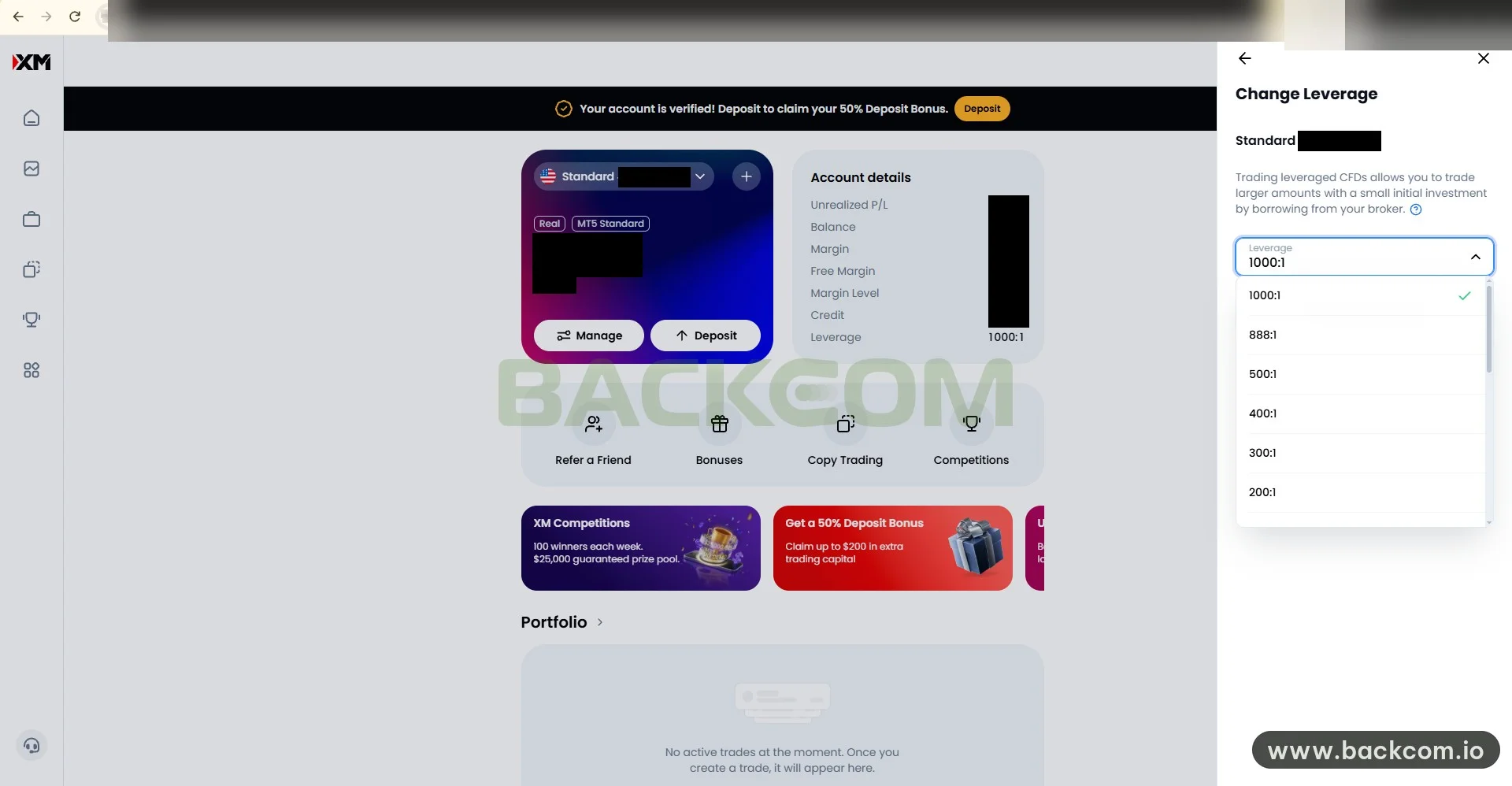
According to the XM Members Area screenshot dated 11 November 2026 (shown above), the account is a Real Standard account on MT5 with leverage set to 1000:1. The "Change Leverage" panel on the right has the list of levels open. XM's note explains that leveraged CFDs let you trade larger amounts with a small initial investment.
Three points about the maximum are worth getting right:
- 1:1000 is the ceiling in the screenshot: it is the highest level in the drop-down of the Standard account shown, not a promise for every account.
- The ceiling depends on region and regulation: the XM broker page says XM advertises up to 1:1000 but the real level is not the same for every product. For brokers inside the ESMA area, retail leverage on major currency pairs is capped at 30:1.
- Account types can differ: that broker page (updated 24 October 2026) lists the Shares account at 1:20, while Standard and Ultra Low carry the advertised 1:1000.
No official public source that we could open confirms a fixed maximum for each XM account type. So you should open your own account in the Members Area and read the levels it allows. To compare account types first, see XM account types and how to choose.
The basic margin formula fits on one line:
Margin = Position Value ÷ Leverage
MetaTrader 5 uses the same formula for forex, with an example of 1 lot EUR/USD at 1:100 giving 1,000 EUR, see the MT5 documentation on forex margin. The full per-product formulas are in how to calculate margin, and the general concept is in what is leverage in forex.
2. XM Maximum Leverage: The 17 Levels Shown In The Interface
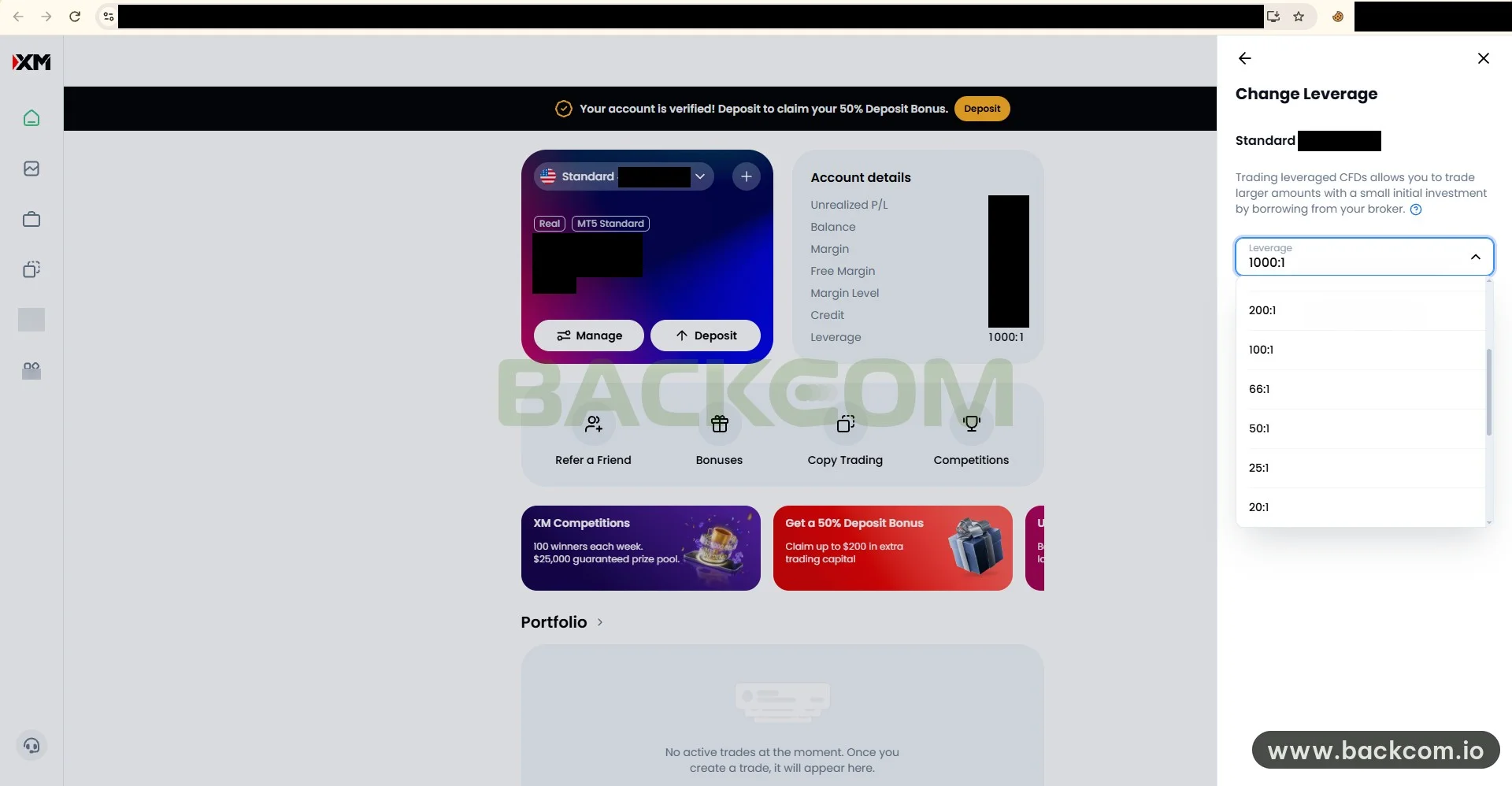
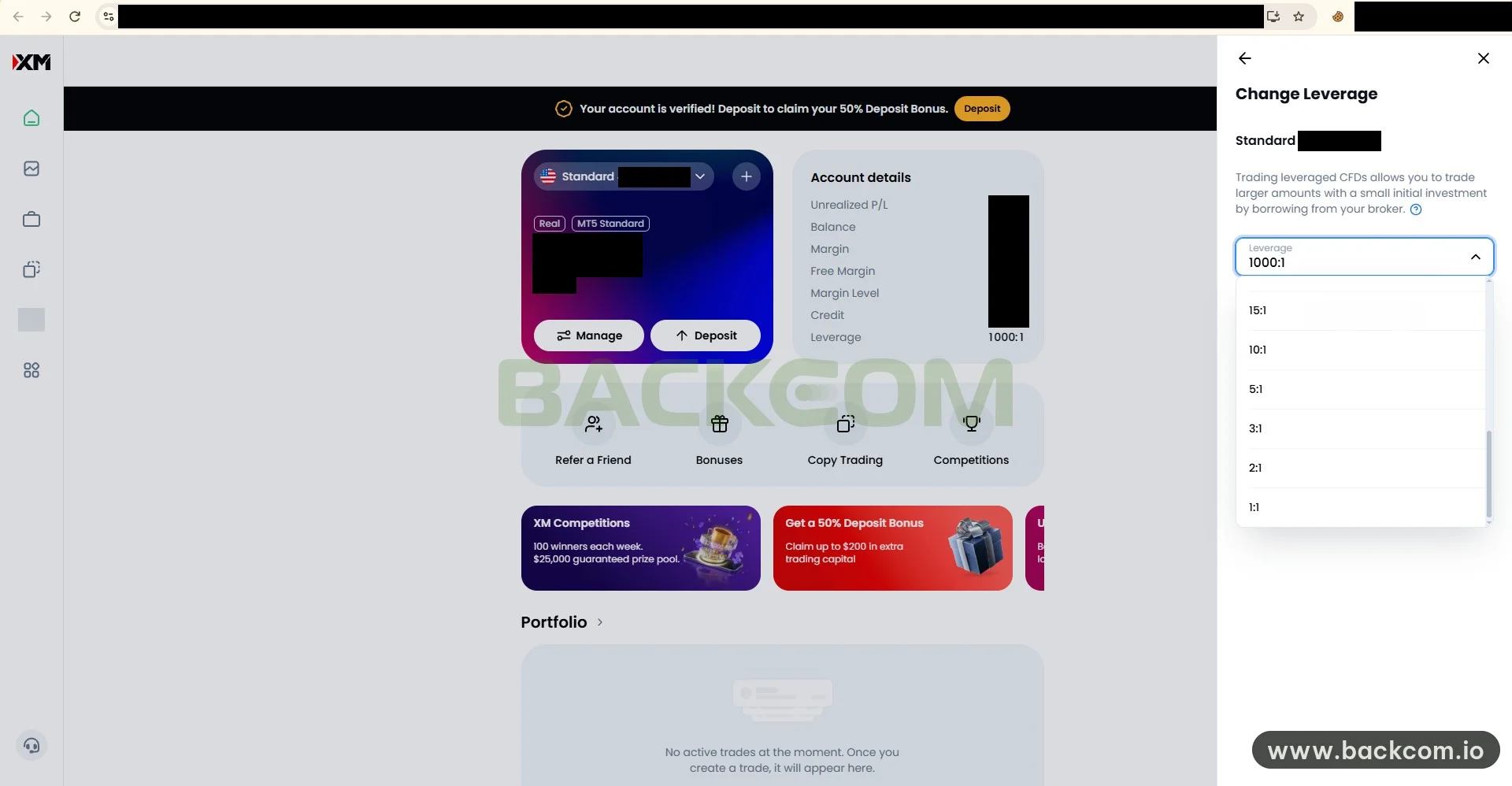
The drop-down of the MT5 Standard account lists seventeen XM leverage levels in total, from 1000:1 down to 1:1. The list is longer than the visible area, so it takes three scroll positions, and the screenshots above capture the middle and the bottom of the list (the top part is in the first screenshot).
From highest to lowest, the levels are:
- High group: 1000:1, 888:1, 500:1, 400:1, 300:1 and 200:1.
- Middle group: 100:1, 66:1, 50:1 and 25:1.
- Low group: 20:1, 15:1, 10:1, 5:1, 3:1, 2:1 and 1:1.
The 888:1 level sitting right under 1000:1 is an unusual detail, not a round number like at many brokers. The lowest levels, such as 3:1, 2:1 and 1:1, let you use almost no leverage.
The list above comes from an XM interface screenshot dated 11 November 2026 for an MT5 Standard account. Available levels can differ by account type, platform and region, so check them on your own account.
The level ticked in the screenshot is 1000:1, which is the selected level, not a mandatory one.
3. XM Leverage By Account Balance: Does The Maximum Drop As Equity Grows?
Many brokers lower the maximum leverage step by step as equity grows. For XM, XM leverage by account balance is something this article can only half answer, because the official tier table is not verified.
What can be said from the sources checked:
- The level in the screenshot is the maximum you selected, not necessarily the level applied: the XM broker page says XM advertises up to 1:1000 but the real level depends on account type, product and conditions, shown in your account when you trade.
- The interface shows no balance tiers: the screenshot dated 11 November 2026 contains only the level selector, with no tier table beside it.
What is not verified:
- The exact equity thresholds: some third-party sites publish tier tables, but their numbers disagree and no official XM document backs them up.
- How XM counts equity: no official source tells us whether bonus balance counts toward equity.
So the article uses no balance threshold as data. You have two more reliable ways to check:
- Reopen the "Change Leverage" panel after a large equity change: if the maximum in the list narrows, balance-based limits are likely in force.
- Ask XM support in writing: request the tier table that applies to your own account and legal entity, and keep the reply.
Whether or not XM applies balance tiers, the practical question is whether you can control position size at 1:1000. Sections 5 and 6 answer that with numbers.
4. How To Change Leverage On XM Step By Step In The Members Area
Changing leverage on XM comes down to one "Change Leverage" panel that slides in from the right of the account page. Based on the screenshot dated 11 November 2026, the order is:
- Log in to the XM Members Area: open your XM account page in a browser. The address in the screenshot is hidden to avoid exposing personal data.
- Pick the right Real account: the account card on the left shows the account type (Standard), the platform (MT5 Standard) and two buttons, Manage and Deposit.
- Open the "Change Leverage" panel: it shows the account name, the current leverage and a drop-down. The screenshot does not show the click that opens it (not verified, more screenshots requested).
- Choose a level in the "Leverage" field: open the drop-down, scroll the list and pick a level such as 500:1 or 100:1.
- Confirm the change: the screenshot has no final confirmation step, so read the button or message XM shows after you pick a level.
After the change, reopen the panel to check the new level, then look at the margin of a small trade in MT5 to be sure it took effect.
Two cautions before you change it:
- Open positions: close or reduce size before lowering leverage, since required margin can rise at once and push margin level down (XM's warning threshold is not verified).
- One level per account: changing one account does not change another.
5. How Much XM Leverage Should You Use? Margin Maths In Two Examples
The short answer is to pick a level that lets you open a sensible size under your risk rule, and keep the leftover margin as a buffer. The two examples below use assumed prices to keep the maths simple, not current market prices.
Example 1: EUR/USD, 1 lot, assumed price 1.1000. A 100,000-unit contract makes the position value 100,000 × 1.1000 = 110,000 USD.
| Leverage | Margin for 1 lot | Margin for 0.1 lot |
|---|---|---|
| 1:1000 | 110 USD | 11 USD |
| 1:500 | 220 USD | 22 USD |
| 1:200 | 550 USD | 55 USD |
| 1:100 | 1,100 USD | 110 USD |
| 1:30 (ESMA cap) | about 3,667 USD | about 367 USD |
Calculation reference as at 11 November 2026 with an assumed price of 1.1000 and a 100,000-unit contract. Real XM margin can differ by account, so check it before trading.
On a 1 lot trade, each EUR/USD pip is worth about 10 USD whether you choose 1:1000 or 1:100. Leverage only changes the margin locked, not the profit or loss per pip.
Example 2: a 500 USD account risking 1%. The 1% rule allows a maximum loss of 5 USD per trade. With a stop loss 25 pips away, the suitable size is 5 ÷ (25 × 10) = 0.02 lot, a position of about 2,200 USD. At 1:1000 the margin is only about 2.2 USD, and at 1:100 it is about 22 USD, still under 5% of capital.
The result shows two things:
- Risk decides the size: a 0.02 lot trade needs little margin at most levels in the list, and higher leverage does not make it earn more.
- Low leverage can block an oversized trade: with 500 USD, 1 lot EUR/USD at 1:100 needs 1,100 USD of margin, more than the whole balance.
Sizing from risk is covered in forex money management and the 1% rule.
6. Risks Of Using 1:1000 Leverage And How To Keep Your Account Safe
The biggest risk of 1:1000 leverage is turning a small loss into a blown account, because low margin makes it easy to open a position that is far too large. With a 500 USD account opening 1 lot EUR/USD at 1:1000, margin is only 110 USD, so the order goes through at once. But each pip is already 10 USD, and about 50 pips against you wipes out the balance.
Common mistakes include:
- Picking the top level and then the top size: low margin creates a false sense of safety.
- Trading without a stop loss: margin level slides until positions are closed automatically.
- Using leverage to win back losses: raising size after a losing streak makes risk balloon.
To limit the damage, you should follow a few rules:
- Size from risk, not from the maximum margin allowed.
- Set the stop loss before entering and keep it where you calculated it.
- Watch margin level, especially before major news.
- Choose a level below the ceiling, such as 1:100 or 1:200, if position size is hard to control.
The margin warning and automatic closing mechanism is in margin call vs stop out, and stop loss placement is in how to set a stop loss.
To see that 1:1000 is not the standard everywhere, look at the retail leverage limits ESMA announced in 2018 for Europe, with 30:1 on major currency pairs. See the source: ESMA's press release on CFD product intervention measures. That framework applies to providers inside the ESMA area, not to the XM interface in the screenshots.
Frequently Asked Questions (FAQ) About XM Leverage
What Is The Maximum XM Leverage?
According to the interface on 11 November 2026, the drop-down of an MT5 Standard account tops out at 1000:1. XM maximum leverage can also differ by account type, product and region, and balance-based limits are not verified, so open the "Change Leverage" panel on your own account to see the levels it allows.
Can You Change XM Leverage After Opening An Account?
Yes. Open the "Change Leverage" panel in the Members Area, choose another level in the "Leverage" field and confirm. Close or reduce open positions before lowering leverage. Then check margin in MT5 to confirm the new level applies.
Does XM Leverage 1:1000 Apply To Every Account?
No. The 1:1000 level is the highest advertised one, and the XM broker page lists the Shares account at 1:20. Where ESMA rules apply, retail leverage on major pairs is capped at 30:1.
Does A Large Balance Lower XM Leverage?
There is no official source solid enough to confirm XM's balance-based tiers. Third-party sites quote different thresholds, so the article does not use them as data. Reopen the "Change Leverage" panel after a large equity change and ask XM support if the maximum narrows.
Does Higher Leverage Make You Earn More?
No. Profit and loss depend on position size and pips, while leverage only changes the margin you must hold.
Conclusion: Choose XM Leverage By Risk, Not By The Ceiling
XM leverage is a margin tool, and a sensible level is one that lets you open the right size under your risk rule with a buffer left over. You need to weigh three things together: the ceiling your account allows, the real level for each product and balance, and the position size calculated from your stop loss.
The next step is to open the Members Area, read the levels on your own account, check real margin in MT5 and set a stop loss on every trade. If you are considering a new account, you can read the XM trading conditions and rebates on the broker page or open an XM account through the referral link.
Backcom.io is an independent introducing broker (IB/affiliate) of XM; rebates are paid from the commission the broker pays Backcom.io, see the risk disclaimer.
Disclaimer: This content is compiled by Backcom.io for information only and is not investment advice, a trading recommendation or legal advice. Trading forex and CFDs with leverage is high risk and you can lose all your capital. The leverage levels and conditions in this article come from the XM interface on 11 November 2026 and can change, so check them on your own account before trading.
Was this article helpful?
Join The Backcom.io Community
Get the latest on trading rebates, trading tips, and broker deals — and connect with thousands of traders worldwide.

Backcom App
Track Your Rebates Every Day
Every rebate is visible by broker and by day. Manage your wallet and withdrawals in one place.
Open Backcom App