Vantage Free VPS: Requirements, How To Submit Your Invoice And Refund Tiers


Renting a virtual server so an Expert Advisor can run around the clock is a fixed monthly cost, and the Vantage free VPS promotion is how the broker gives that cost back to clients who trade enough volume. Unlike brokers that hand out a hosted machine, Vantage does not provide a server. You rent your own VPS, then upload the bill to receive the Vantage VPS rebate in your trading account.
So the first thing to understand is not server specs. It is the Vantage free VPS requirements on deposit and trading volume, plus a VPS invoice that shows everything the broker asks for.
In this article, Backcom.io walks through the two refund tiers, how to convert the volume target into lots, each step of the upload in the client portal, and the reasons a request gets rejected.
1. What Is The Vantage Free VPS Promotion? A Refund, Not A Server
The Vantage free VPS promotion refunds your monthly VPS rental once you have deposited at least $1,000 and reached a trading volume tier, with the refund capped at $25 or $50 a month. In the client portal it sits under the Promotions menu as a VPS rebate card, and the detail page is titled Free VPS.
“Free” here means refunded afterwards, and that has three practical consequences:
- You pick the server: you choose the specs, the data centre location and the provider instead of receiving a fixed machine from the broker.
- You pay first: the refund is only processed after the VPS billing period ends, so the first month comes out of your own pocket.
- The refund is capped: if your plan costs more than $25 or $50, you cover the difference.
A side-by-side look at other brokers' schemes is in the guide to free forex VPS requirements and how to get one.
2. Vantage Free VPS Requirements: A $1,000 Deposit And Two Volume Tiers
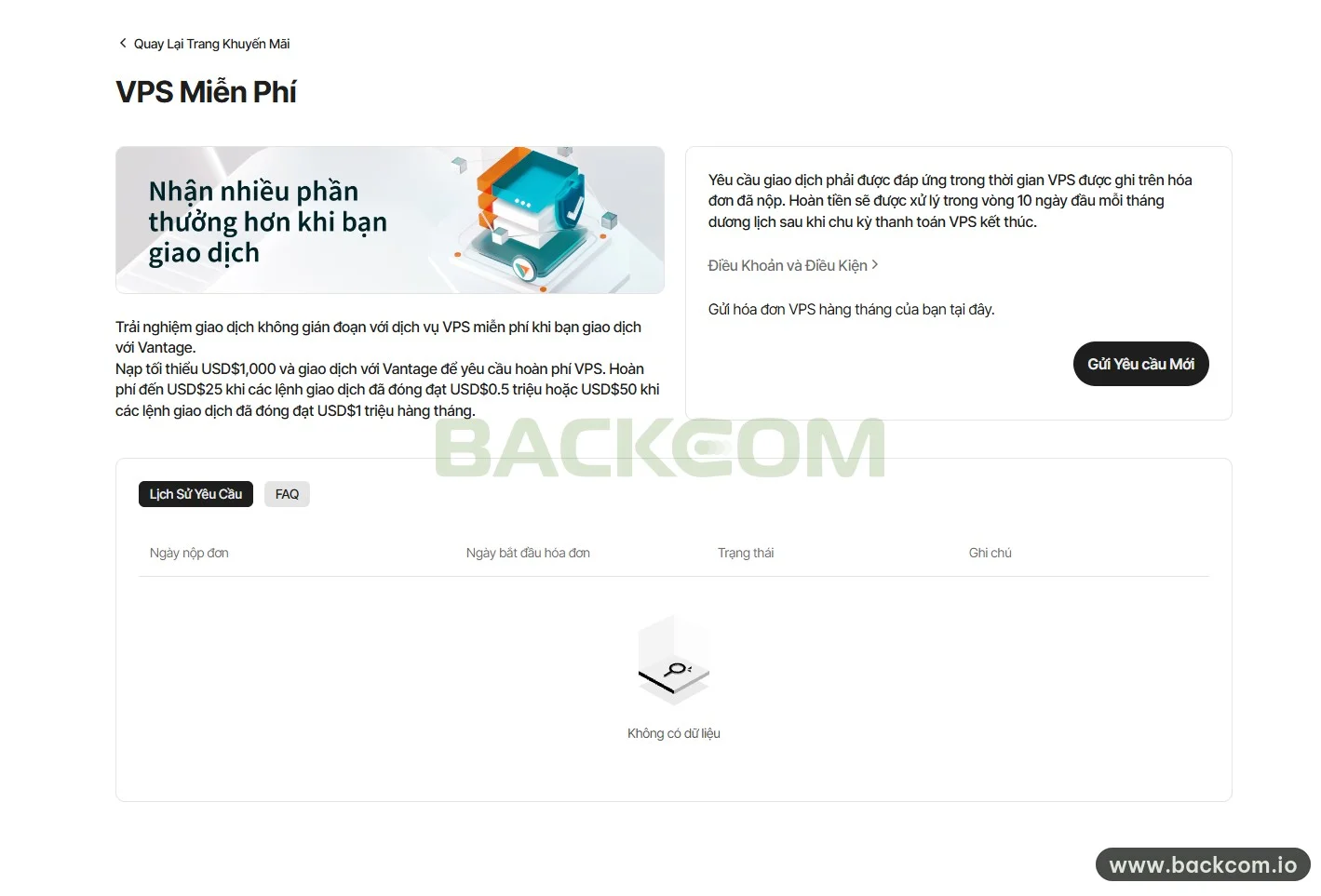
The Vantage free VPS requirements come in two parts: deposit at least $1,000, and close trades worth $0.5 million or $1 million in a month. The tier you reach sets the refund cap.
| Tier | Minimum Deposit | Closed Trades Per Month | VPS Refund |
|---|---|---|---|
| Tier 1 | $1,000 | $0.5 million | Up to $25 |
| Tier 2 | $1,000 | $1 million | Up to $50 |
Conditions as shown in the Vantage client portal on 16 November 2026. The promotion can change, so check the Free VPS page again before you rent a server.
Three details in these conditions are easy to skim past:
- Only closed trades count: a position still open when the period ends is not added to that period's volume.
- All accounts are combined: volume is the total across every trading account you hold, not just the account that receives the refund.
- “Up to” is a cap: the broker refunds the VPS cost shown on your invoice, limited to the tier you reached.
The trading requirement also has to be met within the VPS period printed on the invoice you submit. For an invoice covering 16 November to 15 December, only trades closed inside those dates are considered.
Which Account Types Are Eligible And Which Are Not?
According to the promotion terms published by Vantage Global Limited, viewed on 16 November 2026, the offer applies to valid STP and ECN accounts only. The following fall outside it:
- Cent accounts: not eligible.
- Accounts denominated in USDT, BTC or ETH: not eligible.
- PAMM/MAM master accounts: not eligible.
- Clients introduced by a PAMM/MAM or money manager: not eligible for the broker's offers.
The terms also state that an offer cannot be used together with any other Vantage offer, and that the broker may amend or end the promotion at any time. The overview of Vantage account types helps you confirm which group your account belongs to.
Example: Which Tier Does A Sub-$25 VPS Plan Need?
Take an entry-level forex VPS plan from a local provider, billed in local currency at a price that converts to less than $25 a month with tax included. That invoice sits under the Tier 1 cap.
For a plan in that price range, the $0.5 million tier is enough. Pushing volume up to $1 million does not make the refund any bigger, because the money follows your rental cost and is not a fixed bonus.
3. How Many Lots Is $0.5 Million In Notional Volume?
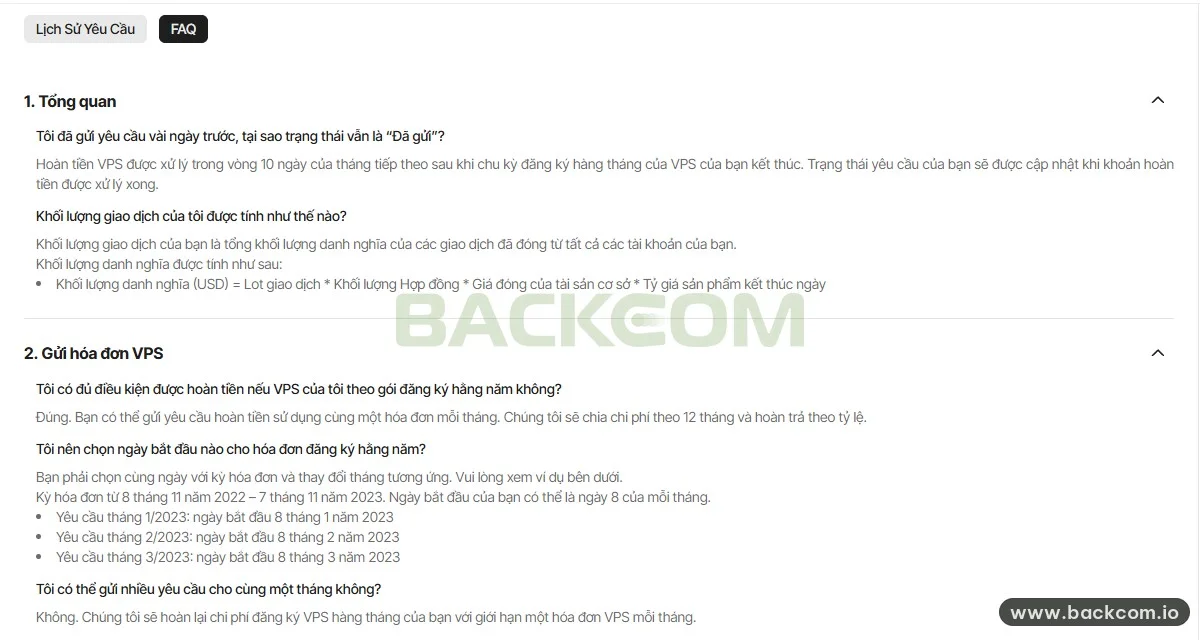
Notional volume is the US dollar value of your closed trades, and on pairs with USD as the base currency, $0.5 million works out to roughly 5 standard lots a month. Vantage calculates the figure with this formula:
Notional volume (USD) = Lots traded × Contract size × Closing price of the underlying × End-of-day conversion rate
Contract size is the number of units of the asset in one lot, and you can see it in each symbol's Specification window. Reference: the Contract size entry in the MetaTrader 5 documentation.
On major currency pairs, one standard lot is 100,000 units of the base currency. The figures below are estimates derived from the formula above, not a table published by the broker:
- USDJPY, USDCAD, USDCHF: one lot is about $100,000, so the $0.5 million tier takes around 5 lots and the $1 million tier around 10 lots.
- EURUSD, GBPUSD, AUDUSD: one lot equals 100,000 multiplied by the closing price. Assuming EURUSD closes at 1.10, one lot is $110,000 and the $0.5 million tier takes about 4.5 lots.
- Gold (XAUUSD): the common contract is 100 ounces per lot, so every $1,000 in the gold price puts one lot at $100,000 of notional value.
Note: adding volume just to hit a tier is a losing trade-off. A refund of at most $25 or $50 does not offset the risk of positions you would not otherwise open. The broker's terms also allow it to exclude clients who open and close trades purely to earn a benefit.
4. What Must The VPS Invoice Show?
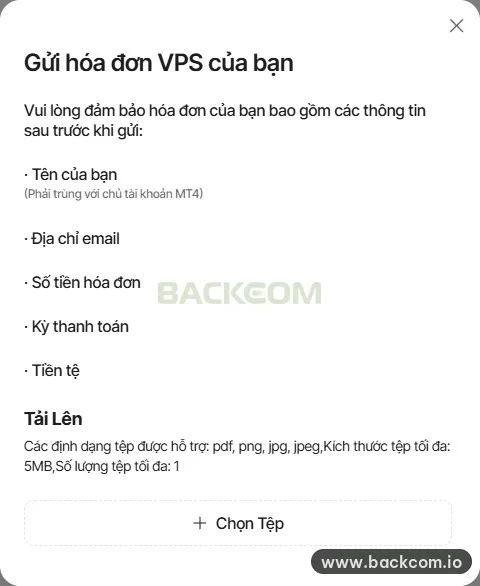
A VPS invoice is accepted when it shows five things: your name, your email address, the amount, the billing period and the currency.
The five items the broker checks are:
- Name: it must match the name of the MT4 account holder at Vantage.
- Email address: the renter's email as shown on the invoice.
- Invoice amount: it has to be a paid amount, as an unpaid invoice is treated as invalid.
- Billing period: the start and end date of the rental period.
- Currency: the currency of the payment.
For the upload itself, the system accepts pdf, png, jpg and jpeg files of up to 5MB, and only one file per request.
Three timing rules matter when you prepare the invoice:
- One invoice per month: the broker refunds a single VPS invoice each month, so you cannot file two requests for the same month.
- A three-month limit: an invoice dated more than 3 months before the submission date is not accepted.
- Annual plans still qualify: you submit the same invoice every month, and the broker splits the cost over 12 months and refunds it pro rata.
5. How To Claim The Vantage Free VPS: 5 Steps In The Client Portal
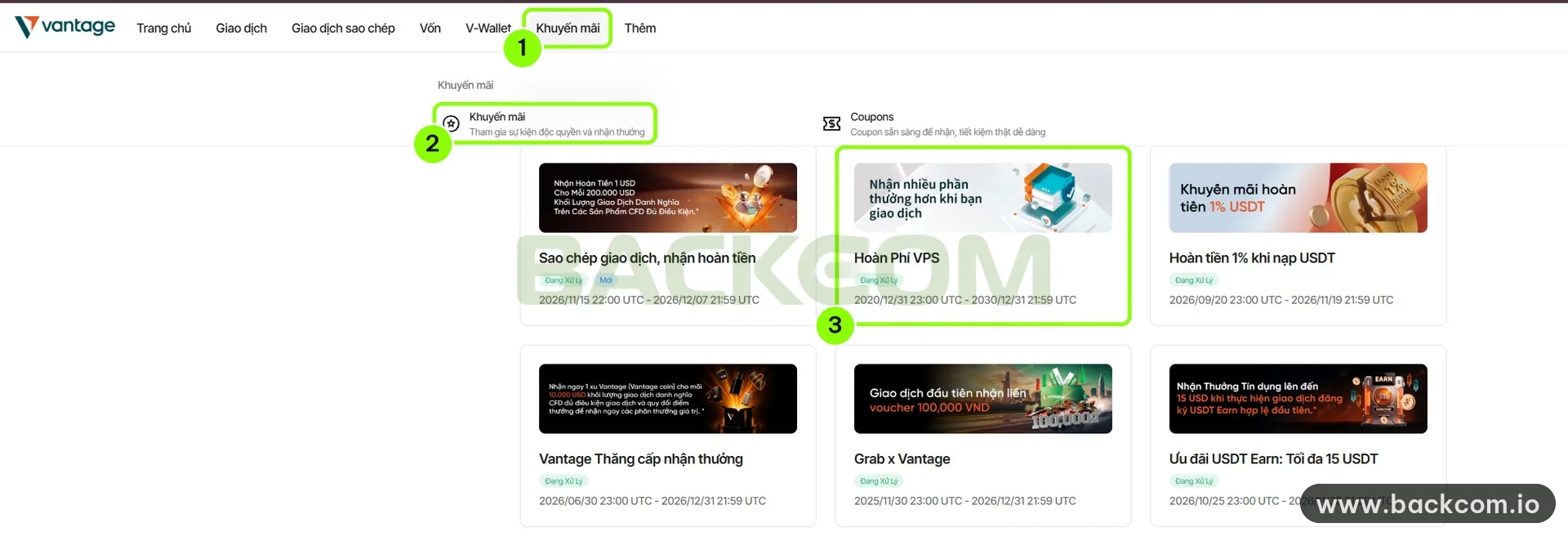
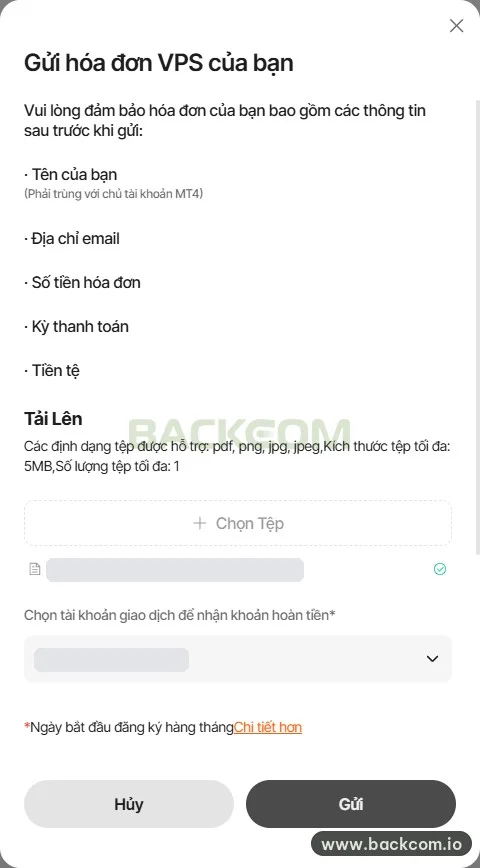
Claiming the Vantage free VPS refund is a single pass through the client portal: open the promotion page, upload the invoice, pick the account to be credited, choose the start date and submit.
Promotions (menu) → Promotions → VPS rebate card → Submit New Request → Choose File → Select account and start date → Submit
Step 1: Open the promotion page
Log in to the client portal and click three things in order:
- Promotions in the top menu.
- The Promotions item in the panel that opens.
- The VPS rebate card in the list of offers.
The Free VPS page opens with the conditions and the invoice button.
Step 2: Start a new request
Click the Submit New Request button in the right-hand panel. An upload dialog opens with the list of five items the invoice must contain.
Step 3: Upload the invoice
Click Choose File and select your invoice. The file name appears underneath with a green tick once the file has been received.
Step 4: Select the account and the start date
In the field for the trading account that will receive the refund, choose the account you want credited. Next comes the monthly subscription start date: select the same start date that is printed on the invoice.
For an annual invoice, keep the day and change the month for each submission.
Step 5: Submit and check
Click Submit to finish, or Cancel if you need to swap the file. The new request shows up straight away in the Request History tab.
If you are setting up automated trading on the server for the first time, the MetaTrader 4 Expert Advisors documentation covers how EAs are launched and stopped.
6. When Is The Vantage VPS Rebate Paid And Where To Track It?
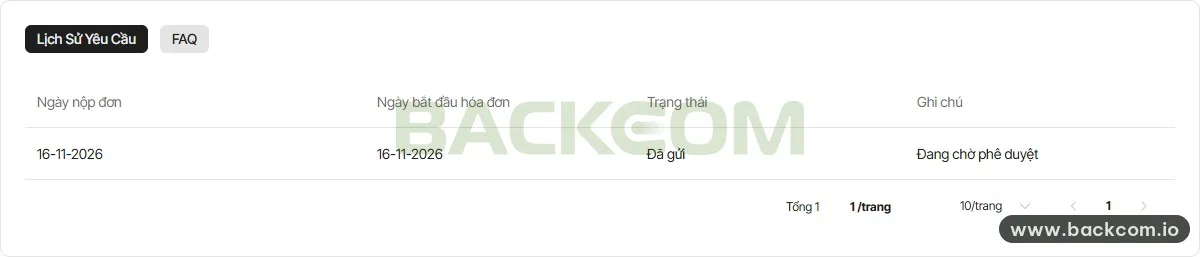
The Vantage VPS rebate is processed within the first 10 days of the calendar month after your VPS billing period ends.
For example, an invoice covering 16 November to 15 December ends in mid-December, so the refund falls into the processing window from 1 to 10 January.
The Request History tab on the Free VPS page lists four columns for every submission:
- Submission date: the day you sent the request.
- Invoice start date: the period start date you selected in step 4.
- Status: shows as submitted right after you send it.
- Remarks: shows as pending approval right after you send it.
A status that stays on submitted for days is normal. The broker only updates it once the refund has been processed, so there is no need to resubmit while you wait.
7. Why Requests Get Rejected And How To Avoid It
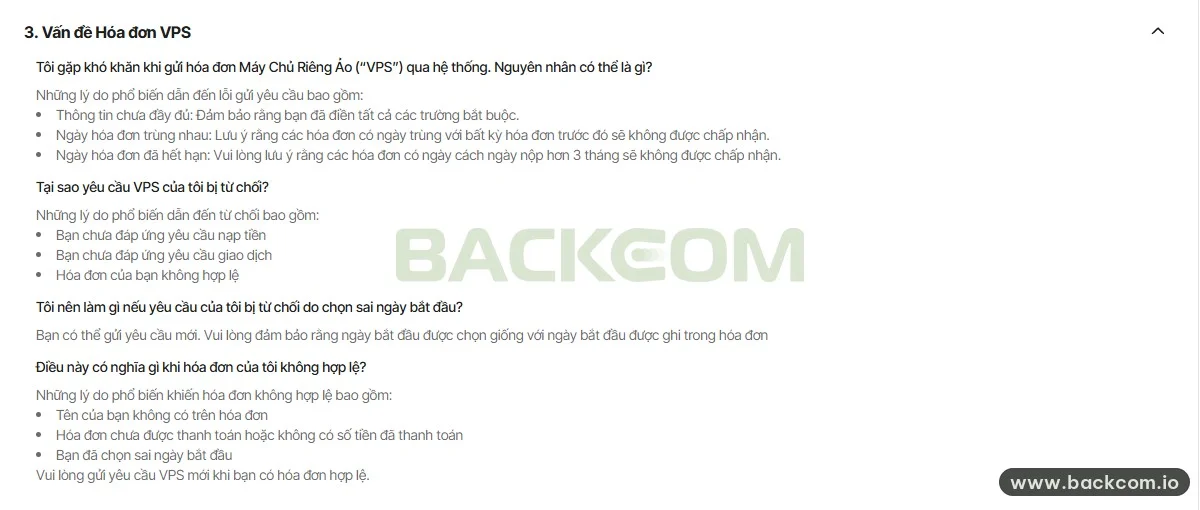
A VPS refund request usually fails at one of two points: the system refuses it at submission, or it is accepted and then rejected on review.
Three errors stop the system from accepting a request:
- Incomplete information: a required field has been left empty.
- Duplicate invoice dates: the date you selected overlaps an invoice period you have already submitted.
- Expired invoice: the invoice is dated more than 3 months before the submission date.
Three reasons lead to rejection after review:
- Deposit requirement not met: you have not deposited the full $1,000.
- Trading requirement not met: your closed-trade volume in the period is below $0.5 million.
- Invalid invoice: your name is missing, the invoice is unpaid or shows no paid amount, or you selected the wrong start date.
A wrong start date is the easiest one to fix: file a new request and select the start date exactly as it appears on the invoice.
8. How The VPS Rebate Differs From Trading Rebates
The VPS rebate and trading rebates come from two different sources: one is paid by Vantage under a promotion, the other is shared back by an introducing broker out of its IB commission.
| Criteria | VPS Rebate | Trading Rebates |
|---|---|---|
| Who pays | Vantage | The introducing broker, out of IB commission |
| How it is calculated | From the VPS invoice, capped at $25 or $50 a month | Per closed lot |
| Conditions | $1,000 deposit and a volume tier | Account registered under the partner's code |
| How you receive it | Upload an invoice each month in the client portal | Paid on the partner's own schedule |
Trading rebates are a separate payment, calculated on each closed trade whether or not you rent a VPS.
Current per-lot rates for each account type are listed on the Vantage Rebates page. Backcom.io is an independent introducing broker (IB/affiliate) of Vantage, and trading rebates are paid from the commission the broker pays its partner. See the risk disclaimer.
If you need help checking an account, message the team on WhatsApp or Telegram.
Frequently Asked Questions (FAQ) About The Vantage Free VPS
Does The Vantage Free VPS Promotion Give You A Server?
No. The Vantage free VPS promotion is a refund scheme: you rent your own VPS, pay for it up front, then upload the invoice in the client portal. The broker refunds up to $25 once your closed trades reach $0.5 million in a month, or up to $50 once they reach $1 million.
How Many Lots Do You Need For The $0.5 Million Tier?
Around 5 standard lots on pairs with USD as the base currency, such as USDJPY, because each lot is about $100,000 of notional value. EURUSD or GBPUSD need slightly fewer lots since the closing price is above 1. Volume is added up across all of your accounts and only closed trades count.
Is A VPS On An Annual Plan Eligible For The Refund?
Yes. You file a request every month using the same annual invoice, and the broker splits the cost over 12 months and refunds it pro rata. Keep the day of the invoice period and change the month each time. For a period that starts on the 8th, the March request uses 8 March as the start date.
Conclusion
The Vantage free VPS promotion is in practice a refund of your server rental, capped at $25 or $50 a month. You need to watch three things together: a deposit of at least $1,000, closed-trade volume that reaches a tier within the invoice period, and an invoice showing all five required items.
The routine itself is short: rent the VPS under the same name as your broker profile, keep the paid invoice, and file one request a month with a start date that matches the invoice. If you are still comparing options, start with the guide to free forex VPS requirements.
Disclaimer: This content is compiled by Backcom.io for information only and is not investment advice or a trading recommendation. The conditions, refund amounts and process of the promotion can change at any time, so check the broker's client portal again before you rent a VPS. Rules also differ by country of residence. CFD trading carries a high level of risk and you can lose all of your capital.
Was this article helpful?
Join The Backcom.io Community
Get the latest on trading rebates, trading tips, and broker deals — and connect with thousands of traders worldwide.

Backcom App
Track Your Rebates Every Day
Every rebate is visible by broker and by day. Manage your wallet and withdrawals in one place.
Open Backcom App