Free Forex VPS 2026: Requirements And How To Get One From Your Broker

Summary
Is a free forex VPS real? The balance and volume requirements, the Exness free VPS in detail, the MQL5 VPS option, and how to get a forex VPS step by step.

A free forex VPS is offered by plenty of brokers, but “free” does not mean you can use it on no conditions at all. Most programmes require you to hold a minimum balance, trade a certain volume, or meet both criteria at once.
So what are the actual VPS requirements? In this article, Backcom.io sets out the conditions attached to each programme, how trading volume is calculated, the Exness free VPS, the MQL5 VPS option, and how to get a forex VPS step by step. More importantly, you will learn when access can be withdrawn, so your EA does not stop without warning.
Is A Free Forex VPS Real? Who Provides It, And Why?
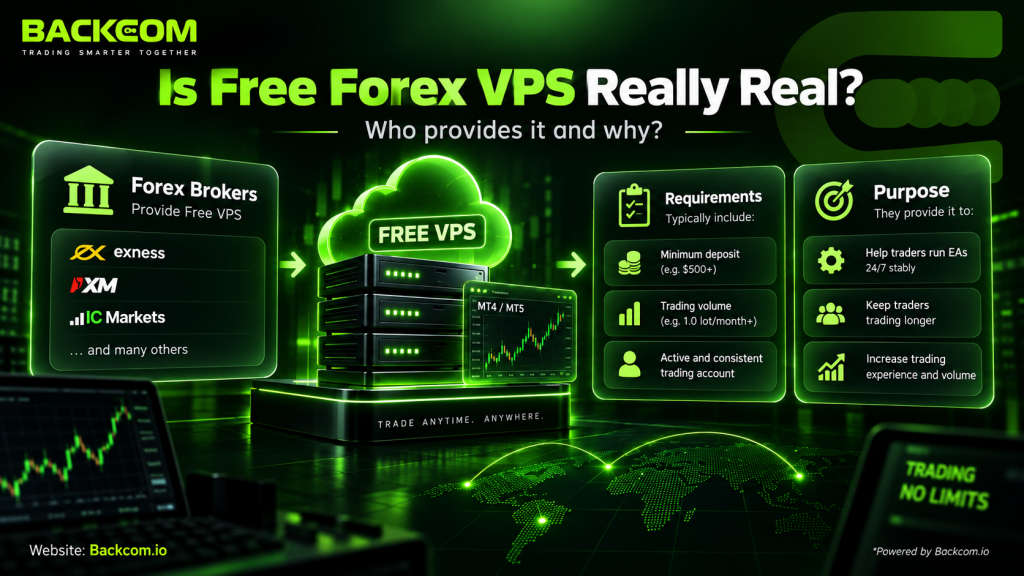
A free forex VPS is real, but it is rarely handed over with no strings attached. It is normally a sponsorship programme: the broker or a partner pays the server bill on your behalf provided your account meets the VPS requirements — a minimum balance, a volume target, and ongoing conditions checked each cycle.
If you are not yet clear on how a VPS works, start with how to open Remote Desktop Connection and reach a VPS.
Two Legitimate Sources
Traders normally reach a free forex VPS through one of two routes:
- A broker-sponsored VPS: the broker provides a server to clients who meet a balance or volume threshold. The Exness free VPS programme, for example, grants access based on account conditions and trading activity.
- Virtual Hosting inside MetaTrader: the MQL5 VPS is built directly into MT4/MT5 and suits running an EA without administering a full Windows server yourself.
The key difference is that a broker’s server is tied directly to the VPS requirements, and access can be withdrawn if you stop meeting them. MQL5, by contrast, runs on a trial or direct-rental basis depending on the MetaQuotes and broker programme in force.
Why Would A Broker Pay For Your Server?
The reason is straightforward: a VPS keeps MT4/MT5 and your EA running 24/7, even with your own computer switched off. That matters most for EAs, scalping and any strategy that needs a stable connection.
From the broker’s side, a trader who trades more consistently generates steadier volume, and the broker earns from spread or commission. So a free forex VPS is usually a sponsorship that suits both parties, rather than an unconditional gift.
That is also why most programmes avoid complicated criteria and focus on two things: account balance and trading volume. The next section works through each group of conditions and how brokers actually count volume.
VPS Requirements: What Every Programme Has In Common
Each broker sets its own VPS requirements, but they usually revolve around three things: balance or deposits, trading volume, and ongoing maintenance conditions. Hitting a threshold once does not mean you keep the server forever.
The 3 Conditions You Will Always Meet
- Minimum balance or deposit: measured either as the balance in the account or as net deposits over a period.
- Trading volume: counted in standard lots or in notional volume, depending on the programme.
- Maintenance conditions: the broker re-checks monthly or on its own cycle; fall short and the server can be withdrawn or switched to a paid plan.
The third one is the easiest to overlook. When you check the conditions, do not look only at what is required to sign up.
Comparing The Conditions At Popular Brokers
| Broker | Balance / deposit | Volume required | Review cycle | How to apply | Note |
|---|---|---|---|---|---|
| Exness | As shown in the Personal Area | As applied to your account | 30/90/180 days | Personal Area → Exness Benefits → VPS | No single threshold applies to every account |
| IC Markets | No separate balance threshold published | Standard 15 lots; Professional 30 lots; Premium 75 lots | Monthly | Apply for IC VPS | Eligible volume covers forex and precious metals |
| HFM | Bronze $400; Silver $8,000; Gold $15,000 net deposit / 30 days | 2 / 8 / 15 standard lots | Monthly | Apply inside myHF | You must meet both the deposit and the volume |
| Vantage | Minimum $1,000 deposit | $0.5 million / $1 million notional volume | Per monthly billing period | Rent it yourself and submit the invoice | Reimburses up to $25 / $50 of the VPS cost |
With Exness, the exact figures have to be read in the Personal Area. IC Markets sets 15–75 lots depending on the tier; HFM combines net deposits with volume; and Vantage works by reimbursing the rental cost rather than providing a server directly.
If you are weighing up IC Markets, it is worth reading the IC Markets review as well. And if none of these VPS requirements fit your situation, the MQL5 VPS is another way to test an EA on smaller capital.
How Is Trading Volume Actually Counted?
This is where most people get it wrong. “5 lots” does not necessarily mean five trades of one lot each; the calculation depends on the instrument and on each broker’s own rules.
Per Exness:
Trading volume = number of lots × contract size
Take USDJPY, with a contract size of 100,000 USD:
- Opening 1 lot contributes roughly 100,000 USD of volume.
- Closing that same lot brings the round trip to about 200,000 USD.
- So a programme asking for 1.5 million USD would work out at roughly 7.5 USDJPY lots opened and closed.
You can use Exness’s official trading volume formula to convert the figures yourself.
Contract sizes differ between forex, gold, oil, indices and crypto. So before you increase your trading just to qualify for a free forex VPS, check whether the broker counts lots or notional volume, how the open and close sides are treated, and which instruments are eligible. Trading more purely to earn a server can cost more in spread and commission than simply renting one.
Exness Free VPS: Conditions, How To Check And How To Activate
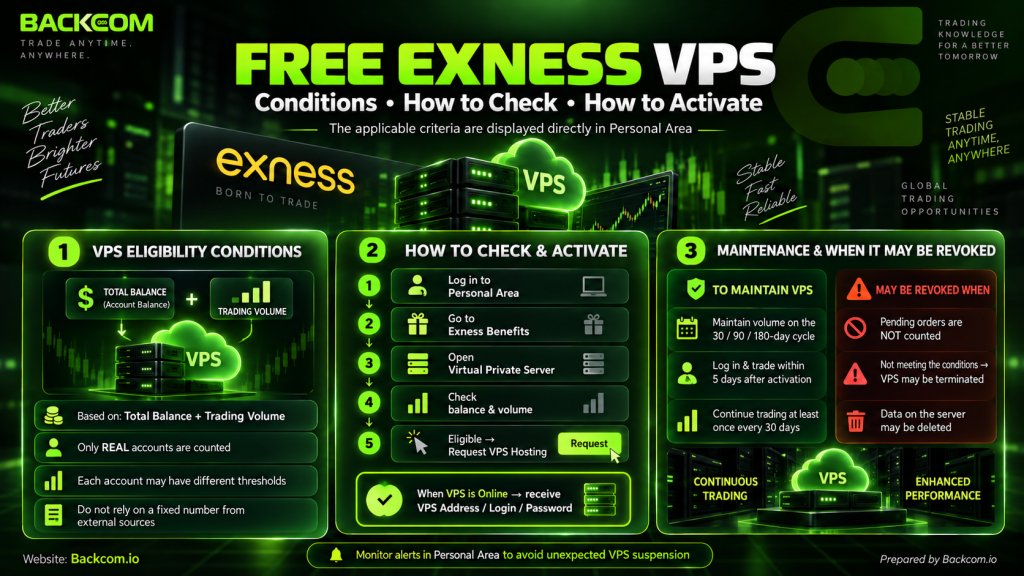
The Exness free VPS is granted to clients who meet criteria on total balance and/or trading volume. Exness does not apply one fixed threshold to every account, though: the conditions that apply to you are shown directly in the Personal Area.
Conditions For The Exness Free VPS
Exness looks at two things:
- The total balance across the accounts in your Personal Area.
- The total trading volume generated on your real accounts.
Only trading on a real account counts toward the volume criterion; demo accounts do not. The balance and volume you need can differ from one client to the next.
For that reason, do not deposit more money based on a figure you read in someone else’s guide. Check the official Exness VPS conditions and look up the criteria currently applied to your own account.
The programme is built around trading volume — and on every one of those lots you can still claw back part of the cost through Exness cashback with Backcom.
How To Check The Conditions On Your Account
To check and request the server:
- Sign in to the Exness Personal Area.
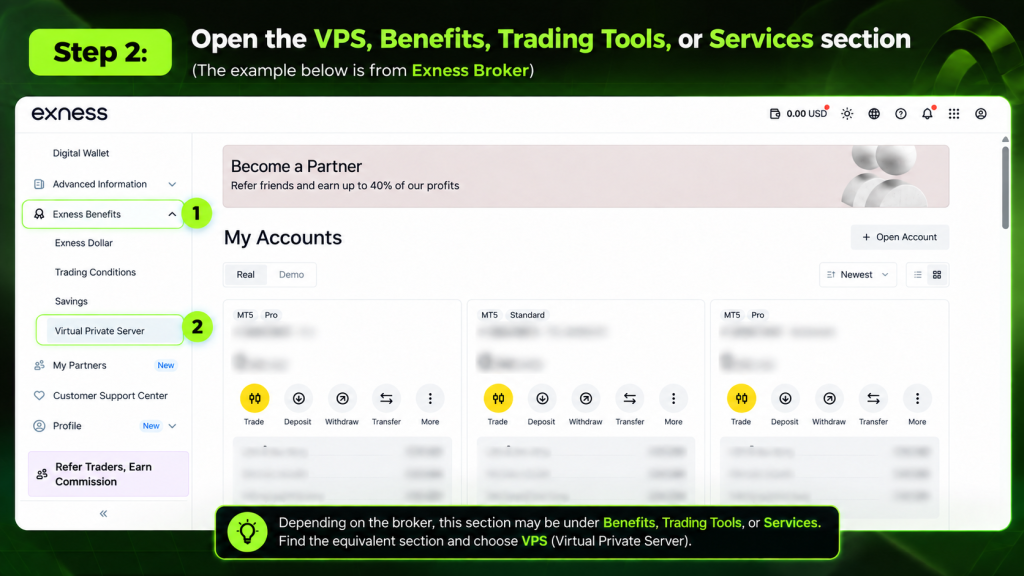
- Open Exness Benefits.
- Go to Virtual Private Server.
- Check the balance and trading volume the system asks for.
- If you qualify, click Request VPS Hosting and complete the request.
Once the server switches to Online, the Personal Area shows the VPS address, login and password you need to connect.
Maintenance Conditions — And When Access Is Withdrawn
After the server is granted, you still have to maintain trading volume against the 30, 90 or 180-day criteria shown in the Personal Area. Meeting any one of the applicable cycles is enough to keep access.
Exness also asks you to:
- Log in and trade from the server within 5 days of it being granted.
- Keep logging in and trading from it at least once every 30 days.
- Note that a pending order does not count as trading activity.
Fall short and the server can be terminated, with the data on it deleted. So when you run an EA on a free forex VPS, watch both your volume and the warnings in the Personal Area to avoid being cut off unexpectedly.
MQL5 VPS: The Free Trial And The Sponsored Option
If you do not yet meet a broker’s conditions, the MQL5 VPS is a sensible way to test an EA without holding a large balance or generating heavy volume. The Virtual Hosting service is built into MetaTrader and tuned specifically for MT4/MT5.
How Long The MQL5 Free Trial Lasts
Each MQL5 account gets around 1,440 minutes of Virtual Hosting trial — 24 hours — which you can use to check your EA, the stability and the synchronisation process before renting long-term.
Activation happens inside MetaTrader, with no Remote Desktop session or Windows administration involved. That makes it worth considering for a small-capital trader who does not yet qualify for a broker-sponsored server.
The Sponsored Option — When The Broker Pays The Rent
Some brokers will fund the cost of an MQL5 VPS for eligible clients. You still use MetaTrader’s Virtual Hosting infrastructure, but the broker picks up the rental fee.
Sponsorship policies vary between brokers, so check with support before you apply.
Limitations You Should Know About
An MQL5 VPS is not a full Windows server. You cannot install your own software or make deep changes to the operating system the way you can on an ordinary VPS.
The important limits:
- An EA that relies on a DLL will not work on Virtual Hosting.
- You cannot install arbitrary Windows software.
- The environment is tuned mainly for EAs, indicators and Signals inside MetaTrader.
- Each virtual terminal is tied to one trading account at a time.
The official MQL5 Virtual Hosting rules set this out in full.
So the MQL5 VPS fits when your main goal is running an EA on MT4/MT5. If you need DLLs, several applications or full Windows administration rights, an ordinary VPS suits better.
How To Get A Forex VPS For Free, Step By Step
How to get a forex VPS depends on whether you take one directly from a broker or use the MQL5 VPS. Before applying, re-check your balance, your volume and the VPS requirements currently applied to your own account.
Applying Through The Broker’S Client Area
For a broker-sponsored free forex VPS, the usual process runs to six steps:
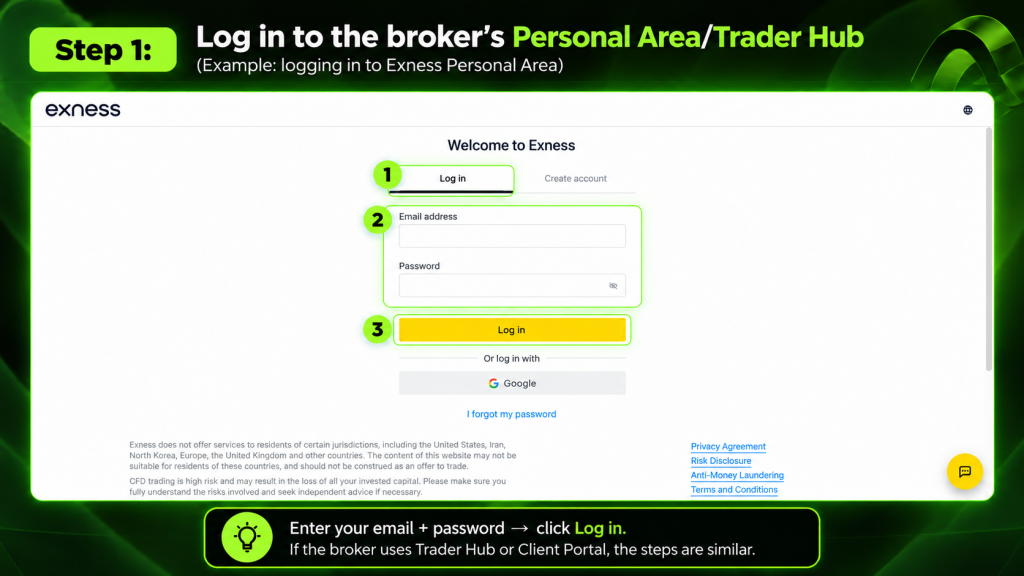
Step 1: Sign in to the broker’s Personal Area or Trader Hub
In this example we are signing in to the Exness Personal Area.
Step 2: Open the VPS, Benefits, Trading Tools or Services section
Step 3: Check the balance, deposit and trading volume conditions
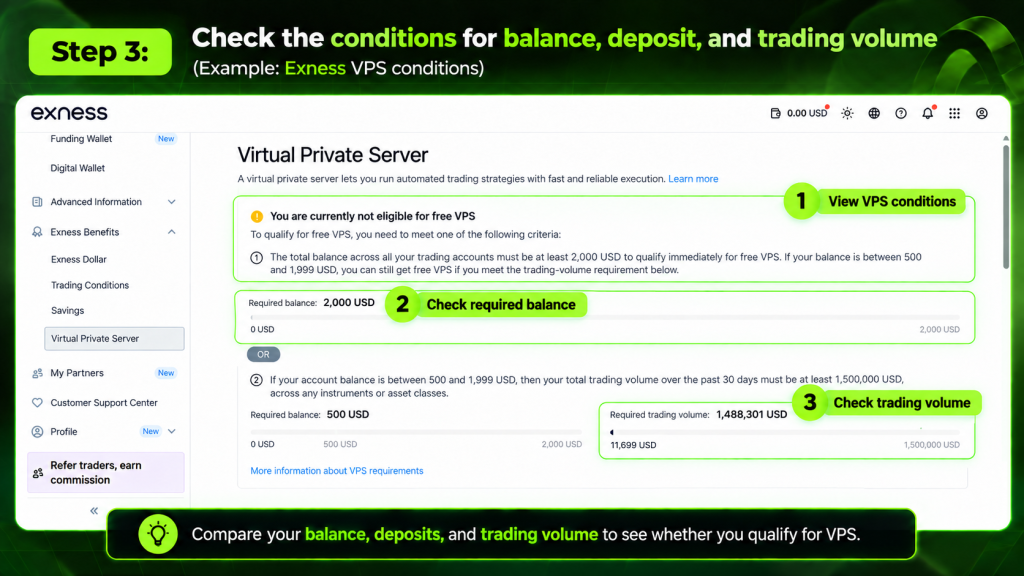
Step 4: Close the gap if you fall short — but do not overtrade
If you have not reached the threshold yet, work toward it through your normal trading. Do not increase your activity purely to earn the server.
Step 5: Read the maintenance terms and submit the request
Read the ongoing conditions carefully before you send the application, so you know what is needed to keep the server after it is granted.
Step 6: Collect the server details once approved
After approval, you receive the IP, username and password through the client area or by email.
With those details in hand, see how to open Remote Desktop Connection to reach the VPS and sign in from Windows.
For the Exness free VPS, both the eligibility check and the request are handled inside the Personal Area.
Activating An MQL5 VPS Inside MT5
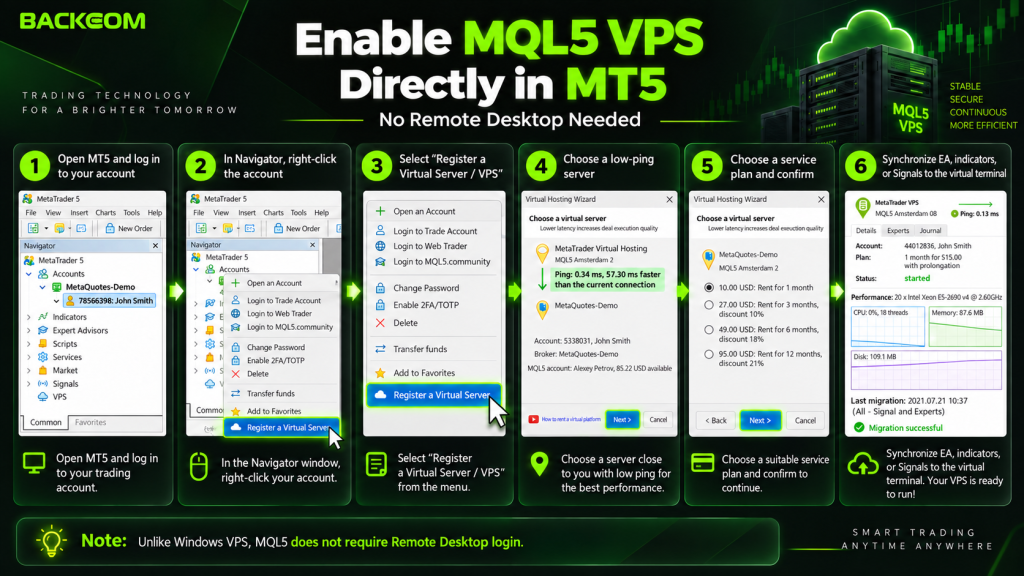
With the MQL5 VPS you can activate everything inside MetaTrader:
- Open MT5 and log in to your trading account.
- In the Navigator window, right-click the account.
- Choose Register a Virtual Server / VPS.
- Pick a server with low latency to your trading server.
- Select a plan and confirm.
- Synchronise the EA, indicators or Signal you want to run to the virtual terminal.
Unlike a Windows VPS, MQL5 does not require a Remote Desktop sign-in.
What To Do After You Have The Server
Once the application goes through, check three things:
- Change the default password if you are on a Windows VPS and the provider allows it.
- Install MT4/MT5, attach the EA and switch on AutoTrading or Algo Trading.
- Confirm the EA is still running after you disconnect.
On a Windows VPS, use Disconnect rather than Shut down or Sign out. On MQL5, check the migration status and the Journal to be sure the EA really is running on the server.
What “Free” Does Not Cover: 4 Things To Know First
A free forex VPS cuts the running cost of an EA, but “free” only applies to the server rent. You still have to meet the VPS requirements, keep trading, and accept some limits compared with a paid plan.
What Is Included And What Is Not
| A free VPS usually includes | Usually not included |
|---|---|
| A server running 24/7 | Freedom to configure or upgrade it |
| A location close to the broker’s infrastructure | Any guarantee of permanent access |
| Enough specification for 1–2 basic terminals | In-depth technical support |
| The cost sponsored or reimbursed by the broker | Exemption from the balance/volume conditions |
Even the Exness free VPS carries activity and volume requirements. So after you apply, keep checking the conditions periodically rather than treating the server as a permanent entitlement.
The Risk Of Losing The Server Mid-Month
Trade lightly in a given month, or miss the maintenance threshold, and access can be withdrawn. For anyone running an EA, a server stopping without warning can leave the robot unable to manage open positions as intended.
The simple defence is to track your volume, watch the warning emails, and always have a fallback ready before the server lapses.
Be Careful With Unknown “Free” Servers
Avoid any server shared publicly by a source you cannot identify. If several people know the username and password, they can reach the terminal that is logged in to your trading account.
An official broker or MQL5 remains the safer route. Saving a few dollars a month on a free forex VPS is not worth handing over access to your account.
When Is A Paid VPS The Better Choice?
A paid plan suits you better if you:
- Run several EAs or several accounts at once.
- Need higher RAM/CPU or full Windows administration rights.
- Trade irregularly, making the maintenance conditions hard to hold.
- Want to choose the specification, server location and rental period yourself.
At roughly 10–30 USD a month, paying can work out more sensible than pushing your volume up just to keep a sponsored server. That is especially true for high-frequency traders such as scalpers, where the extra spread and commission can exceed the rent. It is worth reading scalping and the cost problem it creates on this point.
Frequently Asked Questions About A Free Forex VPS
Is A Free Forex VPS Time-Limited?
It depends on the programme. A broker-sponsored free forex VPS is usually not capped at a fixed number of days, provided you keep meeting the maintenance conditions on balance, trading volume or account activity. An MQL5 VPS trial, by contrast, is time-limited. So distinguish clearly between a long-term sponsored server and a Virtual Hosting trial before you apply.
Can I Get A Server Without A 1,000 USD Balance?
Possibly. Not every broker sets its VPS requirements at a 1,000 USD balance. Some programmes combine a lower deposit with a volume target, while Exness displays its own criteria in the Personal Area. If none of the broker conditions fit, try an MQL5 VPS first rather than depositing more money purely to reach a threshold.
Does The Exness Free VPS Work With MT4 And MT5?
The Exness free VPS can be used to run MetaTrader in the configuration Exness supports. Once the server is granted you receive the sign-in details and can install the trading environment you need. Check the guidance in the Personal Area at the time you activate it, though, because the policy, specification and conditions can change.
Normally there is no direct rental fee under a sponsorship programme. The real “cost” sits in the balance or volume you have to maintain. If you end up trading more just to keep the server, the spread and commission can exceed what renting one would have cost. So compare your trading costs against the rental price before chasing the conditions.
Conclusion
A free forex VPS is a conditional sponsorship, not an open-ended gift. Most brokers grant access on balance, trading volume and — above all — maintenance conditions checked each cycle.
If you do not meet a broker’s bar yet, start with an MQL5 VPS to test your EA. Once you do qualify, read the policy carefully before applying, so you are not driven into extra trading costs simply to hold on to a server.
For anyone trading regularly, Exness cashback with Backcom can also offset part of the cost that builds up with volume.
Note: the conditions and figures here follow each broker’s published information at the time of writing and can change. Always re-check in the client area before applying.
Was this article helpful?
Join The Backcom.io Community
Get the latest on trading rebates, trading tips, and broker deals — and connect with thousands of traders worldwide.

Backcom App
Track Your Rebates Every Day
Every rebate is visible by broker and by day. Manage your wallet and withdrawals in one place.
Open Backcom App