HFM Deposit And Withdrawal: Payment Methods, Processing Time And How To Withdraw To A Bank

Most traders compare spreads and rebates, then discover that HFM deposit and withdrawal has its own rules on payment methods, processing hours and which account receives the money. The question people ask most is how long a withdrawal takes, yet the answer is set by server time, not by your local clock.
Three points cause most of the friction: which bank and wallet options are listed, whether an HFM USDT deposit exists for your account, and why an HFM withdrawal delayed past the expected day even though the request went in that morning.
In this article, Backcom.io reads each screen of the HFM Client Area from screenshots taken on 9 November 2026, converts the processing cut-off to UTC and points out what to check before you move money.
1. Which Deposit Methods Does HFM List Today?
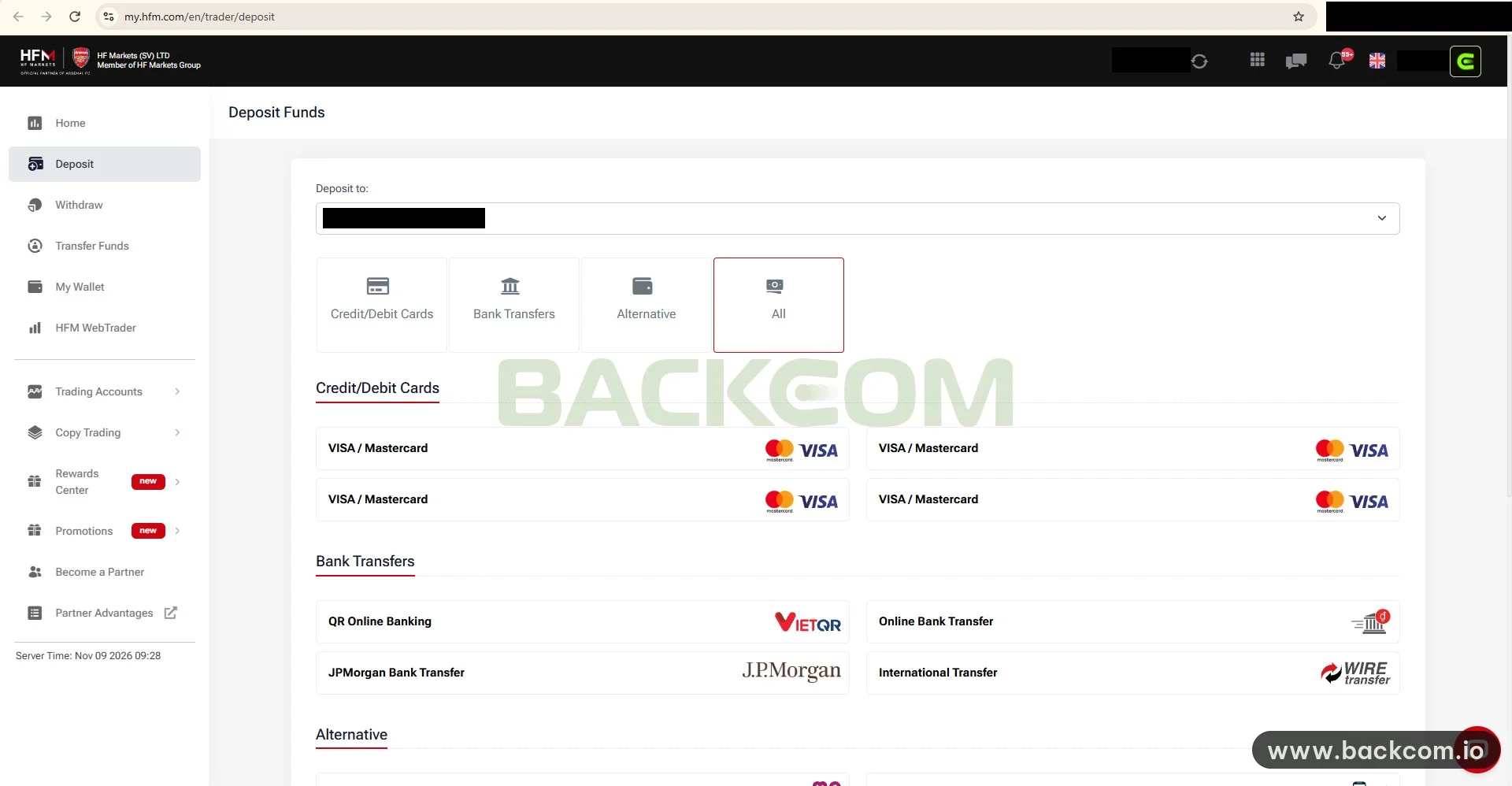
HFM deposit methods are grouped into three tabs on the Deposit page: Credit/Debit Cards, Bank Transfers and Alternative. In the interface captured on 9 November 2026, the list contains:
- Cards: four VISA / Mastercard entries.
- Bank transfers: QR Online Banking (with the VietQR logo), Online Bank Transfer, JPMorgan Bank Transfer and International Transfer (wire).
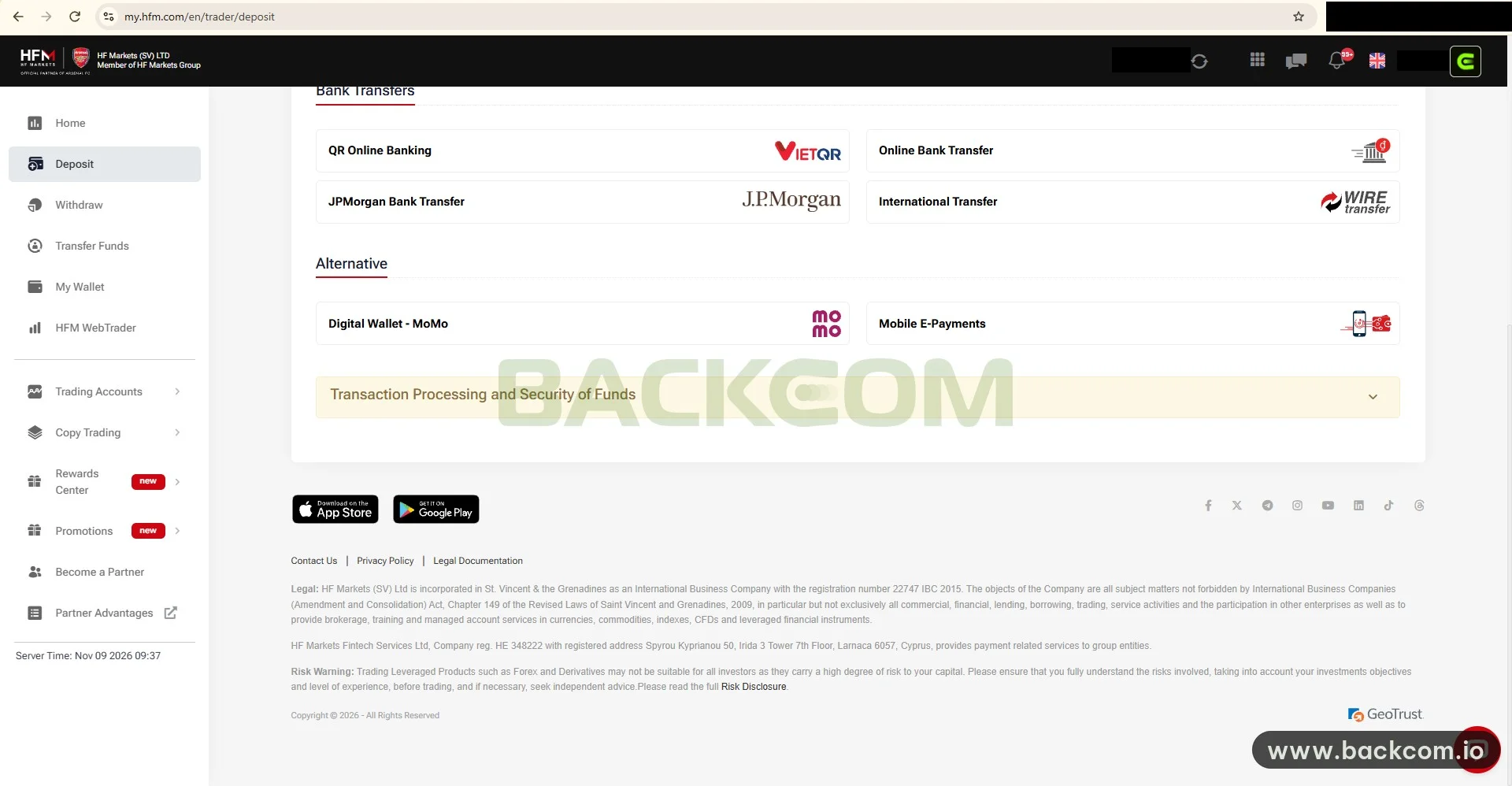
- Alternative: a digital wallet (MoMo) and Mobile E-Payments.
QR and wallet entries such as VietQR and MoMo are regional methods that appeared on the captured account. This list is not fixed. HFM can add or remove methods by region, account type and date, so you should open the Deposit page of your own account instead of relying on a screenshot from someone else.
The "Deposit to" field at the top selects the receiving account. It is the easiest place to make a mistake: with several trading accounts, the wrong choice puts the money in the right profile but the wrong account. The four filter tabs ("Credit/Debit Cards", "Bank Transfers", "Alternative" and "All") shorten the list, and the screenshot at the start of this section was taken on "All".
The screenshot above is the real HFM interface as captured on 9 November 2026. HFM may change the layout and the method list without notice.
Which Method Fits Which Trader?
No single method is best for everyone. Compare three things before you choose:
- Convenience: QR and wallet payments are quick if they are common where you live, while international wires suit larger amounts.
- Cost: fees from HFM, your bank and third parties can differ, and the limits and fees of each method could not be verified, so read them on the deposit screen.
- Withdrawal route: the Withdraw page can offer fewer options than the Deposit page (see section 4).
2. How To Deposit Into HFM By Bank, QR Or Wallet Step By Step
The steps below follow the order of the Client Area. The amount screen and the QR code are not in the screenshots, so only the visible part is described and the rest needs to be checked on the live screen.
- Sign in to the HFM Client Area and open Deposit in the left menu.
- Choose the correct account in Deposit to.
- Pick a group: Bank Transfers for QR Online Banking or a transfer, Alternative for the wallet.
- Select the method, enter the amount and read the fees and limits shown before confirming.
- Complete the payment in your banking app or wallet, then follow the transaction in My Wallet.
The sender name should match the verified profile on HFM. Paying from a third party's account is a common reason for a transfer to be held for review. Before the first deposit, finish registration and verification with the guide to opening an HFM account.
Depositing By VISA Or Mastercard
International cards appear as four separate lines. Your issuing bank may charge a foreign-exchange fee, apply an international payment limit or block the first attempt. Those charges come from the bank. The article gives no figure for them because there is no official source; read them on the deposit screen.
3. Is An HFM USDT Deposit Available?
An HFM USDT deposit is a frequent search, but the screenshots from 9 November 2026 show no USDT or crypto entry in any of the three groups. That applies only to the account that was captured. Other accounts, regions or dates may differ, so it would be wrong to say HFM never supports USDT.
If you want to fund with USDT, follow this order:
- Open the Deposit page of your own account and look for a crypto option.
- If you cannot find one, ask HFM support in writing and keep the reply.
- Never send USDT to an address given by a stranger in a message.
If a USDT option does appear, choosing the right network decides whether the funds arrive, because a wrong network is rarely recoverable. Network choice and withdrawal tips are covered in the guide to depositing USDT to a forex broker.
4. HFM Withdrawal Time: The 10:00 Server Cut-Off Converted To UTC
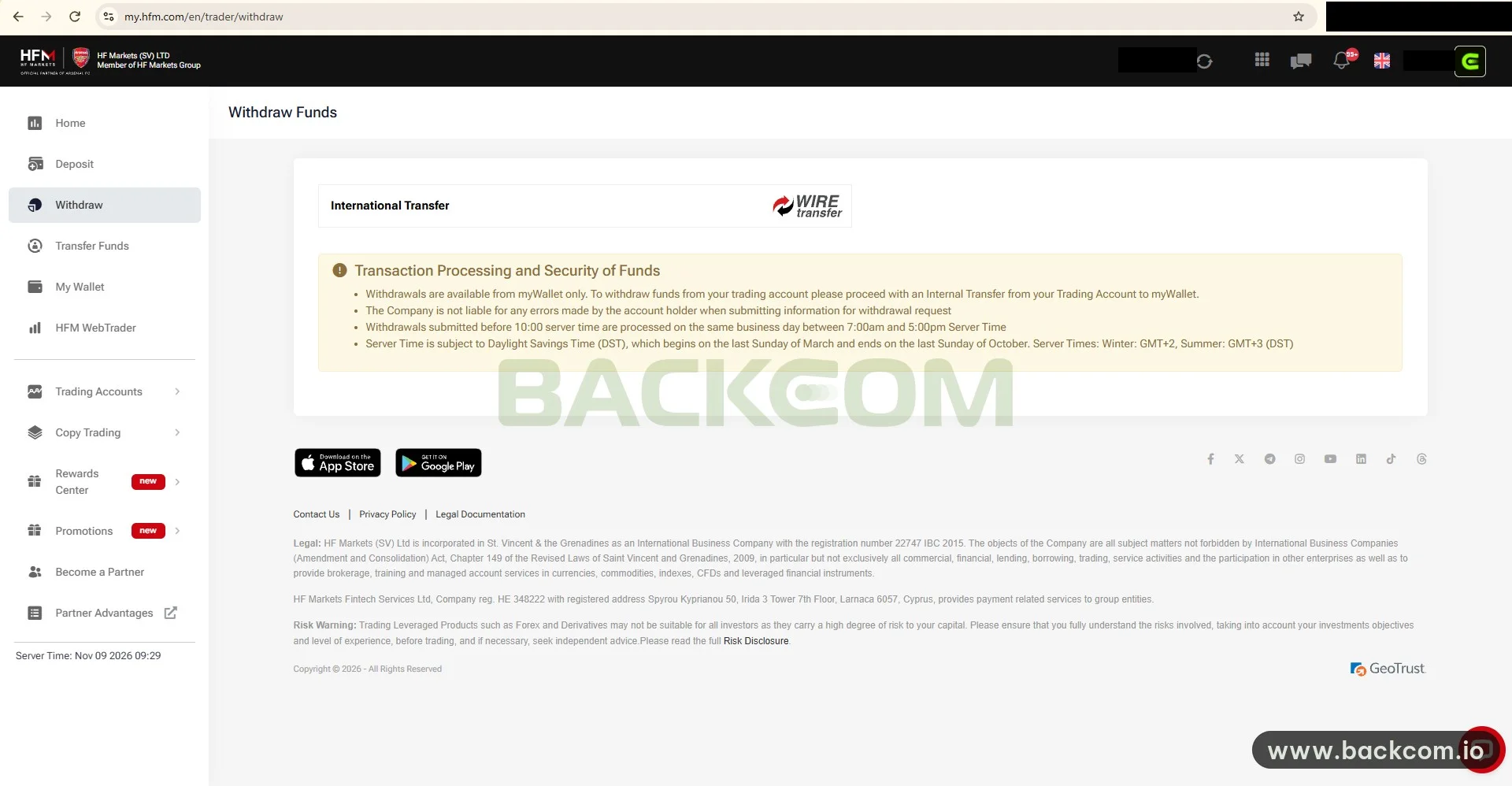
HFM withdrawal time starts with when you submit the request. The "Transaction Processing and Security of Funds" notice on the Withdraw page says that requests submitted before 10:00 server time are processed on the same business day, between 7:00 and 17:00 server time.
Server time is not UTC. HFM states that the server follows daylight saving time, which begins on the last Sunday of March and ends on the last Sunday of October, with GMT+2 in winter and GMT+3 in summer. The captured page showed a server time of 09:29 on 9 November 2026, so it was winter time. That makes the conversion to UTC two hours in winter and three hours in summer.
| HFM rule | Winter (GMT+2) | Summer (GMT+3) |
|---|---|---|
| Cut-off for same-day processing | 10:00 server = 08:00 UTC | 10:00 server = 07:00 UTC |
| Processing window | 7:00–17:00 server = 05:00–15:00 UTC | 7:00–17:00 server = 04:00–14:00 UTC |
Processing hours as shown in the HFM interface on 9 November 2026. HFM may change its rules, so re-read the notice on the Withdraw page before you submit.
For example, a request sent at 09:00 UTC in December is already past the 08:00 UTC cut-off and may roll to the next business day. A request sent at 06:00 UTC is safely inside it.
The cut-off only covers when HFM handles the request. Arrival at your bank depends on the method and the receiving bank. The HFM broker page lists a typical withdrawal time of 2–10 business days, depending on method and region, and notes that third-party fees may apply (read on 10 November 2026). Treat it as a general range, not a commitment from HFM.
5. How To Withdraw From HFM To A Bank Account Through MyWallet
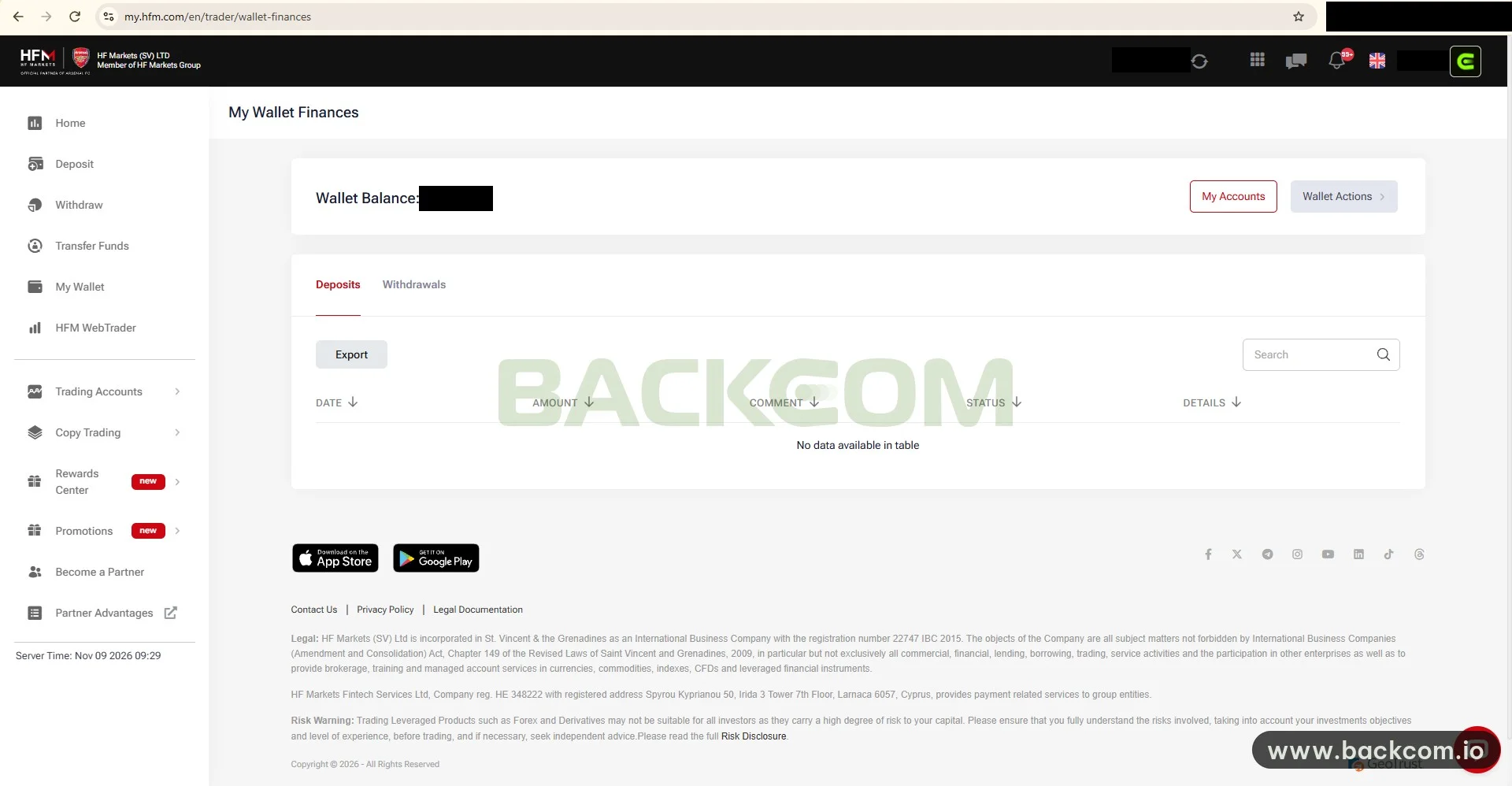
How to withdraw from HFM begins with myWallet, because the notice states that withdrawals are available from myWallet only. To take money out of a trading account, you first make an Internal Transfer from that account to myWallet.
In short:
Trading account → Internal Transfer to myWallet → Withdraw → International Transfer → Money reaches your bank
The detailed steps:
- Review open trades: if the balance changes while trades run, the amount you can transfer changes too.
- Internal Transfer: open Transfer Funds and move the exact amount from the trading account to myWallet.
- Open Withdraw: choose the method shown. On the captured account the Withdraw page listed only International Transfer (wire transfer).
- Enter bank details: account holder name, account number and SWIFT code if asked. HFM states that the company is not liable for errors made by the account holder when submitting the information.
- Submit before 10:00 server time as in the table in section 4, then follow the status in My Wallet.
Note that the Withdraw page has fewer methods than the Deposit page. A trader who funded by QR or wallet may still have to withdraw by international wire, so cost and time are not the same in both directions. Many brokers also expect withdrawals to return along the deposit route; for HFM this could not be confirmed from the screenshots, so ask support before depositing a large sum.
Tracking Transfers In My Wallet
The My Wallet Finances page has two tabs, Deposits and Withdrawals. Each table shows Date, Amount, Comment, Status and Details, with an Export button and a Search box.
Export the table after every large withdrawal to keep a record. The sample account had no transactions yet, so the table reads "No data available in table"; on an active account each row shows its state in the Status column.
6. HFM Withdrawal Delayed: 6 Common Causes
An HFM withdrawal delayed is rarely one big fault; it is usually several small details. Check these six in order:
- Submitted after the 10:00 server cut-off: the request moves to the next business day, and a weekend adds more time.
- Missing Internal Transfer: the money is still in the trading account, not in myWallet, so it cannot be withdrawn.
- Wrong or incomplete bank details: HFM is not liable for data entered by the account holder, and a wire that bounces back can take several days.
- Verification mismatch: the bank account name differs from the verified profile, or documents are still pending.
- Slow receiving bank: international wires pass through intermediary banks, so business days of two countries add up.
- Calendar differences: holidays at HFM, at the intermediary bank and in your country rarely coincide.
If you suspect a request is held, check the Status in My Wallet, re-read the processing notice, then contact HFM support with a screenshot of the request and the time you submitted it in server time. If you cannot sign in to the Client Area at all, the guide to HFM blocked access explains how to reach it with DNS settings.
An introducing broker does not process HFM's money transfers and cannot speed up a withdrawal, so work directly with the broker's support team.
7. How Do Deposit And Withdrawal Costs Relate To Rebates?
Rebates and deposit or withdrawal fees are two separate items, and traders often mix them up. A rebate is calculated on trading volume in lots, while deposit and withdrawal fees arise at the broker, the bank or a third party when money moves.
Three points to keep apart:
- A rebate does not offset transfer fees: the two are not netted against each other.
- Payment method does not change the rebate: the rebate depends on the account type and the instrument, not on how you funded the account.
- Real cost includes both: spread, commission, transfer fees and the rebate.
According to the HFM broker page (read on 10 November 2026, table updated 24 October 2026, effective 1 October 2026), rebates are paid daily in the morning in USD. Sample gold rebates are 12 USD per lot on Premium and 5.6 USD on Zero or Pro. For the full calculation, read HFM rebates: rates, calculation and payout time, the guide to HFM trading fees and the comparison of net cost per lot after rebate.
If you do not have an account yet or need to move your partner link, the current conditions are on the HFM page. Backcom.io is an independent introducing broker (IB/affiliate) of HFM; rebates are paid from the commission the broker pays Backcom.io — see the risk disclaimer.
Check The Legal Entity Before You Deposit
The footer of the Client Area names HF Markets (SV) Ltd, registered in St Vincent and the Grenadines, and HF Markets Fintech Services Ltd in Cyprus, which provides payment services to the group. The entity serving each account differs by region, so find out which one holds yours and check it with the regulator.
Direct references: the FCA register and the CySEC homepage.
Frequently Asked Questions (FAQ) About HFM Deposit And Withdrawal
Does HFM Charge Fees For Deposits And Withdrawals?
There is no single answer. Fees depend on the method, the bank and third parties, and the HFM broker page notes that third-party fees may apply. Because no official source covers each method, read the fee shown on the deposit or withdrawal screen before you confirm.
How Long Does An HFM Withdrawal Take To Reach The Bank?
HFM processes requests submitted before 10:00 server time on the same business day, which is 08:00 UTC in winter. After that the arrival time depends on the method; the HFM broker page lists a typical 2–10 business days. This is a reference range, not a commitment.
Can I Withdraw Directly From A Trading Account?
No. According to the notice on the Withdraw page, withdrawals are available from myWallet only. Make an Internal Transfer from the trading account to myWallet first, then submit the withdrawal.
Does HFM Accept USDT Deposits?
In the 9 November 2026 screenshots, the Deposit page of the captured account shows no USDT option. The list can differ by account and date, so check your own Deposit page and ask HFM support before you send anything.
Conclusion: HFM Deposit And Withdrawal Depend On Server Time And The Real Method List
HFM deposit and withdrawal comes down to three points: the deposit list is wider than the withdrawal list, every withdrawal runs through myWallet, and the 10:00 cut-off is in server time rather than your local time. Knowing these three prevents most delays.
Before a large deposit, test with a small amount, keep screenshots of the transaction in My Wallet and ask HFM support about anything unclear, such as fees, limits and the withdrawal route. If you have more questions, you can ask the community on Telegram.
Disclaimer: This content is compiled by Backcom.io for information only and is not investment advice, a trading recommendation or financial advice. Trading forex and CFDs carries a high level of risk; HFM's interface, methods and rules may change, so re-check them in the broker's Client Area.
Was this article helpful?
Join The Backcom.io Community
Get the latest on trading rebates, trading tips, and broker deals — and connect with thousands of traders worldwide.

Backcom App
Track Your Rebates Every Day
Every rebate is visible by broker and by day. Manage your wallet and withdrawals in one place.
Open Backcom App