How To Backtest An EA In MT5: Strategy Tester Guide And Report Reading

An EA can draw a smooth, rising equity curve on historical data and still lose money in its first week on a live account. The usual cause is not the robot itself but how it was tested: the wrong modelling mode, too little data, or a single profit number taken at face value.
This guide covers how to backtest an EA in MT5 from concept to practice. You will see how the MT5 Strategy Tester works, which modelling mode fits which robot, how to read a real report from a gold run, and when a pretty result is just overfitting in backtesting.
In this article, Backcom.io walks through the concept, the setup, the modelling modes, the report, forward testing and the most common mistakes before a robot moves to a demo account.
What Is Backtesting? Testing A Strategy On Past Data
Backtesting means running a trading strategy on price data that has already happened, to see how the rules would have performed at the time. The strategy can be a hand-written rule set or an EA, an automated robot that follows a fixed algorithm.
The key point is that a backtest does not predict the future. It answers a narrower question: over the chosen history, with the assumed spread, delay and starting capital, does this rule set behave the way its author claims?
Traders use backtesting for three jobs:
- Filtering out ideas that lose even under ideal conditions.
- Measuring the maximum drawdown before real money is at stake.
- Checking that an EA does what its description says.
An EA that fails a backtest has no reason to run live. Passing is only a necessary condition, never a sufficient one. If you are new to robots, start with what a Forex Expert Advisor is.
Backtest, Forward Test And Demo: What Each One Answers
These three steps are often lumped together, yet each answers a different question:
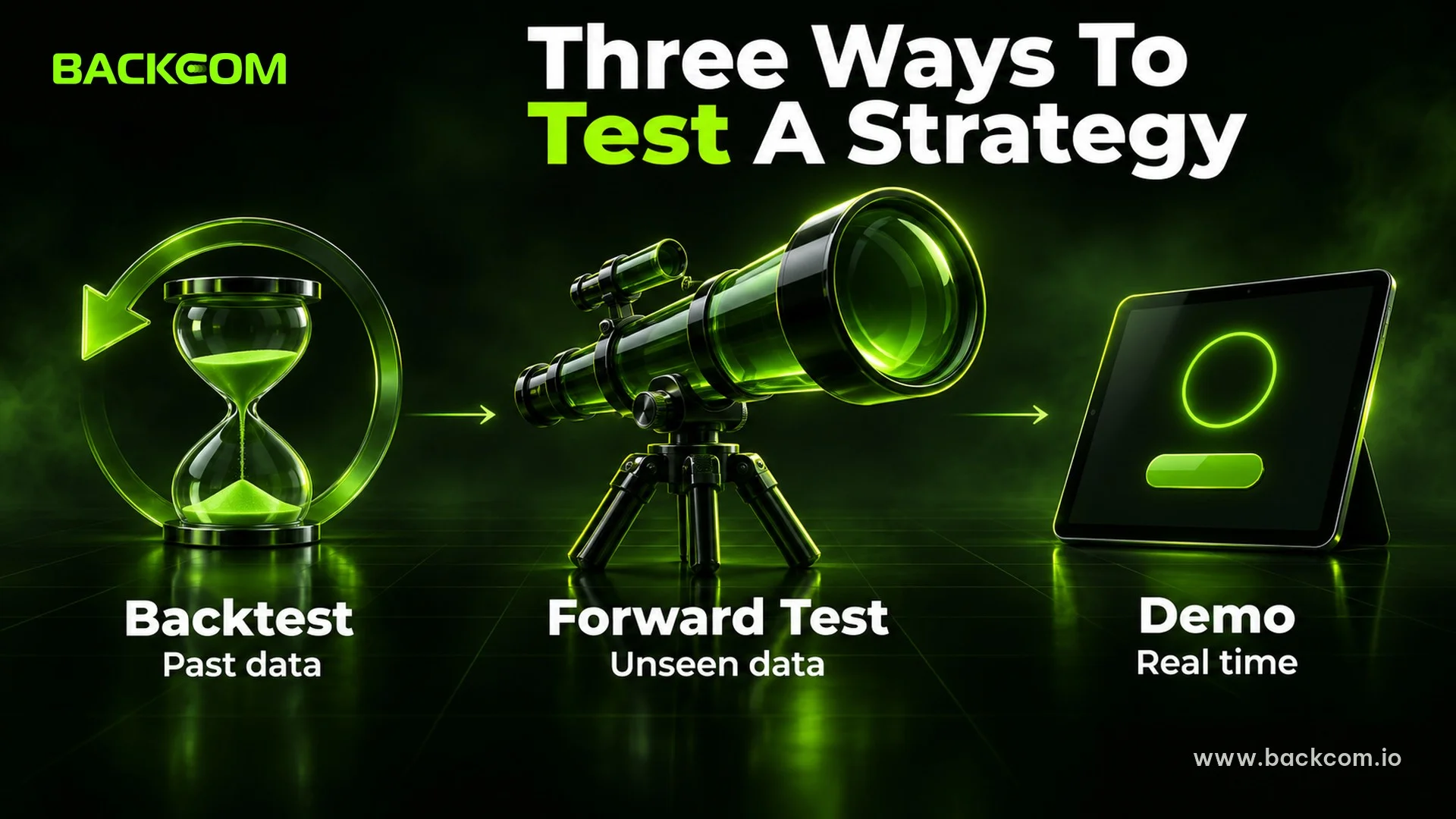
- Backtest: runs on past data in minutes and asks whether the idea is logical.
- Forward test: runs on a data segment the EA was never optimised on and asks whether results repeat out of sample.
- Demo: runs in real time on a virtual account for a few weeks and asks how the EA copes with live prices, spreads and delays.
How To Backtest An EA In MT5 With The Strategy Tester
The MT5 Strategy Tester is the built-in testing module of MetaTrader 5. It runs an EA on historical data without placing a single real order. Traders open it by right-clicking an EA in the Navigator and choosing Test.
The settings panel has these main fields:
- Expert: the EA to test.
- Symbol and timeframe: the main chart for the run, for example XAUUSD on H1.
- Date: a preset range, or Custom period with your own start and end dates.
- Forward: leave it at No for a plain backtest, or pick 1/2, 1/3, 1/4 to reserve the final part of the range for a forward test.
- Delays: emulates execution delay to reproduce slippage and requotes.
- Modelling: how price is simulated, which decides accuracy.
- Deposit and leverage: starting capital and leverage.
- Optimization: switch it off when running a single parameter set.
According to the MetaTrader 5 documentation, a test starts at 00:00 on the first date and the end date itself is excluded. The tester also downloads at least 100 extra bars before the start date so the EA has data for its indicators.
Direct reference: the official MetaTrader 5 guide to testing Expert Advisors, checked on 9 November 2026.
A Real Example: A Sample EA On XAUUSD In The MT5 Strategy Tester
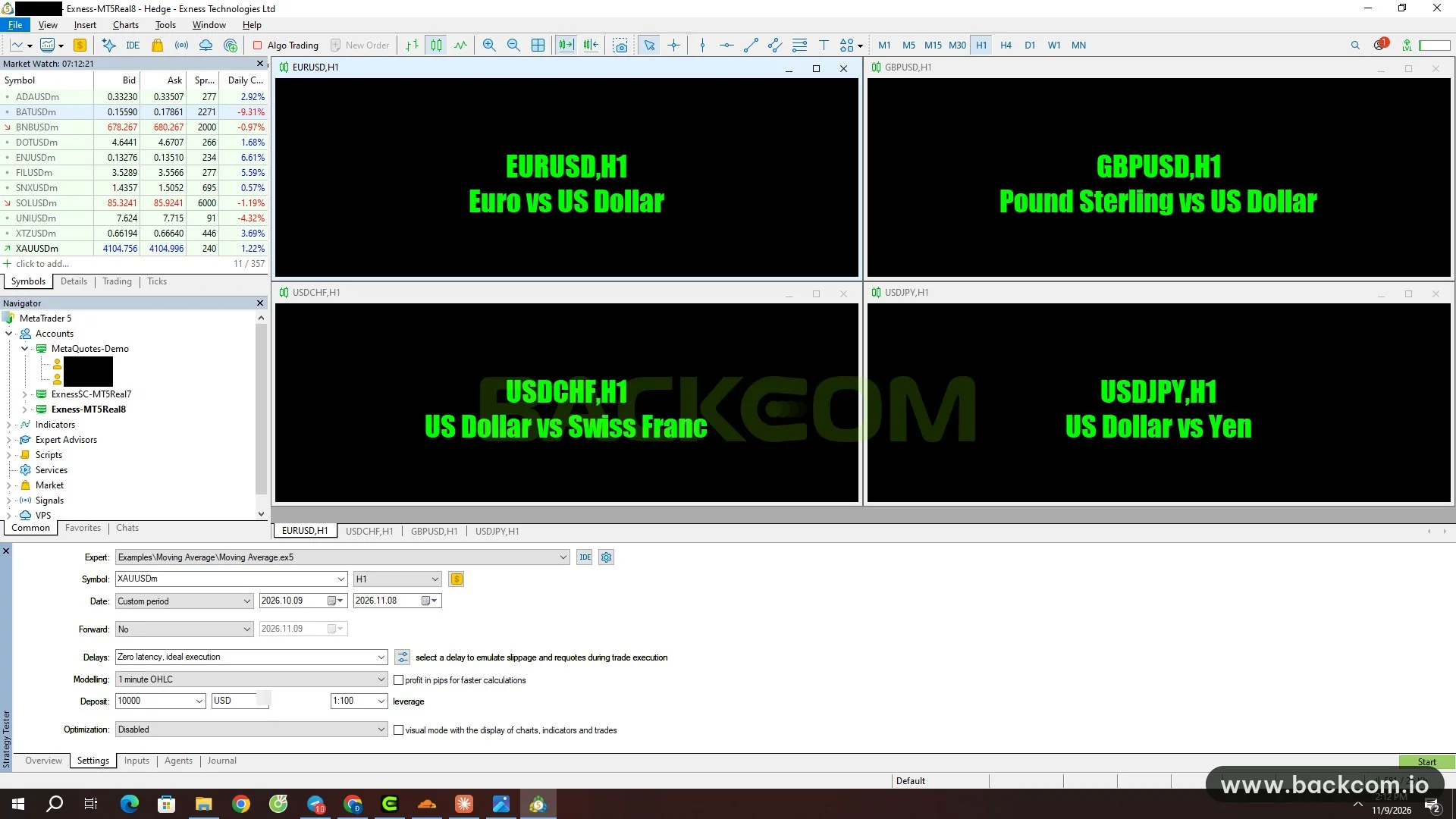
The screenshot at the top of this section shows the Strategy Tester in MetaTrader 5 on an Exness server, captured on 9 November 2026 with the account details hidden. The EA is the sample that ships with MetaTrader 5, run with default parameters. It illustrates the steps only and is not a trading recommendation.
The settings in the screenshot are:
- Expert: Examples\Moving Average\Moving Average.ex5.
- Symbol: XAUUSDm on H1.
- Date: Custom period, 2026.10.09 to 2026.11.08.
- Forward: No.
- Delays: Zero latency, ideal execution.
- Modelling: 1 minute OHLC.
- Deposit: 10,000 USD with 1:100 leverage.
- Optimization: Disabled.
After you press Start, results appear in the Backtest and Graph tabs of the Strategy Tester. The next section explains why the Modelling field matters more than newcomers expect.
Which Modelling Mode Should You Choose? The 5 MT5 Modes
Modelling mode is how the tester rebuilds price movement inside each candle. The more detailed the mode, the closer the result to reality, but the longer the run and the more data it needs.
| Mode | How it simulates | Use it when |
|---|---|---|
| Every tick | Simulates every tick | The EA trades on ticks and needs high accuracy |
| Every tick based on real ticks | Uses real ticks stored by the broker, no simulation | A final check before moving to demo |
| 1 minute OHLC | Emulates only Open, High, Low and Close of each minute | A quick check for EAs that work on candles |
| Open prices only | Uses only the candle's opening price | The EA decides only when a new candle forms |
| Math calculations | Downloads no history and only runs calculations | Testing an algorithm, not judging profit |
Modelling modes as described in the MetaTrader 5 documentation on 9 November 2026. Features can change between versions, so check them again in your own MT5 build.
The rule of thumb is simple. An EA that decides only on candle close can use Open prices only to screen ideas. A scalping EA, or one with a tight stop loss that depends on movement inside the candle, needs Every tick, ideally on real ticks.
History Quality: Do Not Run On Missing Data
The report includes a History Quality line showing the share of correct one-minute data against incorrect data or gaps. According to the MetaTrader 5 documentation, data segments with quality below 50% are shown in red. Low-quality data makes both good and bad results unreliable.
How To Read A Backtest Report: A Real XAUUSD Example
The backtest report sits in the Backtest tab of the Strategy Tester and collects every figure from the run. Beginners tend to look only at Total Net Profit, yet the risk metrics tell you whether the equity curve could survive on a live account.
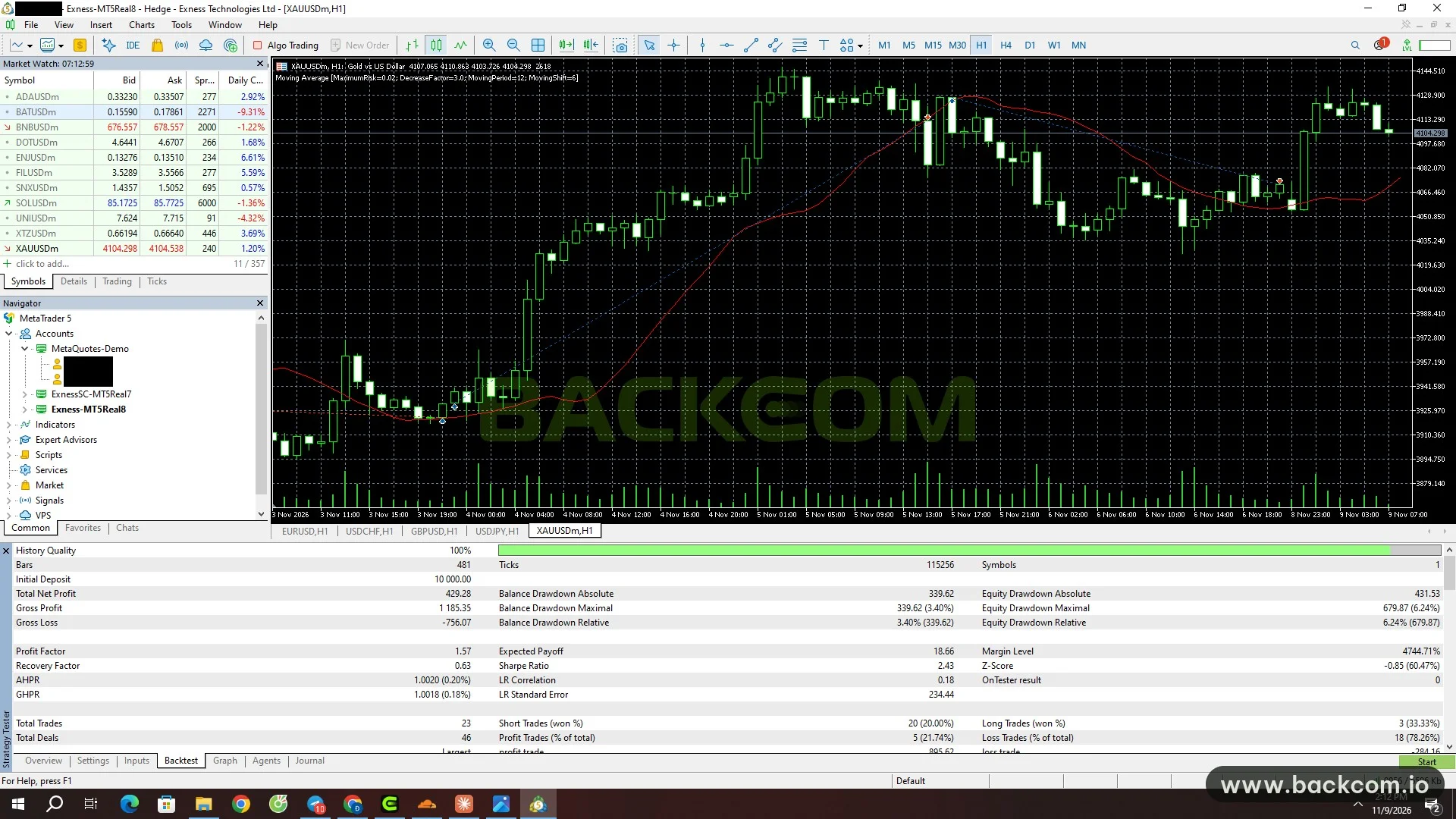
The screenshot at the top of this section shows the result of the run above, taken from the same MT5 window on 9 November 2026. The three groups worth reading first are profit, drawdown and trade count.
| Metric | Value in the screenshot | Meaning |
|---|---|---|
| History Quality | 100% | One-minute data complete and correct |
| Total Net Profit | 429.28 USD | Net gain on a 10,000 USD deposit |
| Profit Factor | 1.57 | Gross Profit 1,185.35 divided by Gross Loss 756.07 |
| Balance Drawdown Maximal | 339.62 USD (3.40%) | Largest balance drop, closed trades only |
| Equity Drawdown Maximal | 679.87 USD (6.24%) | Largest drop including open trades |
| Recovery Factor | 0.63 | Net profit divided by drawdown |
| Total Trades | 23 | Trades over 30 days |
| Profit Trades | 5 (21.74%) | Share of winning trades |
Figures taken from the MT5 screenshot of 9 November 2026, 1 minute OHLC mode, sample EA with default parameters. Past results do not represent future results.
Profit Factor, Expected Payoff And Recovery Factor
According to the MetaTrader 5 documentation, Profit Factor is gross profit divided by gross loss, and a value of 1 means the two are equal, so anything above 1 means gross profit is larger. In the example, 1,185.35 divided by 756.07 gives about 1.57.
Expected Payoff is the average expected gain per trade, here 18.66 USD. Recovery Factor is net profit divided by the maximum drawdown, showing how much the EA earned per unit of risk taken.
A Recovery Factor of 0.63 means the net profit did not even cover the equity drawdown. That is a caution flag even though the Profit Factor looks decent.
A Low Win Rate Can Still Be Profitable: Read Both Sides
Only 5 of 23 trades won, or 21.74%, yet the total is positive. Dividing the report figures shows an average winner of roughly 237 USD against an average loser of roughly 42 USD.
That is why the win rate alone cannot judge a strategy. Read it together with the size of winners and losers instead of picking an EA because it advertises 80% winners.
Drawdown: A More Important Number Than Profit
The report shows two kinds of drawdown, and they differ. Balance drawdown counts closed trades only, while equity drawdown includes open positions and therefore reflects the real dip more closely.
The example has a balance drawdown of 3.40% but an equity drawdown of 6.24%. When judging what an account can endure, use the larger figure. The guide to what drawdown is and how to calculate it covers this in depth.
A Small Sample: 23 Trades Prove Very Little
The run contains only 23 trades in 30 days. The Sharpe Ratio shows 2.43, and the MetaTrader 5 documentation treats 1.0 or higher as good, but with a sample this small the number carries little statistical weight.
Backcom.io does not use this example to judge the sample EA. The only purpose is to show how a report is read. A serious backtest needs a long history covering different market conditions and hundreds of trades.
Overfitting In Backtesting And Forward Tests: Why A Great Result Can Still Fail

Overfitting happens when an EA's parameters are tuned so tightly to one stretch of history that it looks excellent there and fails on new data. It is the most common reason a robot that shines in a backtest loses on a live account.
Optimisation, which tries many parameter sets, always carries this risk: test enough sets and one will look good by chance alone. Three signs give it away:
- A tiny parameter change makes the result collapse.
- Profit is concentrated in a few single trades.
- The strategy works only in one market phase.
Forward Test Vs Backtest: What The Forward Setting Does
A forward test reruns the best optimisation results on a different period, one on which the parameters were never tuned. According to the MetaTrader 5 documentation, the feature exists to avoid parameters being fitted to a particular area of historical data.
In the Forward field of the Strategy Tester you choose 1/2, 1/3, 1/4 or Custom, and the final part of the range is set aside for the forward run. The documentation also notes that the closer the backtest and forward results are, the more likely the EA is to perform well in real trading.
Direct reference: the optimisation and forward testing section of the MetaTrader 5 guide, checked on 9 November 2026.
7 Common Backtesting Mistakes To Avoid
These mistakes repeat across many new traders, and most can be avoided with a quick check before you press Start.
1. Using too short a period. A few weeks or a few dozen trades cannot support a conclusion. Cover trending, ranging and volatile phases.
2. Using a rough mode for a price-sensitive EA. A scalping EA run on Open prices only will not give a realistic result.
3. Ignoring delay. Zero latency gives a more ideal outcome than reality. Try Random Delay or a fixed delay to see how much slippage the EA can take.
4. Not checking trading costs. Spread and fees eat into profit per trade, especially on short-term strategies. The guide to what the Forex spread is helps you count this properly.
5. Optimising too many parameters at once. The more parameters you sweep, the higher the overfitting risk.
6. Looking only at net profit. Read drawdown, Profit Factor, trade count and the spread of wins and losses together.
7. Using a fixed lot unrelated to capital. A result on 10,000 USD does not transfer unchanged to a smaller account. Sizing lots by risk is covered in Forex money management and lot size.
From Backtest To Demo And A Live Account
A passed backtest only lets an EA move on to real-time checks. A sensible workflow has four steps:
- Backtest a long history with a suitable tick mode and check History Quality.
- Forward test on data that was not optimised.
- Run a demo for a few weeks to see spreads, slippage and how the EA behaves on live prices.
- Go live with a small lot, increasing only while the numbers match the backtest.
To see the robots Backcom.io features, visit the EA bot trade page and backtest them yourself with the steps above before using them. Before choosing where to run an EA, check that the broker allows it. The brokers for EA trading comparison covers this. For prop trading, EA rules differ by firm, so see the prop firm EA trading rules.
Frequently Asked Questions (FAQ) About Backtesting EAs In MT5
Is A Backtest Accurate?
Not completely. A backtest only simulates, and accuracy depends on the modelling mode, data quality and the assumptions about spread and delay. Treat the result as first evidence, then check further with a forward test and a demo.
How Many Years Of Data Is Enough?
There is no single threshold for every strategy. The data should cover different market phases and produce hundreds of trades. One month with 23 trades, as in the example above, only suits learning how to read a report.
Does A Great Backtest Mean The EA Will Profit?
No. A great backtest only shows the strategy once worked on the data that was run. Overfitting, real costs and changing markets can all shift the outcome, so run a forward test and a demo before using real money.
Conclusion: What Backtesting Can And Cannot Tell You
Backtesting is the step that removes weak ideas using past data, not proof of future profit. Traders should weigh three things together: data quality, modelling mode and risk metrics such as drawdown.
The practical routine is to run enough data, read Profit Factor, Recovery Factor and the trade distribution, check overfitting with a forward test, then go through demo before committing capital. For the basics first, read what a Forex Expert Advisor is and come back to practise in the Strategy Tester.
Disclaimer: This content is compiled by Backcom.io for information only and is not investment advice, a trading recommendation or an assessment of any specific EA. The figures in the example come from one illustrative run of a sample EA; past results do not guarantee future results. Trading Forex and gold carries a risk of losing capital.
Was this article helpful?
Join The Backcom.io Community
Get the latest on trading rebates, trading tips, and broker deals — and connect with thousands of traders worldwide.

Backcom App
Track Your Rebates Every Day
Every rebate is visible by broker and by day. Manage your wallet and withdrawals in one place.
Open Backcom App