What Is Hedging In Forex? Locking Trades, Real Costs And Risks To Know


A 1 lot EURUSD Buy is 400 USD in the red, so the trader opens a 1 lot Sell to "lock" the position and wait for a recovery. This is the most common form of hedging in forex, often called locking a trade. The floating P/L almost stops moving, but the loss does not disappear.
In this article, Backcom.io explains what a hedge trade is, puts a dollar figure on the cost with hypothetical examples, shows how to recognise a hedging account on MT5 and summarises the prop firm hedging rules of several funded-account firms.
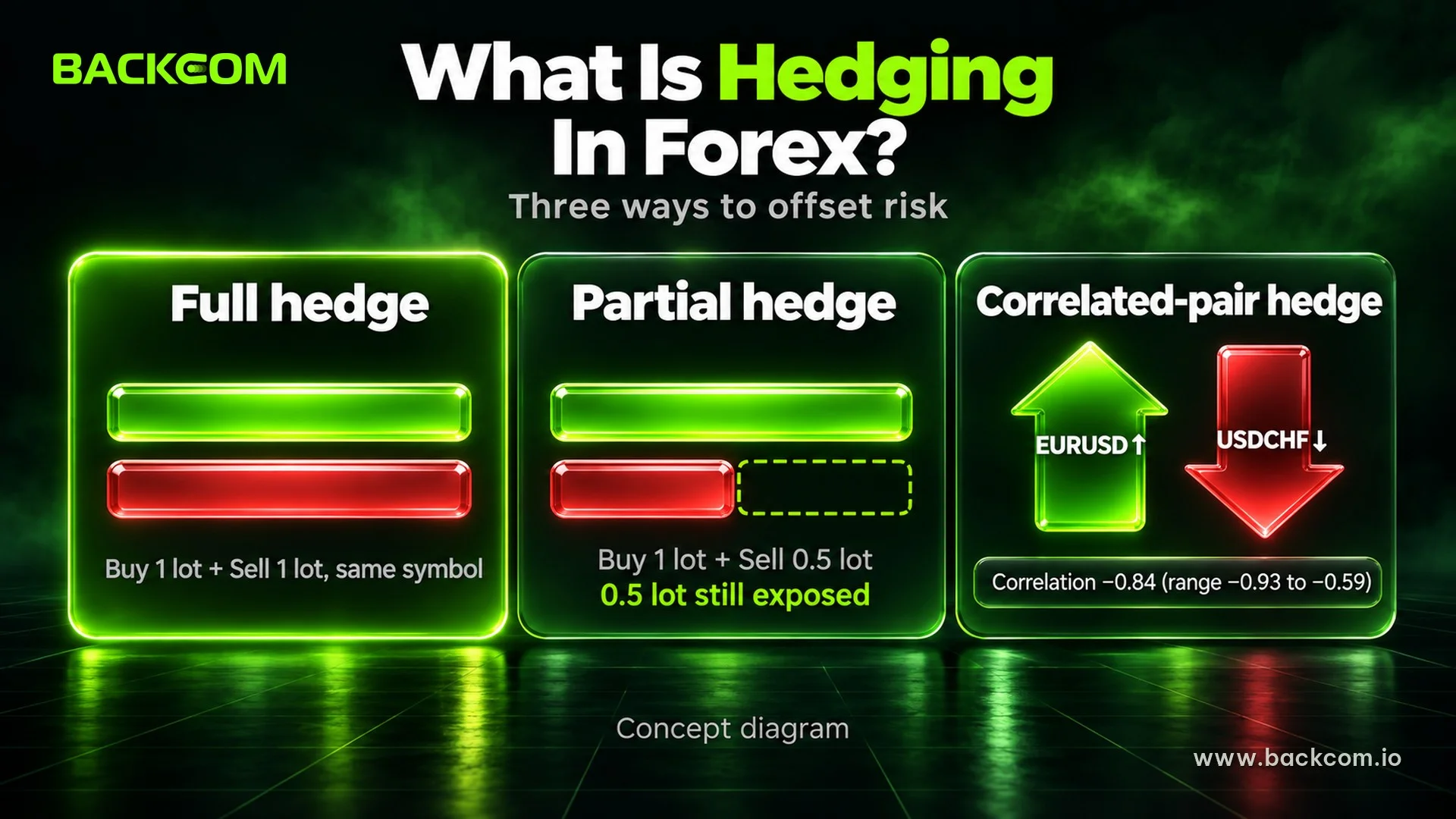
Hedging in forex means opening an extra position to offset the price risk of a position you already hold. A Buy and a Sell on the same pair with the same volume form a locked pair, one of three common types of hedge:
- Full hedge: a Buy and a Sell of the same symbol and size on one account, so price moves on the two legs almost cancel out.
- Partial hedge: a 1 lot Buy against a 0.5 lot Sell still leaves the difference exposed to price.
- Correlated-pair hedge: positions on two pairs whose prices are related, so the offset is only approximate. Calculated from ECB reference rates between Oct 1, 2025 and Oct 16, 2026, the daily correlation of EURUSD and USDCHF was −0.84, but it ranged from −0.93 to −0.59 on a 60-session rolling window, so the pair's P/L does not stand still.
What Is A Hedge Trade And How Is It Different From Cutting A Loss?
There are two ways to handle a losing position, and their outcomes and costs differ:
- Cutting the loss: you close the position, realise the loss, release the margin and stop paying swap on that trade.
- Opening a hedge trade: you keep both positions and postpone the decision to close, while swap and margin requirements keep running.
Setting the stop and position size before you enter, as in a forex money management plan, gives you a ready answer when price moves against you.
How Does Locking A Trade Work In Forex? An Example Of Frozen P/L
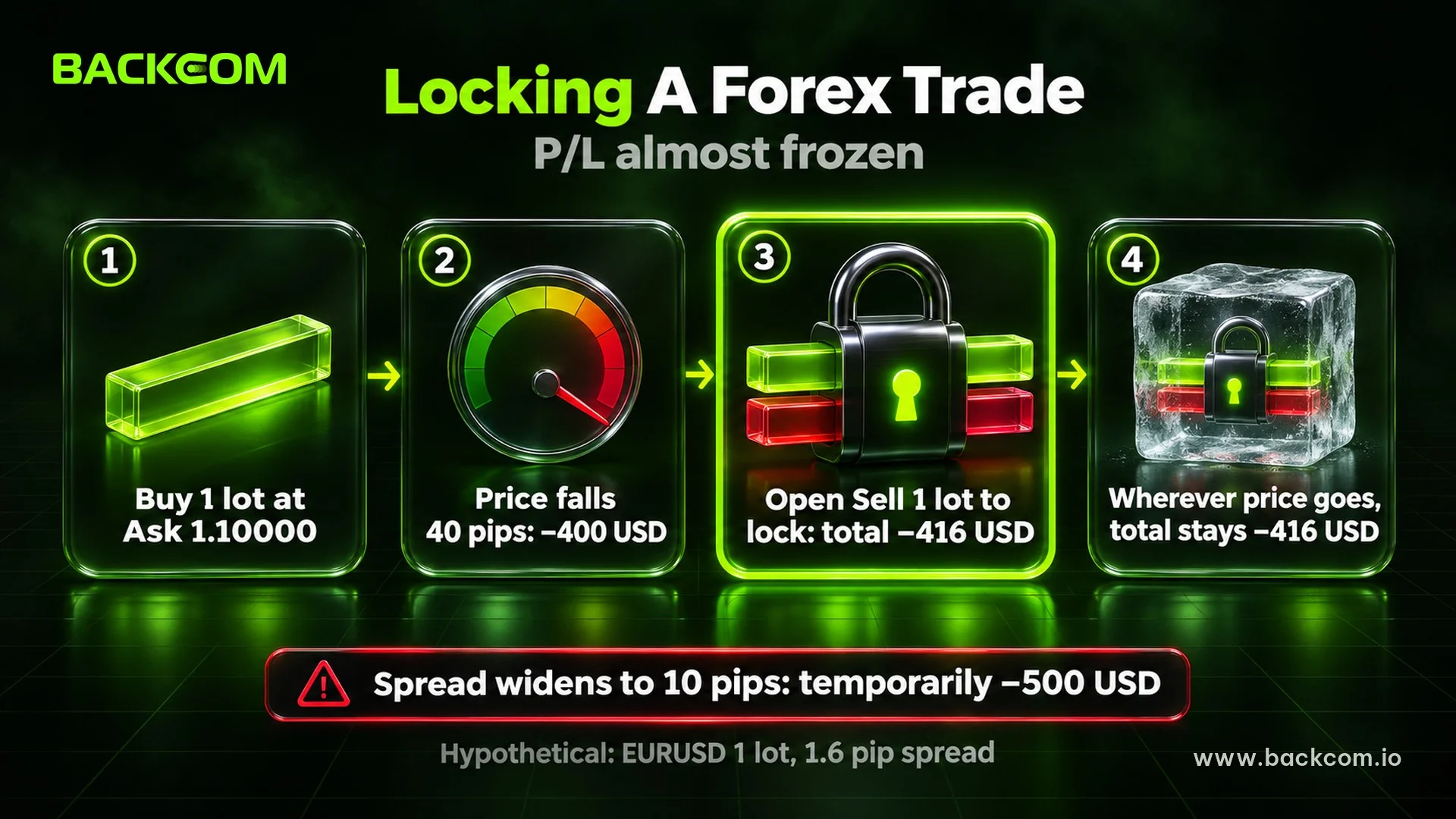
Locking a trade means holding a Buy and a Sell on the same symbol with the same volume in an account that allows hedging. The combined P/L stays almost "frozen" until one leg is closed, while swap and margin still apply.
Assume a hedging account on MT5 trading EURUSD, where 1 lot is 100,000 EUR and each pip is worth 10 USD. The hypothetical example uses a fixed 1.6 pip spread, or 16 USD per lot, and no commission.
| Step | Bid / Ask | Floating P/L |
|---|---|---|
| Open a 1 lot Buy | Ask 1.10000 | −16 USD from the opening spread |
| Price falls 40 pips | Bid 1.09600 | Buy −400 USD |
| Open a 1 lot Sell to lock | Bid 1.09600 / Ask 1.09616 | Total −416 USD |
| Price moves to 1.08000, 1.09000, 1.10500 or 1.12000 | Spread still 1.6 pips | Total still −416 USD |
| Spread widens to 10 pips | Bid 1.09600 / Ask 1.09700 | Total temporarily −500 USD |
When both legs have the same volume, the combined result is:
Locked pair P/L = (Sell open price − Buy open price) × 100,000 × Lots − Current spread
The gap between the two opening prices creates a 400 USD loss, and the 16 USD spread takes it to −416 USD. When the spread widens to 10 pips, the floating total drops to −500 USD, so the P/L is only "frozen" while the spread stays the same.
How To Unwind A Hedge: Close The Pair Or One Leg At A Time
A locked pair only postpones the decision, so eventually you must choose how to unwind it:
- Close the whole pair: you realise the locked result plus the costs incurred. Close By on MT5 can save one spread compared with closing each leg separately.
- Close one leg: the remaining position takes the full price move again, so one-way risk returns.
If the Bid falls to 1.09300, closing the Sell at the Ask of 1.09316 books +284 USD while the Buy shows −700 USD, so the total is still −416 USD before swap. After that, the total becomes −16 USD if the Bid recovers to 1.09700, stays at −416 USD at 1.09300, or falls to −716 USD at 1.09000.
The Real Cost Of Hedging: Double Spread, Two-Way Swap And Hedged Margin
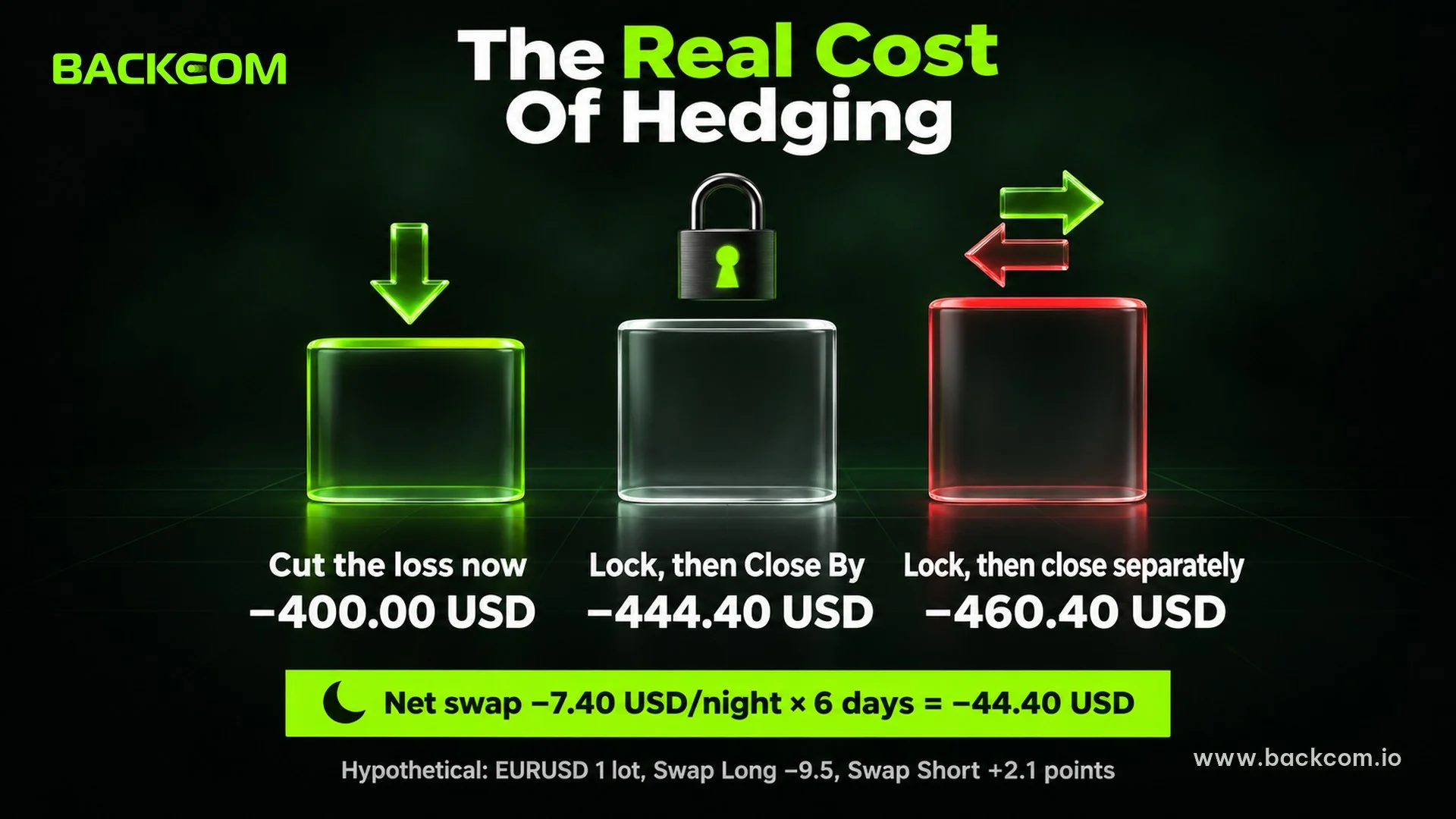
Hedging costs come from both positions existing at once, so count four items: spread on both legs, commission if the account charges per lot, swap on both sides, and the hedged margin that is recalculated when one leg is closed.
Six Swap Days Of Locking: How Much More Than Cutting The Loss?
Assume Swap Long is −9.5 points and Swap Short is +2.1 points per night, with 1 point on 1 lot worth 1 USD. As our guide to swap in forex explains, each leg is charged separately, so the net swap per night of a locked pair is the sum of both legs:
Net nightly swap of a locked pair = Buy swap + Sell swap
That gives −9.50 + 2.10 = −7.40 USD per night. Locking from Monday to Friday, before the swap cut-off, creates 1 + 1 + 3 + 1 = 6 swap days, for a total of −44.40 USD. If Swap Short were also negative, at a hypothetical −1.0 point, the six days would cost −63.00 USD.
| Approach At The Same Bid Of 1.09600 | Price P/L | 6-Day Swap | Result |
|---|---|---|---|
| Cut the loss when you would have locked | −400.00 USD | 0 USD | −400.00 USD |
| Lock, then unwind with Close By | −400.00 USD | −44.40 USD | −444.40 USD |
| Lock, then close both legs separately | −416.00 USD | −44.40 USD | −460.40 USD |
Hypothetical figures: EURUSD 1 lot, 1.6 pip spread, Swap Long −9.5 and Swap Short +2.1 points, not any broker's rates and not a broker ranking.
The 16 USD gap between Close By and closing separately is exactly one spread here: a benefit of how you close the pair, not a refunded loss.
Locking for six swap days does not make the 400 USD loss smaller: the total cost rises by 44.40–60.40 USD compared with cutting the loss at once, even before both swaps turn negative.
Hedged Margin Depends On The Broker's Settings
According to the MetaTrader 5 margin calculation documentation, the broker sets the margin for opposite positions through the Hedged margin field in the Specification. For a 1 lot Buy and a 1 lot Sell on EURUSD at 1:500 and these prices, four settings give different results:
- Hedged = 100,000: margin for the pair is about 219.60 USD, close to the margin of a single Buy.
- Hedged = 50,000: margin for the pair falls to about 109.80 USD.
- Hedged = 0: the offsetting volume carries no margin at all.
- Larger leg: the system charges the margin of the bigger leg, about 220 USD in this example.
Check the single-Buy figure with how to calculate margin. Whatever the setting, closing one leg brings back the full margin requirement for the position that remains.
Can Rebates Offset The Cost Of A Locked Trade?
A locking trade adds volume, but it also costs another 16 USD in spread. Assume a hypothetical rebate of 8 USD per lot, calculated the way a forex rebate per lot works and not tied to any broker:
- Cut the loss at once: the 1 lot Buy earns 8 USD, so the result is −400 + 8 = −392 USD.
- Lock, then close separately: 2 lots earn 16 USD, so −460.40 + 16 = −444.40 USD, which is 52.40 USD worse than cutting the loss.
- Lock, then use Close By: the result before rebates is −444.40 USD. Some brokers exclude Close By trades from rebate calculations, so check the partner terms: this case may not earn a rebate at all.
Ask the rebate provider how locked trades are counted before holding a pair, and never open two-way positions just to add rebate volume.
Hedging Vs Netting Accounts On MT5: How To Check And Place A Hedge
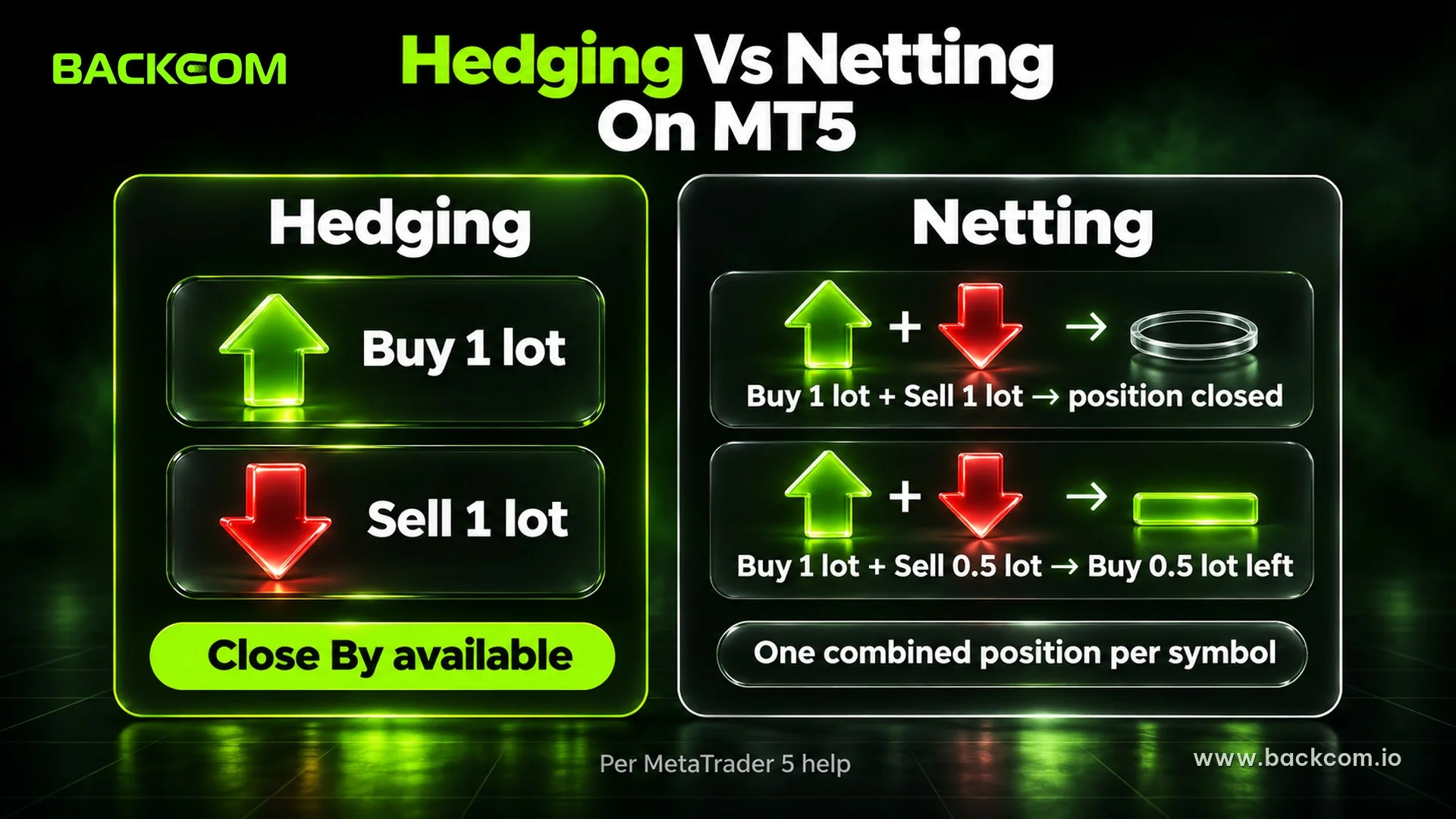
A hedging account can hold a Buy and a Sell on the same symbol, while a netting account only keeps one combined position. According to MetaTrader 5, the broker sets this mode for each account. On a netting account holding a 1 lot Buy, a 0.5 lot Sell leaves a 0.5 lot Buy, a 1 lot Sell closes the position and a 1.5 lot Sell reverses it into a 0.5 lot Sell.
Source: how MetaTrader 5 accounts for positions. MT4 only uses hedging, while MT5 supports both, as explained in our comparison of MT4 vs MT5.
| Criterion | Hedging | Netting |
|---|---|---|
| Positions per symbol | Several, including opposite directions | One combined position |
| An opposite order | Opens a new position | Reduces, closes or reverses the position |
| Close By | Available | Not available |
| Margin on opposite positions | Set by the Hedged margin field | Not applicable |
| FIFO when enabled by the broker | Can apply | Not applicable |
Source: MetaTrader 5 help, checked on Oct 19, 2026.
How To Tell If You Have A Hedging Account On MT5
The account mode decides whether an opposite order creates a locked pair or changes the existing position. Check three signs, or ask your broker about the live account:
- Demo: tick "Use hedge in trading" when opening the account to choose hedging.
- Desktop: the mode appears in the title bar and in the Journal tab on MT5.
- Indirect signs: having Close By suggests hedging, while a Sell that reduces your Buy suggests netting.
Placing A Hedge And Closing It With Close By
MT5 has no "hedge" button, so on a hedging account the process has four steps:
- Check the mode: confirm the account can hold two positions on one symbol, because on netting the next order changes the existing one.
- Open the opposite order: choose New Order and open a Sell with the same symbol and volume as your Buy.
- Choose Close By to close the pair: in the Trade tab, open the close window and select "Close By" in the Type field.
- Select the opposite position and click Close: MT5 closes the pair and records the combined P/L in the history.
Close By uses the opening prices of the two positions to offset them and is only available on hedging accounts. See the MetaTrader 5 guide to Close By.
FIFO And The NFA Rule: Why Some Brokers Do Not Allow Locking
NFA Compliance Rule 2-43(b), effective from May 15, 2009, requires NFA Forex Dealer Members to offset opposite positions in customer accounts on a FIFO basis, meaning the oldest position is closed first. It applies to US dealers within the NFA's scope and is not a ban on hedging everywhere. MT5 help also notes that a broker can enable FIFO closing on a hedging account, and the platform shows an error if you close positions in the wrong order.
Do Prop Firms Allow Hedging? Prop Firm Hedging Rules Within And Across Accounts
Prop firm hedging here means the trading rules of funded-account firms, not the activity of hedge funds. Some firms allow a Buy and a Sell within one account but ban opposite positions across several accounts, while FundingPips puts "hedging" on its list of prohibited strategies.
| Firm | Hedging Within One Account | Hedging Across Accounts | Note |
|---|---|---|---|
| Blueberry Funded | Allowed on all plans | Banned, including your own accounts | Serious breach, profits can be lost |
| E8 Markets | Allowed within one account | Banned, even for the same trader | Hedges that dodge Best Day can see profits combined |
| FTMO (US version) | Allowed on one account | Banned between linked accounts or other providers | Hedging to get around profit rules is banned |
| FundedNext | Allowed within the same account | Banned | High-risk hedging behaviour may be reviewed |
| FundingPips | "Hedging" is on the prohibited list | Opposite account trading banned | Ask support about your specific case |
Official sources checked on Oct 19, 2026, FTMO US version. Listed alphabetically, not a ranking.
- Across your own accounts: Blueberry and E8 both ban hedging between accounts held by the same trader, and Blueberry treats it as a breach even when it is unintentional.
- Hedging to get around rules: FTMO US bans using opposite positions to get around the Best Day Rule or a prop firm consistency rule, while E8 can combine profits that were split across days with a hedge.
Warning: opening opposite positions between a funded account and an account at another broker or firm can breach cross-account terms and get your profits cancelled. Before buying a challenge, read the firm's current FAQ and its list of accepted countries.
Frequently Asked Questions (FAQ) About Hedging In Forex
Should You Lock A Losing Trade?
Locking a trade does not make the loss smaller: in the hypothetical example, holding the pair for six swap days and then closing it cost 44.40–60.40 USD more than cutting the loss straight away. It is better to decide the volume and the stop level before you enter.
Does A Locked Trade Pay Overnight Swap?
Yes. Both the Buy and the Sell pay swap at the rate for their own direction. With −9.5 and +2.1 points, the Wednesday night swap is −22.20 USD. Holding for 28 days adds up to −207.20 USD, or −294 USD if the short swap is also negative at −1.0 point, so check both swap rates in the Specification before holding a locked pair overnight.
Does Locking A Trade Prevent A Margin Call?
No. The opposite order still needs enough free margin and can be rejected. The margin required for the pair depends on the broker, while a widening spread and swap keep reducing equity. With a hypothetical 1,000 USD balance, equity after locking is 584 USD, then 500 USD when the spread widens to 10 pips.
Conclusion
Hedging in forex offsets price movement, but locking a trade does not erase the loss. Knowing what a hedge trade is comes first. Before acting on a losing position, you also need to:
- Check whether the account uses hedging or netting before opening a new order.
- Work out the net swap of both legs before holding the pair overnight.
- Look at the Hedged margin and your free margin so you can afford to unwind.
- Read the current prop firm rules if you trade a funded account.
Rebates only cover part of your trading costs, and you can check each broker's rate in the forex rebate table per lot. Backcom.io is an independent introducing broker (IB/affiliate) of these brokers; rebates are paid from the commission the broker pays Backcom.io — see the risk disclaimer.
Disclaimer: This content is compiled for information only and is not investment advice or a trading recommendation. The prices, spreads, swaps, margin and rebate rates in the examples are hypothetical. Broker terms and prop firm rules can change by entity, plan and date. Leveraged forex and CFD trading can cost you all of your capital.
Was this article helpful?
Join The Backcom.io Community
Get the latest on trading rebates, trading tips, and broker deals — and connect with thousands of traders worldwide.

Backcom App
Track Your Rebates Every Day
Every rebate is visible by broker and by day. Manage your wallet and withdrawals in one place.
Open Backcom App