How To Open An IC Markets Account In 2026: Step-By-Step Guide (Web + App)

Summary
Learn how to open an IC Markets account in 2026 on the new IC client portal, with step-by-step guides for web and app covering documents, KYC verification and account setup.

Last updated: 22 September 2026 — written against the new client portal after IC Markets rebranded to IC.
It only takes a few minutes to open an IC Markets account, but since July 2026 the broker has rebranded to IC and moved to ic.com, so most older walkthroughs no longer match what you see on screen. Beginners also tend to get stuck on the trading-experience questionnaire or at IC Markets account verification. Have your documents and IB code ready before you start.
This guide covers how to open an IC Markets account on both web and app using the new Secure Client Portal, plus ID verification, your first deposit and the errors people hit most often. Every screen described below was checked against the current portal.
Before You Open An IC Markets Account: The Broker Is Now IC, And What To Prepare
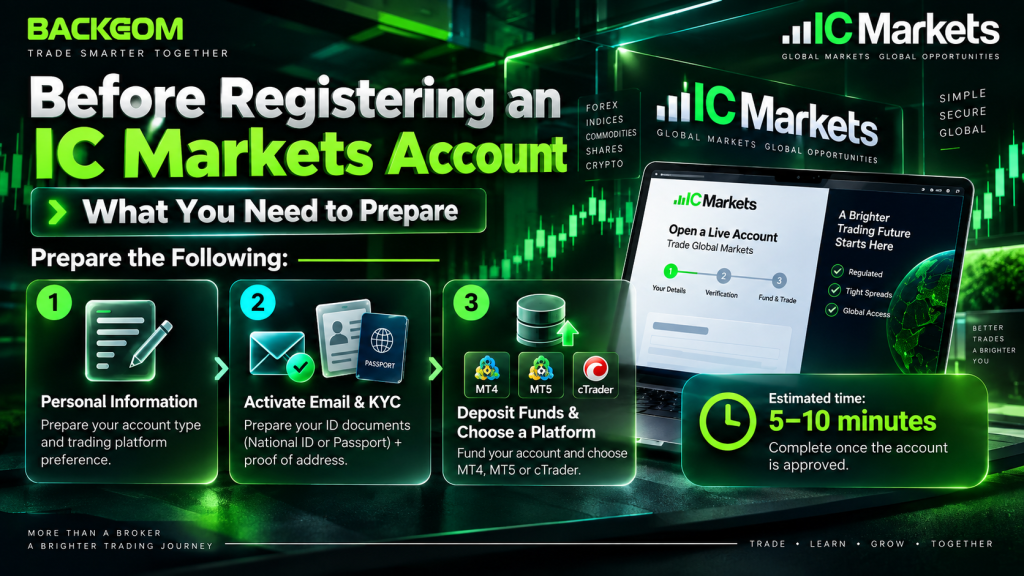
To open an IC Markets account you go through three stages:
(1) fill in the application, choose an account type and a platform;
(2) activate your email, then complete KYC with an ID document and proof of address;
(3) fund the account and download MT4, MT5 or cTrader.
The application itself usually takes 5–10 minutes, not counting review time.
IC Markets Rebranded To IC And Moved To Ic.com — Is It A Different Broker?
No. According to IC’s official rebrand announcement, from 11 July 2026 IC Markets trades under the IC identity with ic.com as its main domain.
The entity and the regulation are unchanged: retail clients outside the EU and Australia are still onboarded under IC Markets Global, operated by Raw Trading Ltd and regulated by the FSA in Seychelles. For the full picture, see our IC Markets review.
When you open an IC Markets account, use only ic.com, icmarkets.com or the official client portal. Do not trust an unfamiliar domain simply because it contains the letters “IC”.
What Documents And Details Do You Need?
Before you open an IC Markets account, get the following ready:
| What to prepare | Notes |
|---|---|
| Use an email not already registered with IC | |
| Phone number | International format, drop the leading zero |
| ID card or passport | Valid, colour photo, all four corners visible |
| Proof of address | Bank statement or utility bill less than 3 months old |
| Starting capital | Standard, Raw Spread and cTrader have no minimum; Raw Pro from $5,000 |
| IB code | 95095 |
| Account type | Standard, Raw Spread, Raw Pro, Raw Pro + or Raw Spread on cTrader |
| Platform | MT4, MT5 or cTrader |
If you are not sure whether to take Standard or Raw Spread, compare IC Markets trading fees by account type first — the choice is locked to the account, so it is worth getting right before you submit.
Should You Open A Demo Account First?
If MT4, MT5 or cTrader is new to you, open a demo account before the live one. Demo uses virtual money, needs no KYC and no deposit, so it is a cheap way to learn order entry and check the platform runs properly on your machine.
A demo account earns no cashback, though. To receive rebates you still have to open an IC Markets account for real, through a link carrying IB code 95095.
There is also no need to choose between the two. You can run a demo alongside the live profile, so nothing stops you from trying the platform first and going on to open an IC Markets account the same day.
How To Open An IC Markets Account On Web: 5 Steps
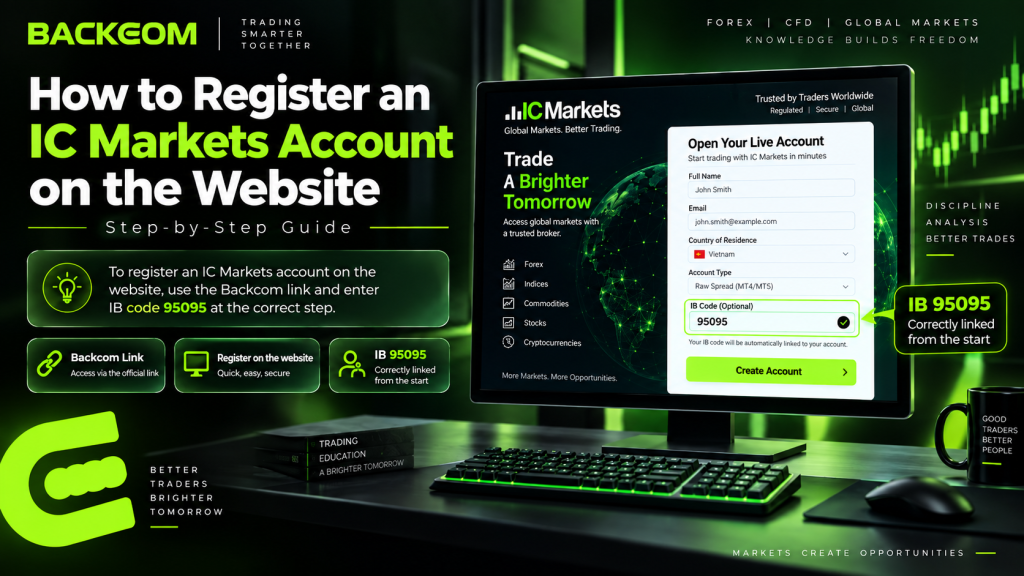
The quickest way to open an IC Markets account on a desktop is to start from the Backcom link, so that IB code 95095 is attached from the very beginning. The registration form runs across 4 stages on a progress bar, with email activation as the final step.
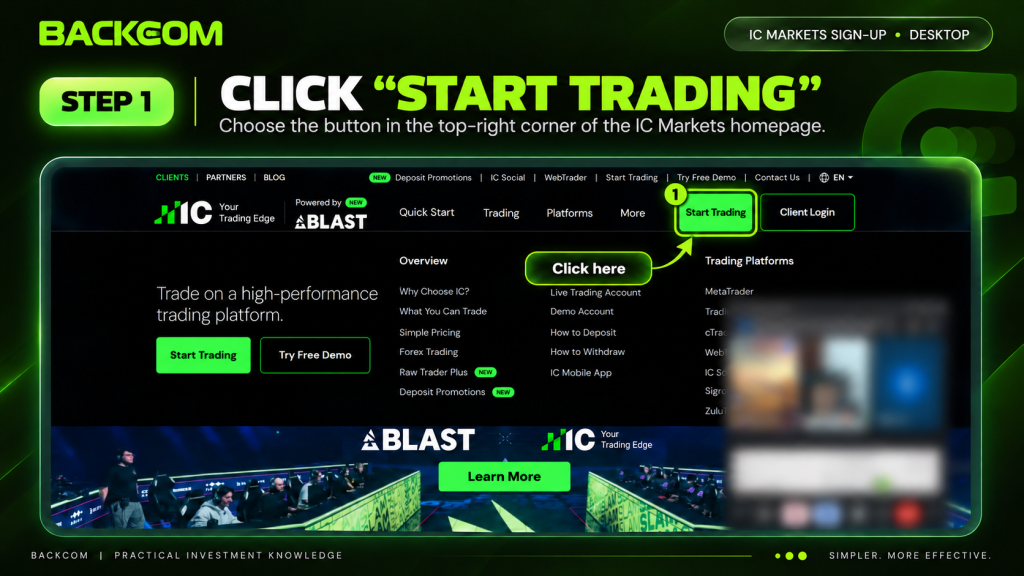
Step 1: Click “Start Trading” On The IC Homepage
Open the IC homepage and click the green Start Trading button in the top right, next to “Client Login”. The same button also sits in the hero block at the top of the page, beside “Try a Free Demo” if you want a demo account first.
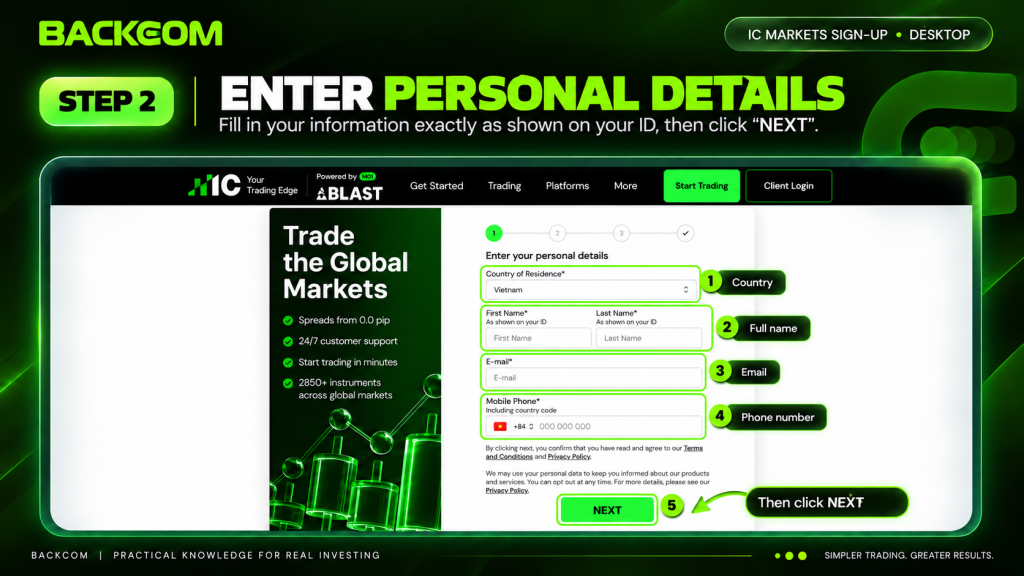
Step 2: Fill In Your Contact Details And Click “Next”
The form opens at stage 1 on the progress bar, with four fields:
- Country of residence: select the country on your ID documents.
- First Name and Last Name: exactly as they appear on the ID you will use for verification — the form itself says “As shown on your ID”.
- E-mail: an address you actively use, because the activation link is sent there.
- Mobile phone: international format — pick your country flag, then enter the number with the leading zero removed.
Below the form you confirm you have read the Legal Documents and Privacy Policy, plus an opt-in for marketing messages that you can withdraw later. Check everything, then click NEXT.
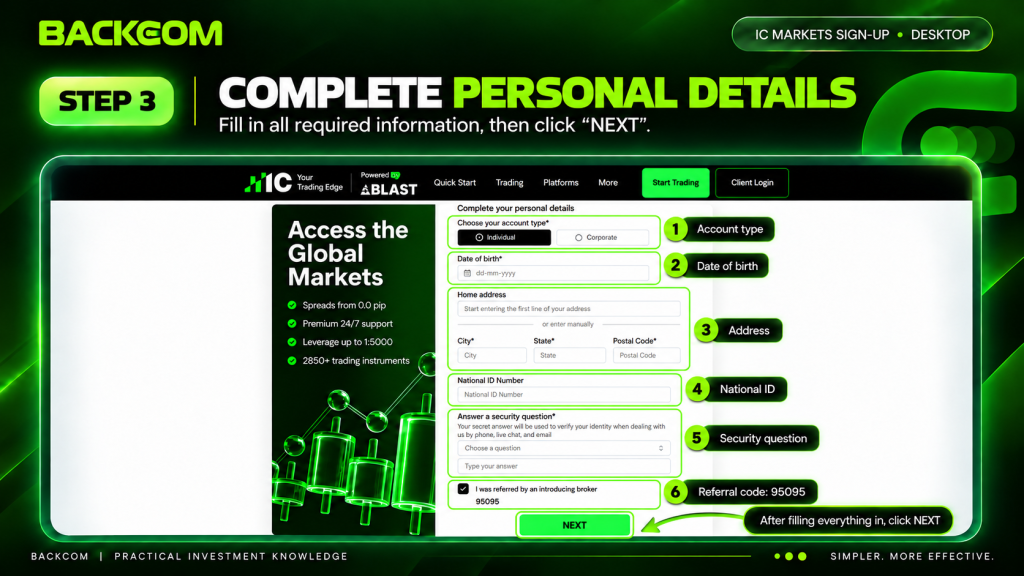
Step 3: Complete Your Personal Details And Tick Referral Code 95095
Stage 2 on the progress bar asks for more detail:
- Account type: choose Individual, or Corporate if you are opening for a company.
- Date of birth: enter it in dd-mm-yyyy format.
- Home address: type a few characters for the lookup, or pick “or enter manually” and fill in Address, City, State and Postcode yourself. The address should match the proof of address you will upload at the KYC stage.
- ID number: the exact number on the document you will use for verification.
- Security question: pick a question and enter an answer. IC uses it to confirm your identity over phone, live chat and email, so make it memorable.
- Referral code: tick “I was referred by an Introducing Broker” and check the field shows 95095. Skip this box and the account will not earn cashback through Backcom.
When everything is filled in, click NEXT.
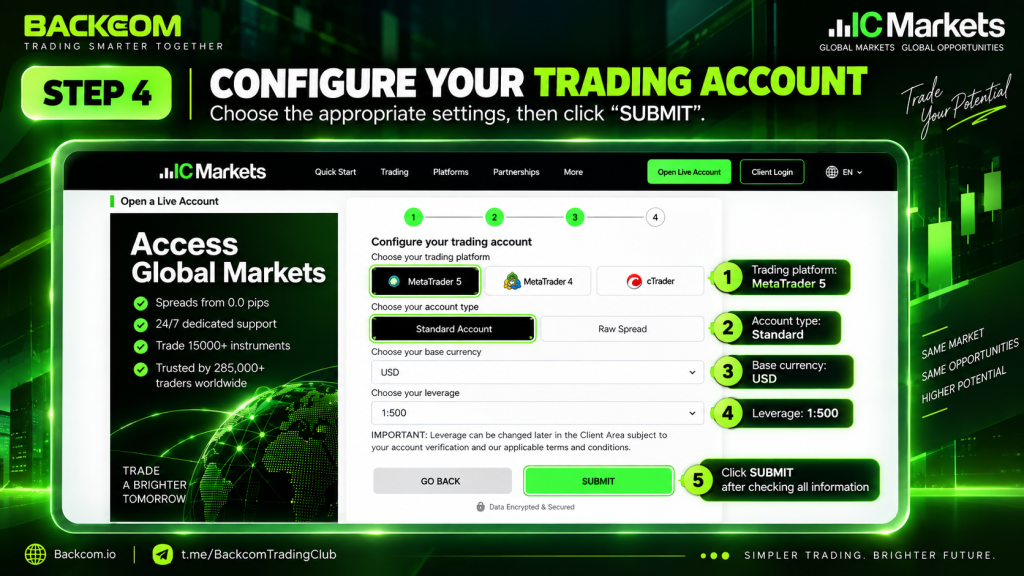
Step 4: Configure The Trading Account And Click “Submit”
Stage 3 on the progress bar is where you configure the trading account itself:
- Choose your platform: MetaTrader 5 (recommended), MetaTrader 4 or cTrader. Each account is tied to one platform, so pick the one you will actually use.
- Choose your account type: Standard Account or Raw Spread. Standard builds the cost into the spread; Raw Spread has tighter spreads and charges a separate commission per lot.
- Base currency: USD keeps capital, costs and cashback easy to track against the published rates.
- Leverage: choose according to your risk tolerance. The list goes very high — up to 1:5000 on the account overview — and IC notes under the selector that leverage can be changed later in the Client Area, subject to verification and its terms. Beginners should still start low rather than plan to reduce it afterwards.
Review the whole configuration, then click SUBMIT to complete the application.
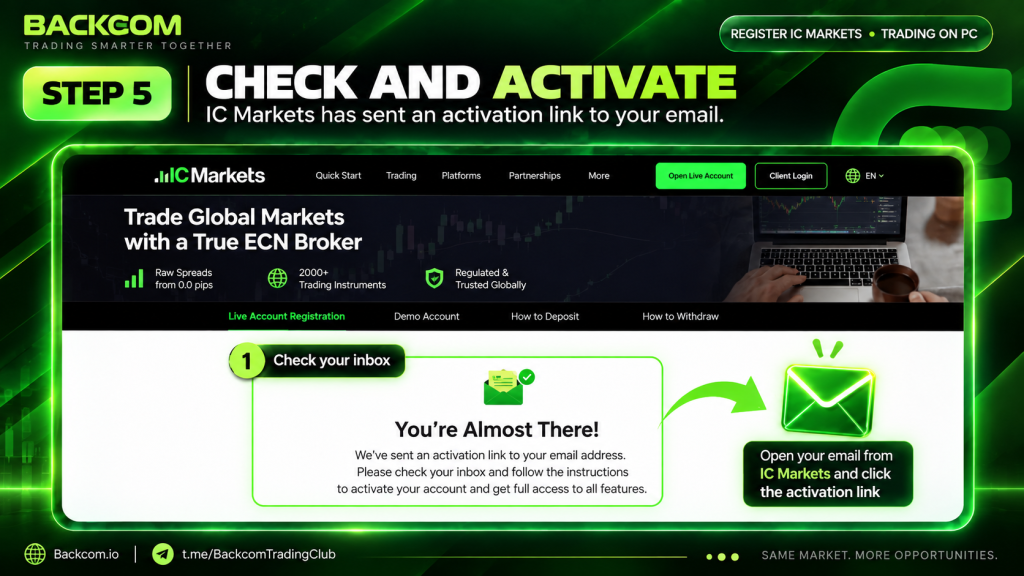
Step 5: Check Your Email And Click The Activation Link
The “You’re Almost There!” screen confirms IC has sent an email with an activation link. Open your inbox — check Spam and Promotions if it is not there — and click the link to activate and sign in to the Secure Client Portal. Inside the portal you complete the trading-experience questionnaire if prompted, then move on to IC Markets account verification.
Those 5 steps are all it takes to open an IC Markets account from a browser. IC has since launched a new Secure Client Portal, so any guide written before July 2026 will show a different interface from the screenshots above.
IC Markets App Registration: Open An IC Markets Account In 8 Steps
IC Markets app registration suits anyone who wants to do everything on a phone: create the account, attach IB code 95095, verify your ID with the camera and Face ID, and switch on two-factor authentication — all inside the app. Only download it from the official stores.
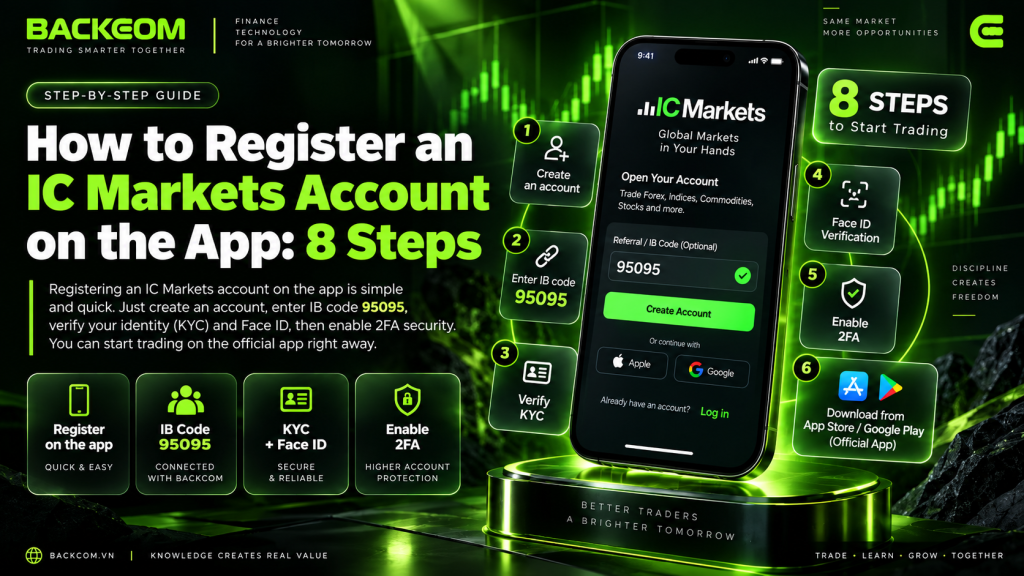
- Download the IC Markets Global app and open it: find it on Google Play or the App Store, install it and launch. Never install an APK from outside the stores.
- Create an account with email and password: on the first screen, enter your email, set a password, tick the terms box and tap the create-account button.
- Choose “Live account”: the app offers a live and a demo account. Pick live if you want to trade real capital and earn cashback; demo is only for getting familiar with the platform.
- Enter your personal details: full name exactly as on your ID, email, phone in international format and your country of residence. Tap “Next”, then complete the remaining fields on the following screen — date of birth, address and ID number.
- Tick referral code 95095: this is the field that decides whether the account earns cashback. Tick “I was referred by an Introducing Broker”, enter 95095 and double-check the code before tapping “Next”.
- Configure the account and submit: choose the platform (MT5, MT4 or cTrader), the account type (Standard or Raw Spread), USD as base currency and a leverage level that matches your risk tolerance, then tap “Submit”.
- Activate your email, set a password and answer the questionnaire: when the “almost there” message appears, open the email from IC and click the activation link inside the green security box. Set your account password, then answer the multiple-choice questionnaire about your trading knowledge and experience and submit it.
- Verify your identity and enable 2FA: enter your email and tap “Start verification”, fetch the six-digit code from your inbox and paste it into the app, tap “Create my account” and choose “Continue verification”. In the document list, pick ID Card (or your passport), photograph and upload both sides, tap “Continue”, then record the Face ID scan as instructed on screen.
Common problem at step 3: the app reports that it cannot reach the IC Markets site. If your network blocks the domain, install Cloudflare’s 1.1.1.1 app, switch the connection on and reopen the IC Markets app — that usually restores access immediately.
Setting up 2FA after verification: IC shows a QR code together with a backup key — save that key so you can restore access if you change phone. Open your authenticator app (Authy, Google Authenticator and so on), add a new account, scan the QR code or paste the key, and name it something obvious like “IC Markets”. Then copy the six-digit code currently displayed, enter it in the IC Markets app before it rotates, and tap to activate.
After those 8 steps the account is registered and verified, and you just sign back in to start trading. The app is easier for camera-based KYC; the web is more convenient when your documents are already on a computer. Either way you only open an IC Markets account once — both routes create the same client profile. Document requirements and review times are covered in IC Markets account verification (KYC) below.
You can also follow the video walkthrough below to register and claim Backcom 100%:
IC Markets Account Verification (KYC): Documents, Upload And Review Time
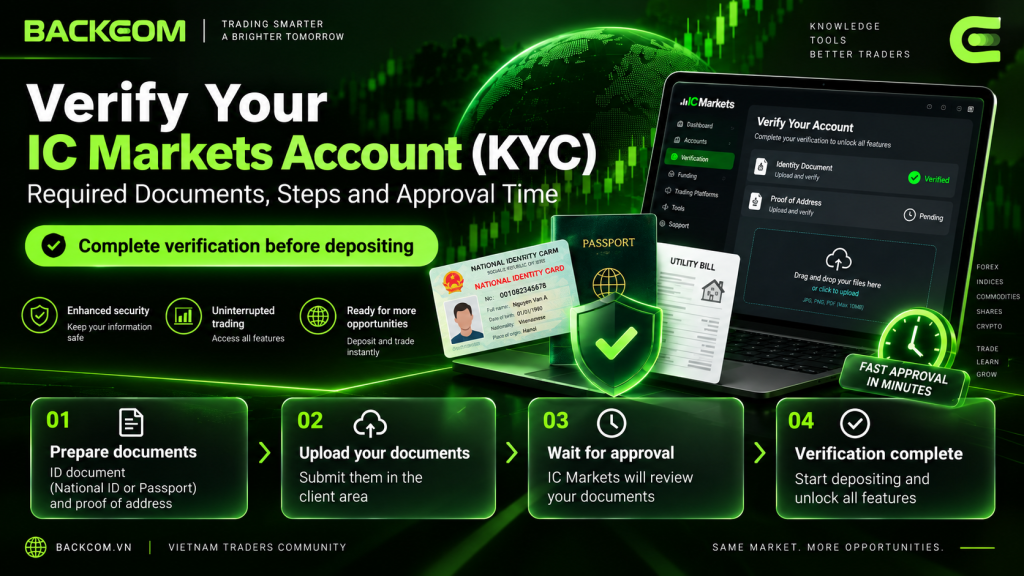
Complete IC Markets account verification before you deposit. Funding an unverified profile only creates delays later, so treat KYC as part of the job of opening the account rather than something to handle afterwards.
Documents Required For IC Markets Account Verification
You need two categories of document:
- Proof of Identity: a valid ID card or passport — colour, sharp, with all four corners in frame.
- Proof of Address: a bank statement or an electricity, water or internet bill less than 3 months old, showing a name and address that match your application.
How To Upload Your Documents
Sign in to the Secure Client Portal → Upload Documents → upload a JPG, PNG or PDF. In the app you can photograph the documents directly and submit them from there.
How Long Does Approval Take And Why Do Documents Get Rejected?
Verification normally takes about 24–48 business hours. The IC Help Centre carries the current requirements if anything changes.
Documents are usually rejected for blurred photos, a cropped corner, details that do not match the application, or proof of address older than 3 months.
After Registration: Deposit, Download The Platform And Open Extra Accounts
Once you open an IC Markets account and KYC is approved, you can fund it, collect your platform login details and start trading.
IC Markets Minimum Deposit By Account Type
According to the official IC Markets Global account table, Standard, Raw Spread and cTrader accounts currently have no minimum deposit; Raw Pro starts at $5,000 and Raw Pro + at $100,000. Plenty of older guides still quote an IC Markets minimum deposit of $200 — that is a historical figure, so check the Client Portal before you transfer anything.
Available methods can include local bank transfer, Visa/Mastercard, Skrill and Neteller; what you actually see depends on your region, so confirm it in the Client Portal.
IC does not charge a deposit fee. Processing time varies by method. Use a payment method in your own name, and fund the account only after KYC has been approved.
Because Standard and Raw Spread carry no minimum, you can open an IC Markets account and deposit whatever suits your risk plan rather than a fixed figure. Size the first deposit around the position sizes you actually intend to trade.
Download MT4, MT5 Or cTrader And Log In
Your login details arrive by email and are also shown in the Client Portal. Download the right platform, then enter the account number, password and matching server.
Open An Extra Account Or Change Account Type
In the Client Portal, choose Open Additional Account. To change the configuration you normally create a new account and move funds across internally rather than editing the existing one.
If your goal is to cut the real cost per trade, register through IC Markets cashback with Backcom using IB code 95095. Under the current Backcom policy, rebates are paid into your Backcom wallet every Monday. You can also check the broker rebate comparison, or see how to open an HFM account if you are adding a second broker.
Common Errors When You Open An IC Markets Account And How To Fix Them
These are the problems that come up most often when people open an IC Markets account, and what to do about each.
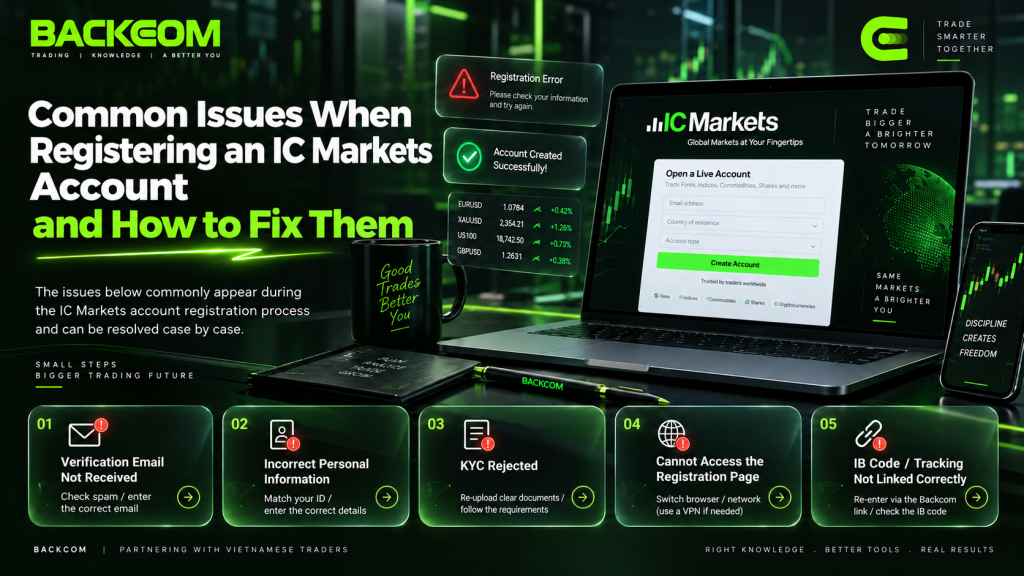
- No activation email: check Spam and Promotions and request it again. If the address has been used before, try signing in instead of creating a new account.
- Phone number rejected: use international format and drop the leading zero — for example 0912… becomes +84912…
- Declined after the questionnaire: answer it honestly and resubmit. The broker is entitled to assess whether leveraged products are appropriate for you.
- KYC documents rejected: re-shoot them in colour with all corners visible, confirm the proof of address is under 3 months old, and check the details match your application.
- Existing account without IB 95095: email IC support from your registered address and ask for the profile to be linked to IB 95095, resolving any previous IB. Expect roughly 1–3 business days, and tell Backcom so they can confirm it.
- Landing on a fake website: use only ic.com, icmarkets.com and the official client portal. A domain that merely contains “IC” is not proof of anything.
Frequently Asked Questions
What Is The IC Markets Minimum Deposit, And Does Registration Cost Anything?
Registration is free. On the current IC account table, Standard, Raw Spread and cTrader have no minimum deposit, while Raw Pro starts at $5,000 and Raw Pro + at $100,000. IC charges no deposit fee.
How Long Does IC Markets Account Verification Take?
IC Markets account verification normally takes about 24–48 business hours. Upload your documents as soon as you have activated your email so the wait overlaps with everything else.
Is IC A New Broker After The Rebrand From IC Markets?
No. It is the same brand and the same legal entities. What changed is the IC identity and the move to the ic.com domain.
Should I Register On The App Or The Web?
Both routes lead to the same profile, so it makes no difference to the account you end up with. IC Markets app registration is easier when you want to photograph your KYC documents; the web is better when your documents are already stored on a computer, or when you would rather open an IC Markets account on a large screen where the referral field is easy to check.
Can I Open An IC Markets Account Without A Passport?
Yes. A national ID card is accepted for Proof of Identity, and in the app you select ID Card from the document list and upload both sides. What matters is that the document is valid, photographed in colour with all four corners visible, and carries the same name as your proof of address.
I Already Have An IC Markets Account — Can I Still Get Cashback?
Possibly. If your account is not currently under the Backcom IB, email IC from your registered address and ask for the profile to be linked to code 95095, then wait for confirmation before any rebate is calculated.
Conclusion
On the new interface, to open an IC Markets account you work through three stages: create the profile, complete KYC, then deposit and download your platform. Have your documents ready before you begin, fund the account only after approval, and check IB code 95095 before you hit submit.
If you want cashback under the Backcom programme, register through Backcom IC Markets and confirm the IB link is in place before you start trading.
Was this article helpful?
Join The Backcom.io Community
Get the latest on trading rebates, trading tips, and broker deals — and connect with thousands of traders worldwide.

Backcom App
Track Your Rebates Every Day
Every rebate is visible by broker and by day. Manage your wallet and withdrawals in one place.
Open Backcom App