Lambo V10
v1.1.0
Gold · one-way grid that turns itself on and off with the market
live since 20 October 2026
View Bot DetailsAll content on this website is for informational purposes only and does not constitute investment advice.
Trading forex CFDs involves significant risks, including legal and regulatory risks in certain jurisdictions. Please research carefully before deciding to participate.
Read the full Risk Disclosure
Exclusive
Track your rebates, place trades, run bots and set risk brakes for MT5, all in one Windows app.
Version 1.0.0 · Windows 10/11 64-bit · requires MT5 and a Backcom.io account · ~114 MB
Windows says “Windows protected your PC”? The installer isn’t digitally signed yet: click More info → Run anyway to continue.
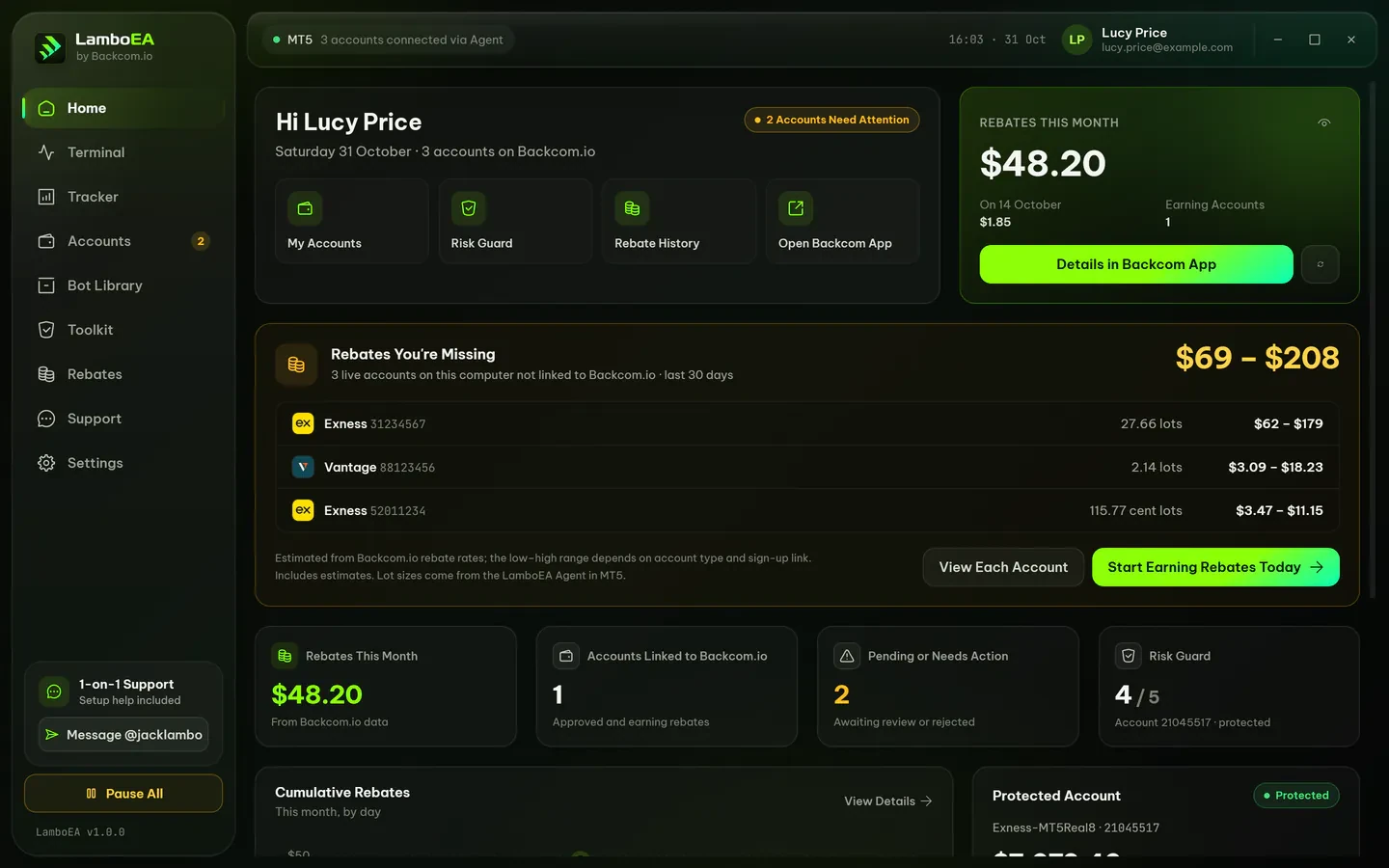
01Rebates
LamboEA spots the live MT5 accounts on your PC that aren’t earning rebates yet and estimates what you’re leaving on the table. The figure sits right on the app’s Home screen.
The figure in the app is an estimate based on the Backcom.io rebate table and each account’s lots over the last 30 days, not money paid or money you are certain to receive.
02Inside The App
Three screens you’ll use every day, on demo and live accounts alike.
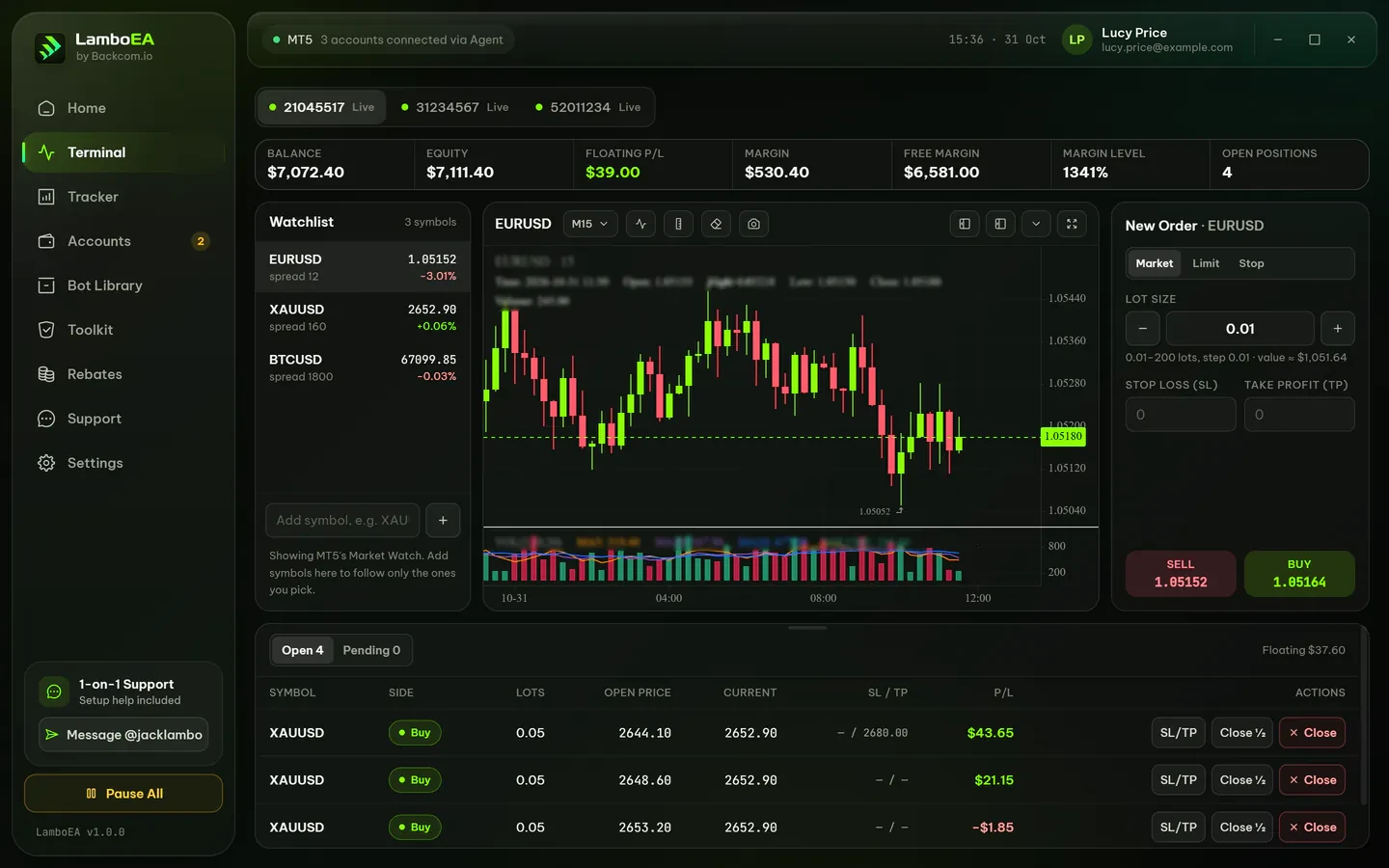
A candlestick chart, a Watchlist pulled from your MT5 Market Watch and an order ticket, all on one screen. Orders go through the LamboEA Agent into your own MT5.
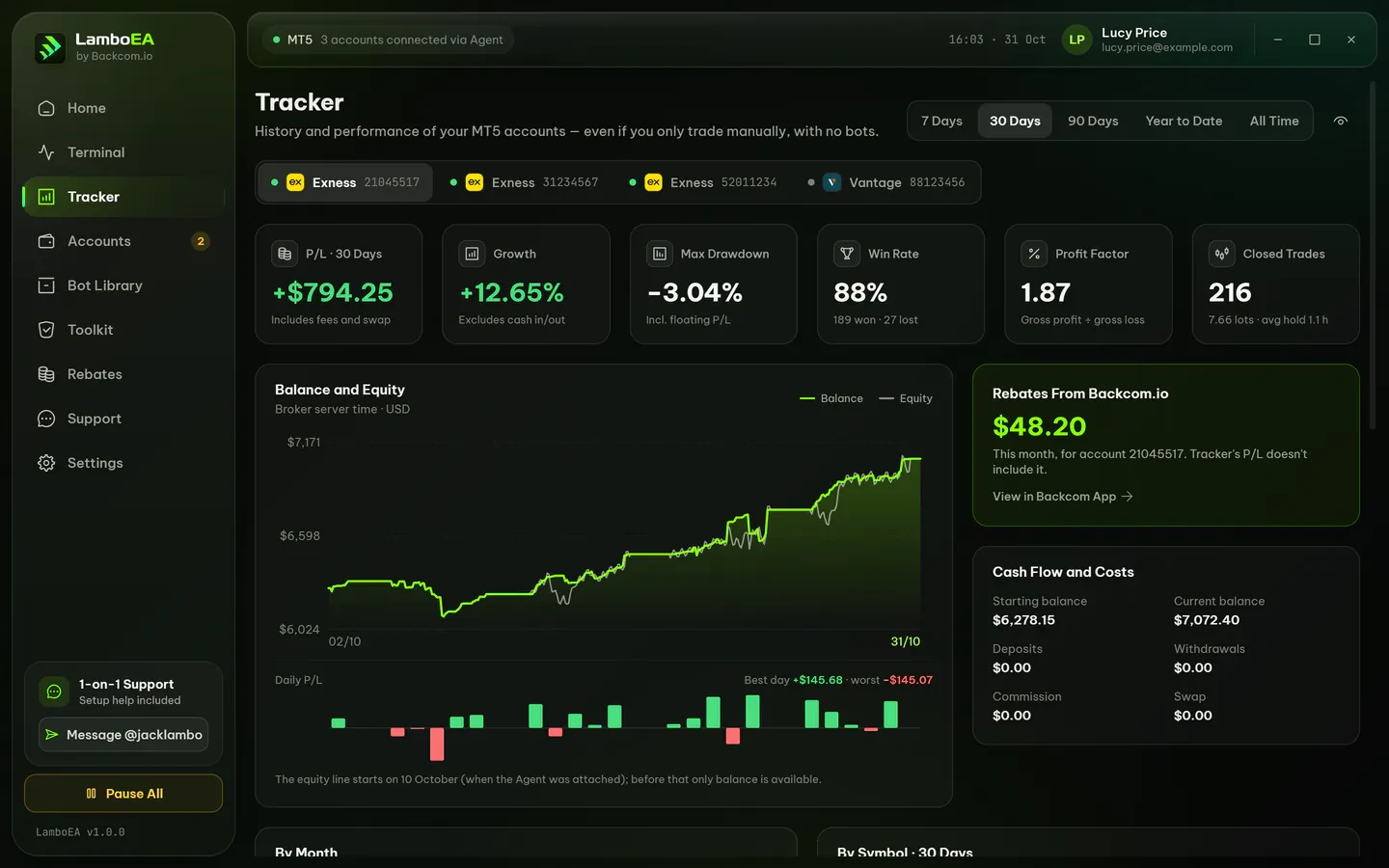
History and performance of your MT5 account, for traders who only trade by hand too.
Scans the MT5 accounts on your PC and checks each one against Backcom.io.
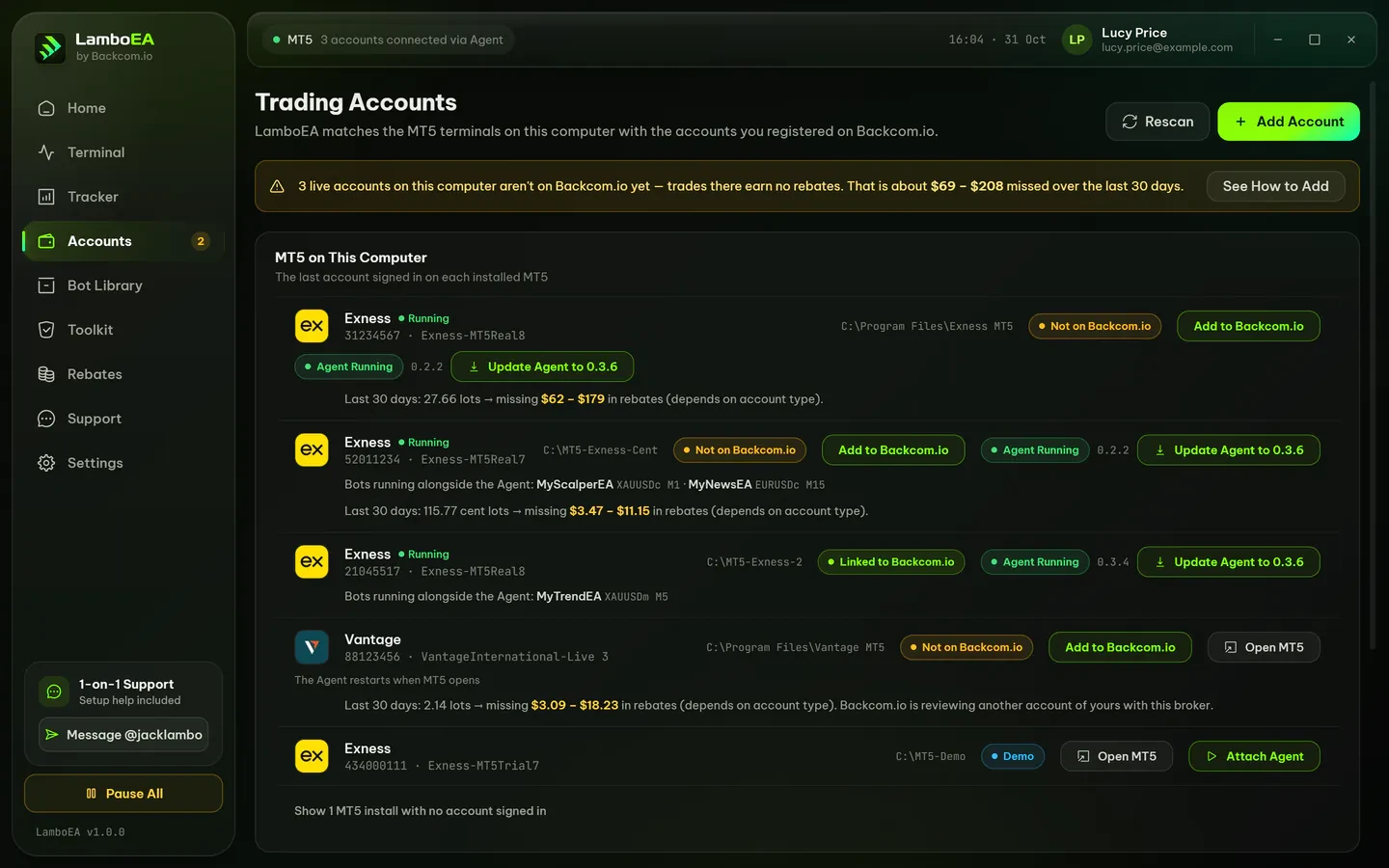
03Risk Guard
Risk Guard lives in the app’s Toolkit and covers manual and bot trades alike. The brakes run inside MT5, even when LamboEA is closed.
If the day’s loss goes past the limit you set, every position is closed and trading stays locked for the rest of the day.
If equity falls too far from its peak, every position is closed and trading stops until you click Resume. Deposits and withdrawals do not count toward the drop.
Positions opened in the window around high-impact news on the MT5 economic calendar are closed right away.
Closes positions before the Friday break, so you avoid the Monday-morning gap.
A trade larger than the size you set is closed right away, a guard against fat-finger mistakes.
Always on the app’s sidebar, for when you need to stop in a hurry.
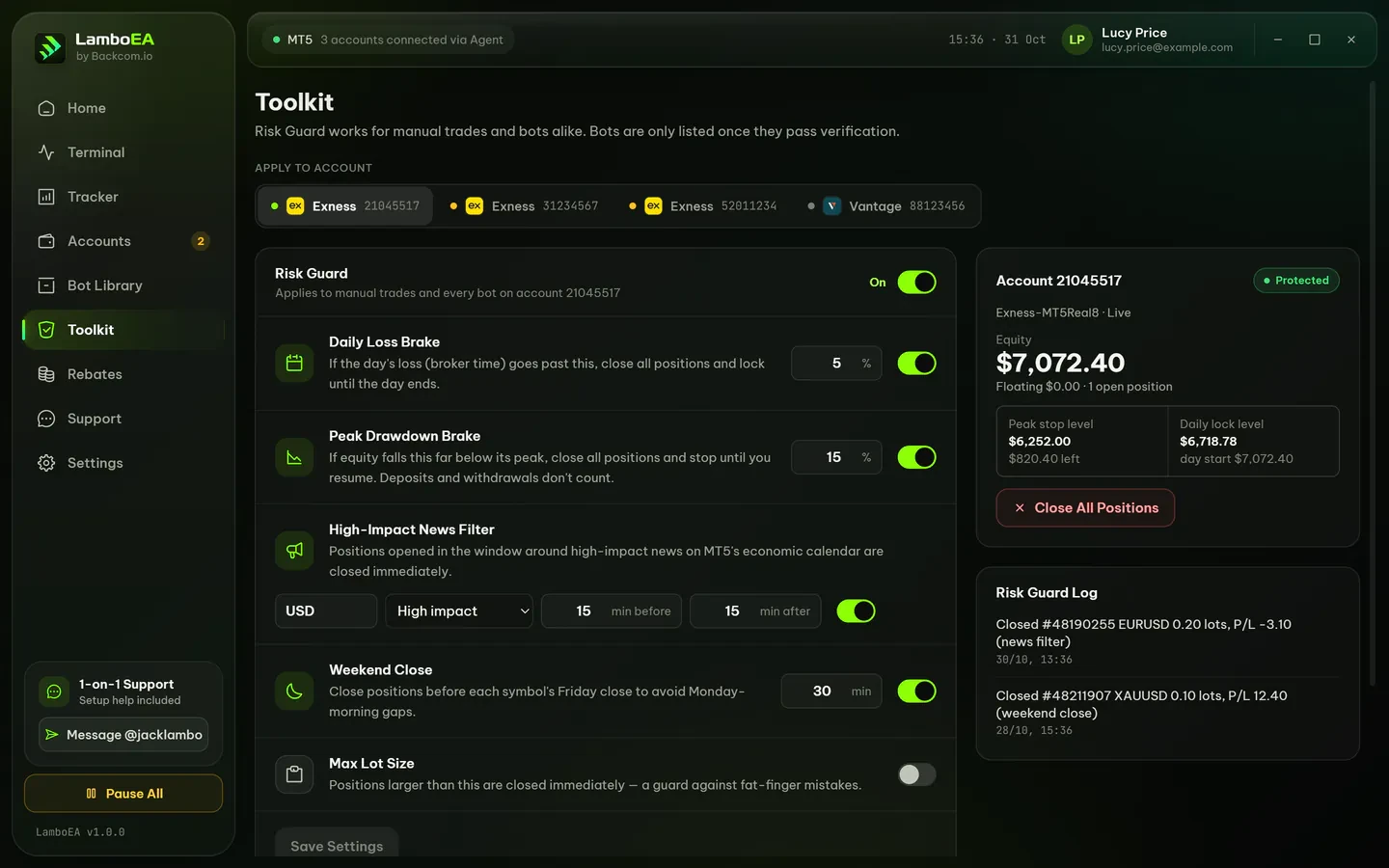
Risk Guard reduces risk; it cannot remove it. When the market gaps, price can jump past a brake level before a position is closed. The brakes run inside MT5, so they stop when MT5 is closed.
04Bot Library
Backcom.io runs its bots itself first. In the app, every card shows which numbers are live and which are simulated.
v1.1.0
Gold · one-way grid that turns itself on and off with the market
live since 20 October 2026
View Bot Detailsv1.7.0
Gold M15 · Keltner breakout, middle-band stop, one trade at a time
View Bot Detailsv1.0.0
Tool · copy any account with its investor password, same direction
View Bot Detailsv1.2.0
Tool · trade against any account you hold the investor password for
View Bot Detailsv1.1.0
Gold M15 · Heikin Ashi pullback, high-volume doji, structural stop
View Bot DetailsThis page lists only names, versions and status. Each bot’s numbers live in the app’s Bot Library, every one labelled live or simulated, with how long it has run.
Bots can lose money. Past results, live ones included, do not predict future results. Try a bot on a demo account first.
05Get Started
Install LamboEA and sign in with your Backcom.io email and password, plus your 2FA code if you have turned it on. No account yet? Sign up at app.backcom.io.
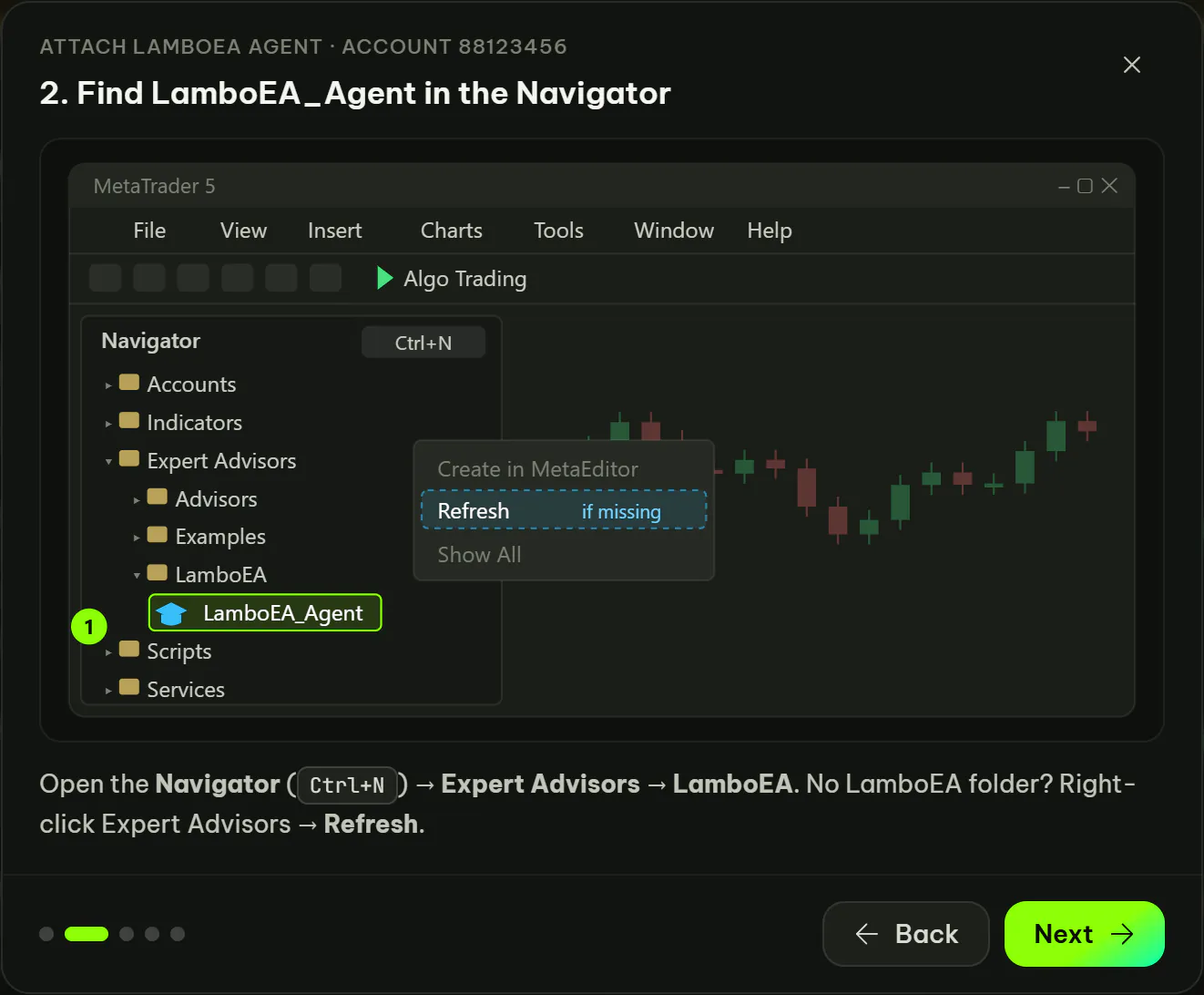
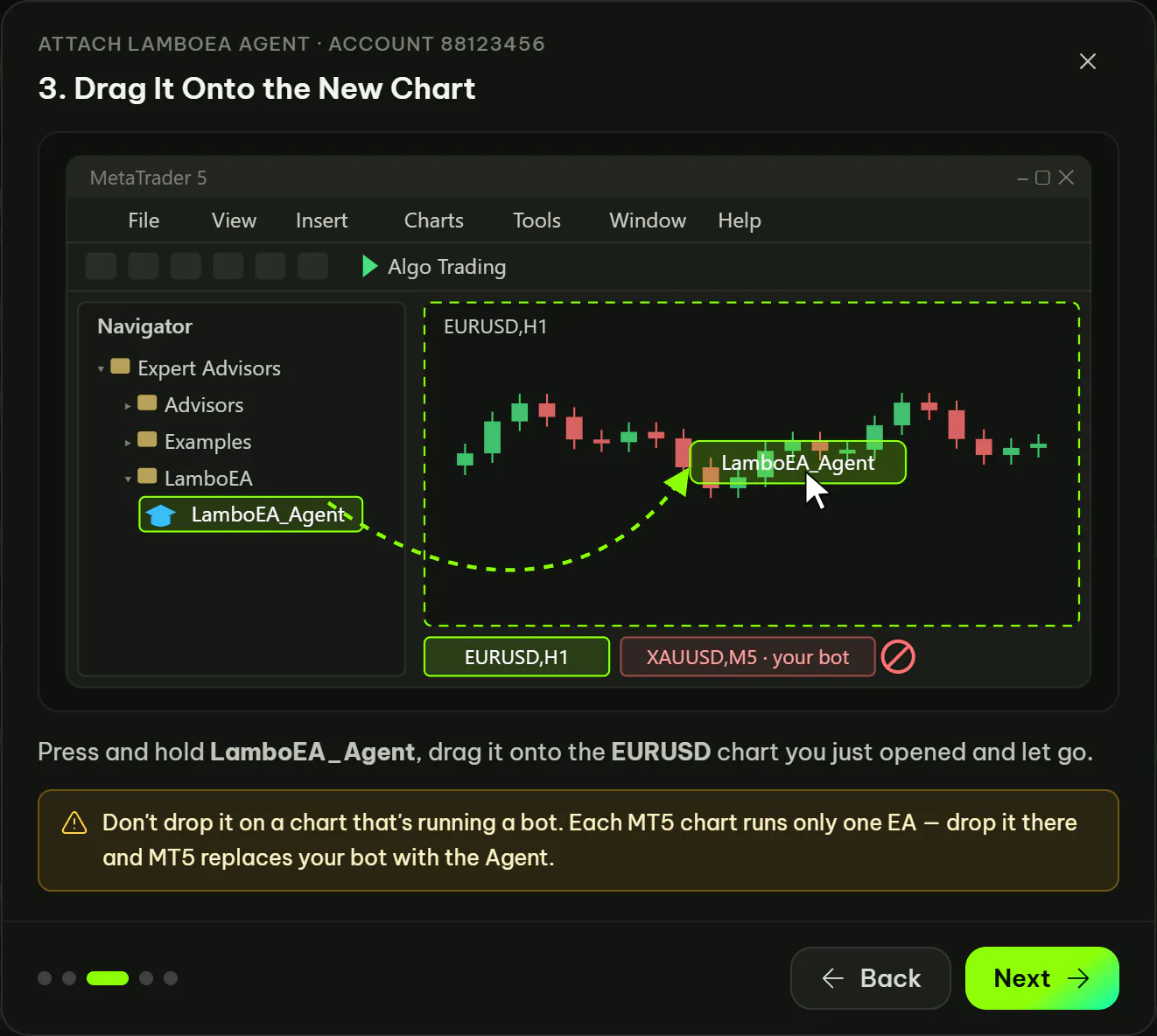
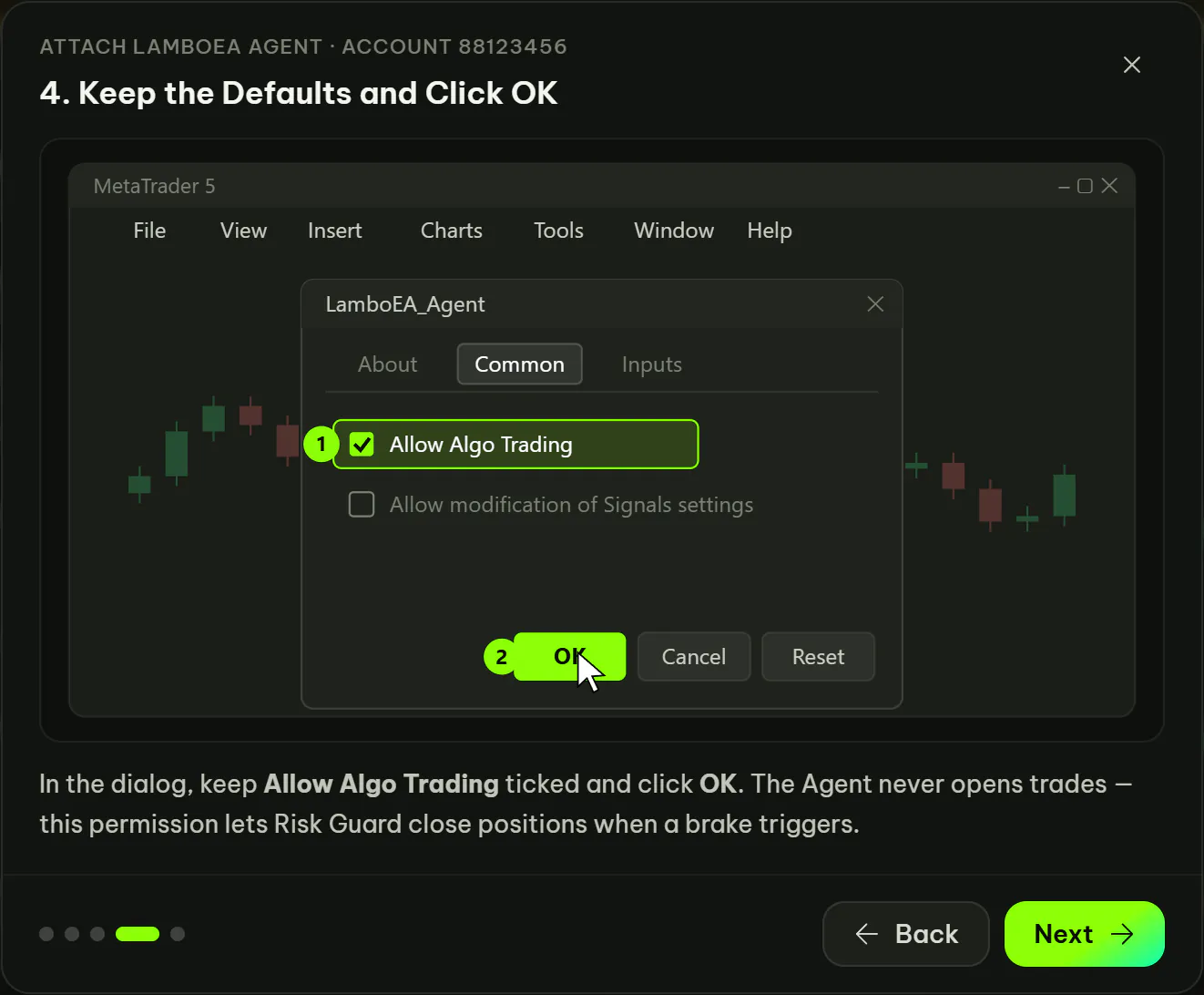
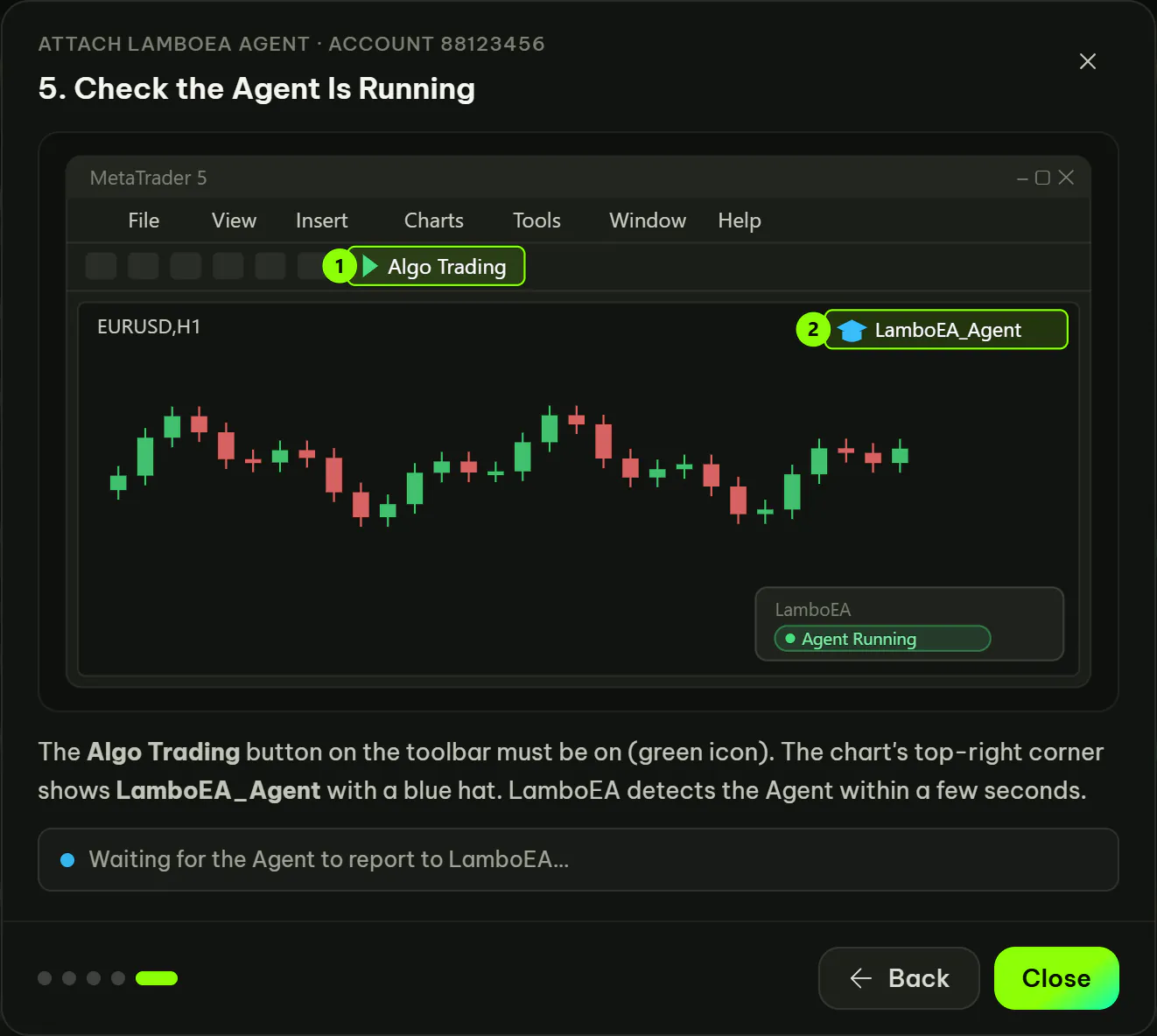
Download LamboEA For WindowsThe app copies the Agent into MT5 for you. Open a new chart in MT5 and drag the Agent onto it; the app walks you through each step with pictures and tells you once it detects the Agent.
Terminal, Tracker, Risk Guard and bots work on a demo account straight away. A live account opened through Backcom.io unlocks Risk Guard and earns rebates.
The LamboEA Agent is a small EA the app copies into MT5. You drag it onto a new chart by following the guide built into the app, and you never hand LamboEA your MT5 trading password.
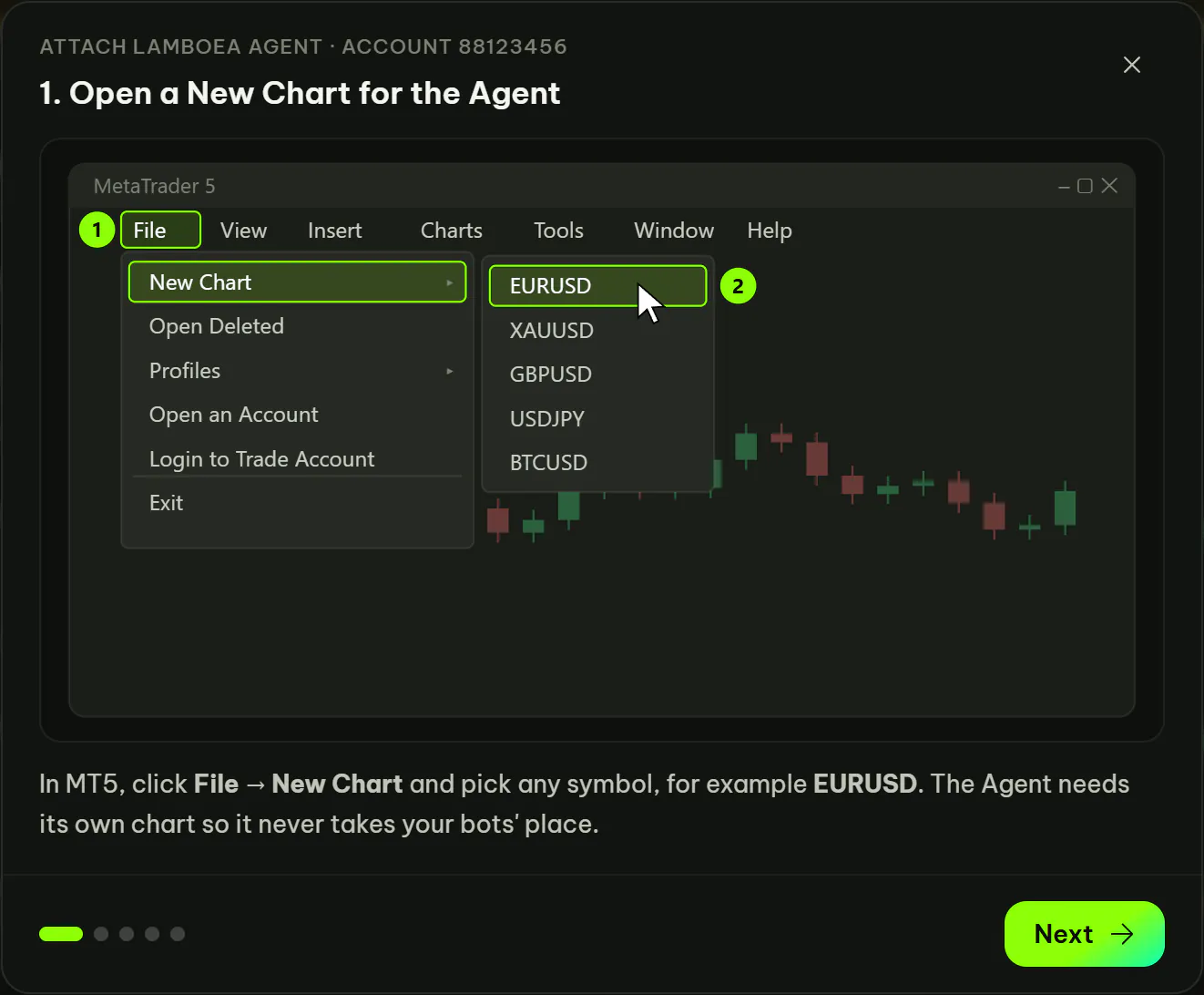
The MT5 pictures in the guide are redrawn for clarity. Once you are done, the app tells you it has detected the Agent.
06Requirements
Windows 10/11 64-Bit
LamboEA is a desktop app for Windows PCs.
MetaTrader 5 Desktop
Installed on the same PC, so the app can copy in the LamboEA Agent and scan your MT5 accounts.
A Backcom.io Account
Sign in with your Backcom.io email and password, plus your 2FA code if it is on. No account yet? Sign up at app.backcom.io.
There is no macOS or mobile version, and LamboEA does not work with MT4.
Every feature works: Terminal, Tracker, Risk Guard and bots. A good place to get familiar before using real money.
Risk Guard switches on only when the account is linked to Backcom.io (opened through a Backcom.io link). For other accounts the app shows a “Move Account to Backcom.io” button.
07FAQ
No. LamboEA is included for Backcom.io clients: sign in with your Backcom.io account and start using it, with no fee for the app. On a live account, Risk Guard needs that trading account to be linked to Backcom.io.
No. LamboEA is a Windows 10/11 64-bit app that works with the desktop version of MetaTrader 5. There is no macOS or mobile version, and it does not work with MT4.
The LamboEA installer isn’t digitally signed yet, so Windows SmartScreen shows this warning when you open it. Click More info → Run anyway to continue. Only download the installer from download.backcom.io, the link on this page.
No. LamboEA connects to MT5 through the LamboEA Agent, a small EA the app copies into MT5 for you to drag onto a new chart. You never give the app your MT5 trading password; you sign in to LamboEA with your Backcom.io account.
Terminal, Tracker, the Accounts screen and the Rebates You’re Missing card all work. Only Risk Guard needs the account to be linked to Backcom.io (opened through a Backcom.io link); for other accounts the app shows a “Move Account to Backcom.io” button. On a demo account, every feature works.
Yes. Bots and Risk Guard run inside MT5, so they keep going after you close LamboEA. If MT5 is closed, they stop too.
LamboEA downloads new versions by itself. When one is ready, just click “Restart to Update”. The download link on this page always points to the latest version.
08Support
Message the Backcom.io team on WhatsApp, or ask in the Backcom Global group on Telegram.
LamboEA for Windows, a Backcom.io client perk. Try everything on demo, then earn rebates and unlock Risk Guard once your live account is linked to Backcom.io.
Version 1.0.0 · ~114 MB · updates itself
Risk Warning: Your capital is at risk. Leveraged products may not be suitable for everyone. Please read our Risk Disclosure carefully.