Introduction
XM is one of the most popular international Forex brokers among Vietnamese traders thanks to its stable execution and strong support. However, if you don’t create your XM account correctly, you may not receive 90% Backcom, or you’ll have to go through a time-consuming account transfer later.
In this guide, Backcom.io will show you:
- How to create an XM account the right way
- How to choose the correct account type to maximize Backcom
- Important notes to avoid losing your rebate eligibility
Who Should Read This?
- Traders who don’t have an XM account yet
- Traders planning to open an XM account for long-term trading
- Traders who want to secure 90% Backcom from the start
Requirements to Get 90% Backcom on XM
To qualify for 90% XM Rebates , make sure you:
- Creating your XM account via Backcom.io referral link
- Select the correct XM account type eligible for rebates
- Complete KYC verification according to XM requirements
If you previously created an XM account not through Backcom, you can still resolve it through an alternative method (explained in a separate guide).
Step 1: Access the XM Registration Page via Backcom.io
- Go to the XM guide page on Backcom.io 👆🏻
- Click the “Register XM Account” button in the registration section above
Registering through the correct link is mandatory for the system to track and apply Backcom.
Step 2: Fill in Your Personal Information
Make sure to enter the following details accurately:
- Your active email address
- Create a password
- Referral code: BCGLOBAL (new code)
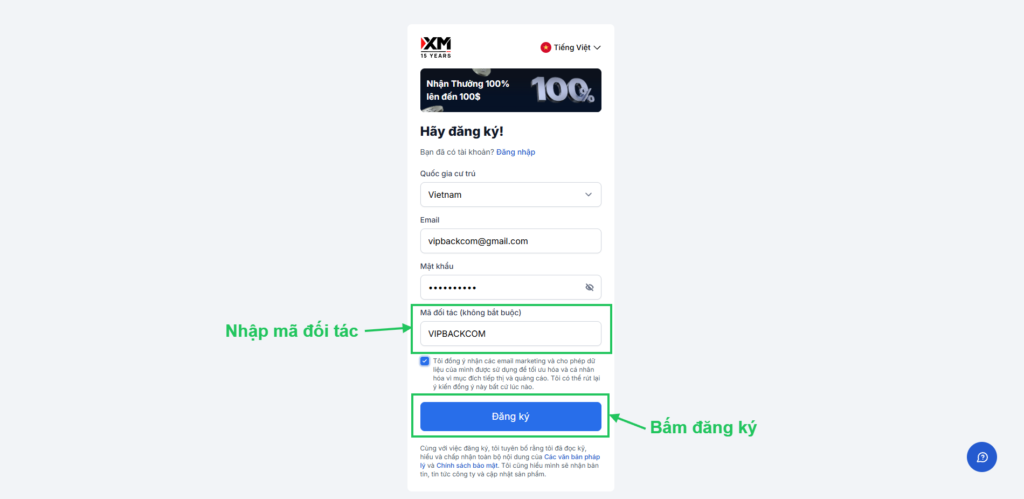
Notes:
- Do not use fake information
- Use a long-term email to avoid issues later
After clicking register, please verify your email and then log in to your XM account.
After creating your account:
- Log in to the XM Members Area
- Upload the following documents:
- ID Card/Passport
- Proof of address (as required by XM)
⏱️ Verification usually takes a few minutes to a few hours.
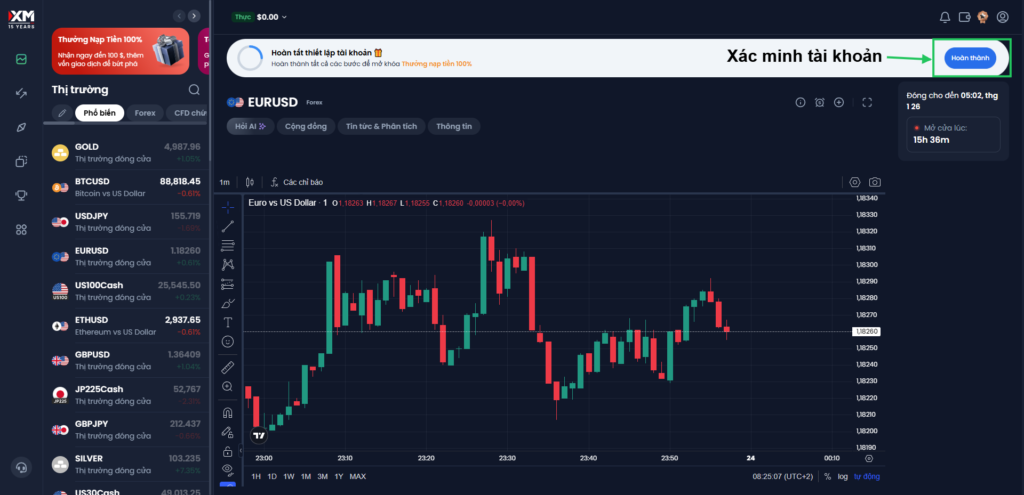
Step 4: Choose the Right XM Account Type
When you first create an XM account, the system will default to a Standard account. Currently, XM does not allow you to choose the account type during the initial registration.
If you want to use a different account type (e.g., Ultra Low), you will need to log in to the XM Members Area and create an additional trading account after completing registration.
Since each XM account type has different spreads and trading costs, choosing the right one from the beginning will help you avoid unnecessary fees and optimize Backcom efficiency in the long run.
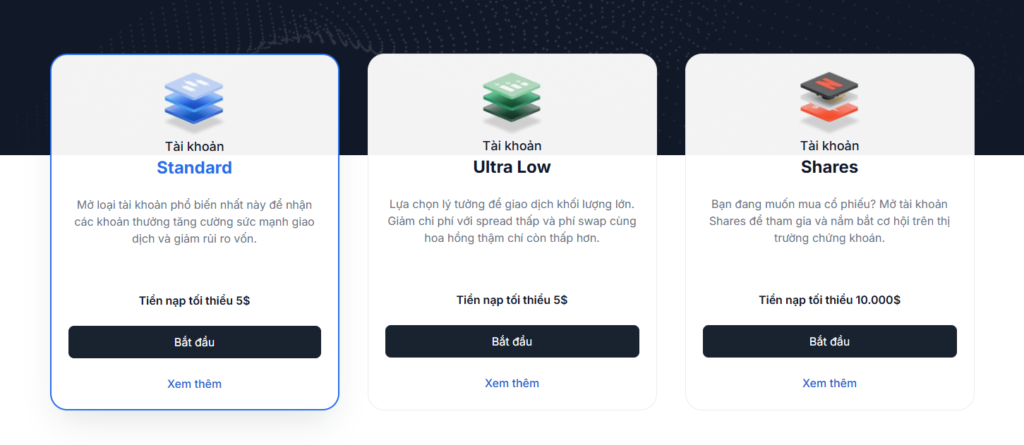
Before creating an additional trading account, you should check the following article to better understand each XM account type:
XM Account Types – Which One Should You Choose for Efficient Trading?
This guide will help you understand the differences between XM account types, avoid choosing high-cost accounts, and optimize Backcom from the start.
Step 5: Check XM Backcom Status
After completing registration and XM account verification, Backcom.io will automatically link your account to XM’s official Backcom program.
Once the process is completed:
- Your trading account will be applied with Backcom automatically by the system
- You will receive a confirmation email from XM
- XM Backcom (90%) will start taking effect according to the policy
Below, Backcom.io will provide sample confirmation emails and screenshots showing that your account has been successfully linked to the Backcom program for you confirm
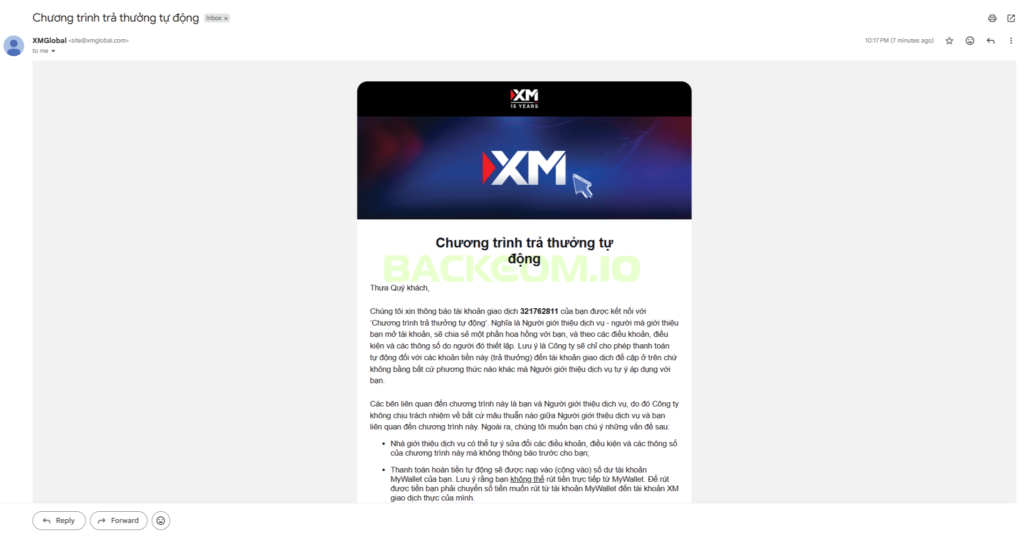
If You Haven’t Received the Confirmation Email
If you haven’t received any email from XM after some time, please:
- Check your Spam / Promotions folder
- Contact Backcom support for quick verification and assistance
Common Mistakes When Creating an XM Account
- Registering directly on the XM website (not via Backcom link)
- Choosing the wrong account type (not optimized for rebates)
- Using mismatched email or verification documents
- Creating multiple accounts with duplicate information
These mistakes may result in not receiving the 90% Backcom.
Frequently Asked Questions (FAQ)
Is Creating an XM Account Free?
No. Creating an XM account is completely free.
Will I Receive 90% Backcom Immediately After Registration?
Yes, if you register through the correct Backcom link and choose the appropriate account type.
What If I Already Have an XM Account?
You can still resolve it through the appropriate method. Backcom provides a separate guide for this case.
Conclusion
- Creating your XM account the right way from the start will help you:
- Receive 90% Backcom
- Avoid issues later
- Optimize trading costs in the long term
- Before choosing an account type, make sure to carefully review the comparison of XM account types to avoid mistakes.
If you need further assistance, feel free to contact Backcom support for detailed guidance.